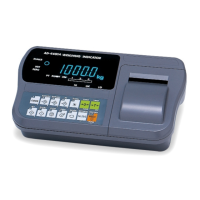
Page 48 AD-4405A Weighing Indicator
ENTER key .............The key to register the unit weight and return to the piece
count display. The unit weight is calculated automatically
with the weight and the number of samples.
Press the ESC key while pressing +/- key
The key to return to the piece count display without changing
the unit weight.
Notes It is preferable to have a large number of samples, to minimize the
counting error.
Press the ENTER key after the STABLE mark turns on.
If the total weight of the samples is too light and is not adequate to be
used as the unit weight, loUt is displayed for 2 seconds and returns
to the registration display.
Digital Input
When the unit weight is known, digital input is available.
Step 1 Start with the normal weight mode.
Step 2 Press the SAMPLE key. U xxx and the unit weight is displayed with unit pcs
blinking. Use the following keys:
0 - 9 key .................The key to set the unit weight. Maximum is 5 digits.
+/- key.....................The key to select the weighing unit of the unit weight.
ZERO key ...............The key to clear the digital input. U---- is displayed.
ESC key..................The key to return to the weighing mode without changing the
registered unit weight.
ENTER key .............The key to register the unit weight and return to the weighing
mode.
Press the MODE key while pressing the +/- key……… The key to shift the decimal point.
Command Input
When the unit weight is known, command input via the serial interface is available. For
details, refer to “16.3. Command Format”.
12. Counting Function


 To Next Page