22
9. RS-232C SERIAL INTERFACE
This interface allows the EK/EW-i series to be connected with a multifunction printer or
a personal computer.
The RS-232C interface has the following four modes.
Stream mode Outputs data continuously.
Key mode Outputs data by pressing the PRINT key.
Auto-print mode Outputs data which meets the conditions of auto-print.
Command mode Controls the balance using commands from a computer.
Set the parameters of the data format (bps and btpr) and data output mode
(prt), as necessary.
Use a D-sub 9 pin cable (straight type) to connect with a computer.
Windows Communication Tools Software (WinCT) to communicate with a
computer is provided as freeware. Visit the A&D website to download WinCT.
9-1. Interface specifications
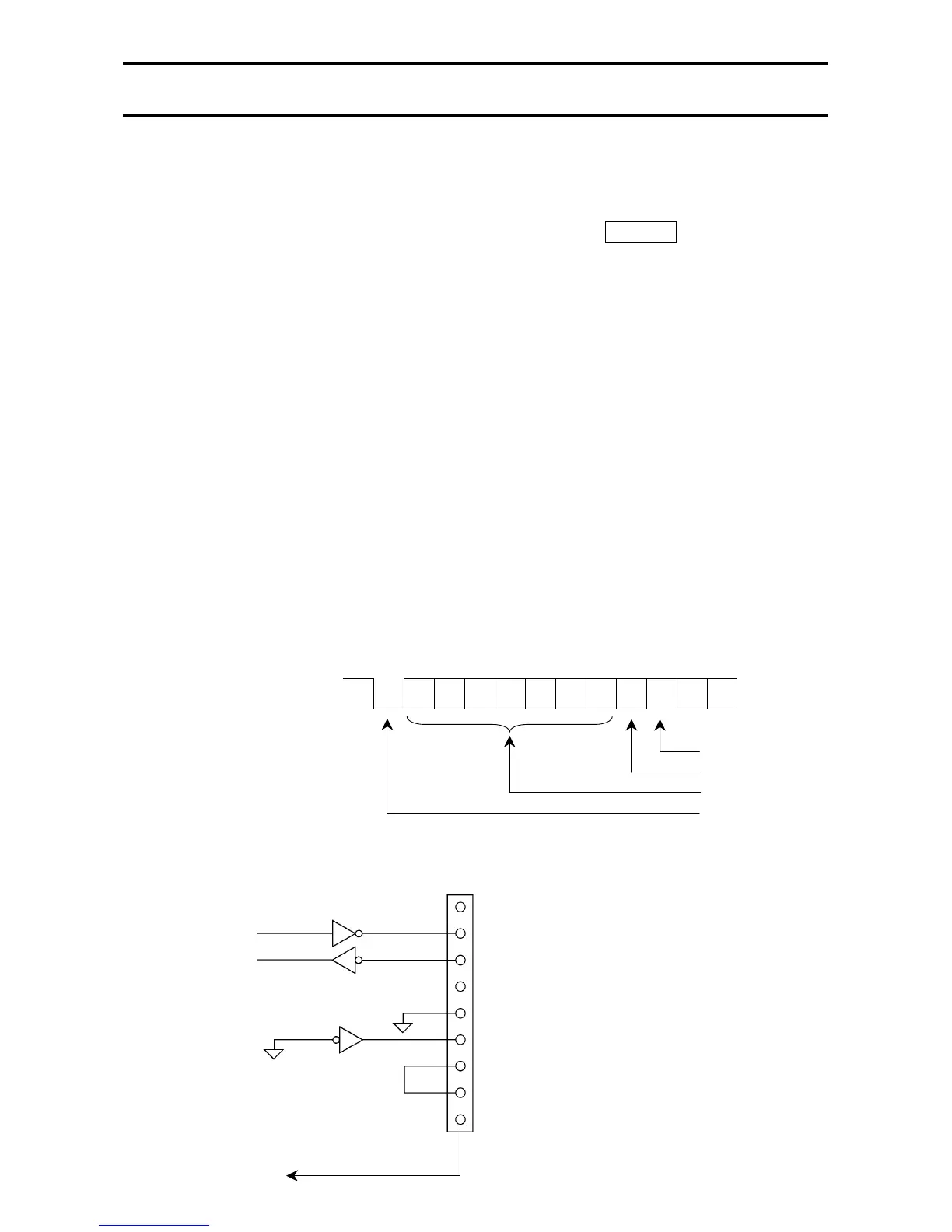
Transmission system EIA RS-232C
Transmission form Asynchronous, bi-directional, half-duplex
Data format Baud rate: 1200, 2400, 4800, 9600 bps
Data: 7 bits + parity 1 bit (even or odd)
or 8 bits (non-parity)
Start bit: 1 bit
Stop bit: 1 bit
Code: ACII
Terminator: C
R
L
F
(C
R
: 0Dh, L
F
: 0Ah)
LSB
0
1
2
3
4
5
MSB
6
Stop bit
Parity bit
Data bit
Start bit
Pin connections
1 (-15V~-5V)
0 (5V~15V)
D-sub 9pin male connector
1 N.C.
2 Transmit data
3 Receive data
4 N.C.
5 Signal ground
6 Data set ready
7 Request to send
8 Clear to send
9 N.C.
Inside of the EK/EW-



 To Next Page