Quickstart Guide
ABB PLC and drives integration using Modbus RTU
ModbusRTU‐28‐ PLCanddrivesintegration
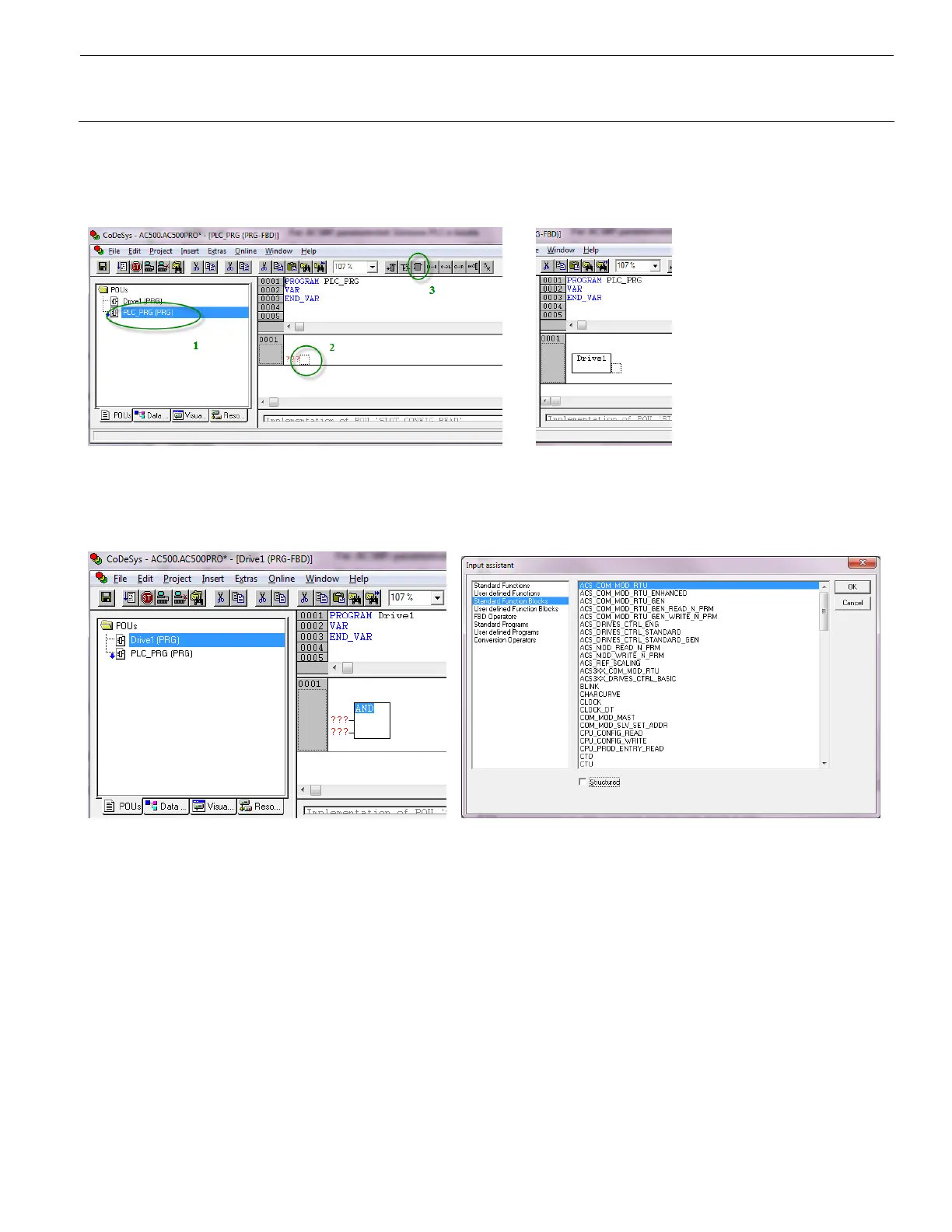
Double‐click“PLC_PRG”(1)toopenthemainprogram.Selectthedottedbox(2)inNetwork0001andinsertabox
(3).WritethenameofyournewProgram(Drive1(PRG)intheexample)tocallforitfromthemainprogram.
Double‐click your new program and add a box as described above. This time, press F2 while the block title is
selected and choose “ACS_COM_MOD_RTU” from “Standard Function Blocks”, then click “OK” (Tip: untick the
“Structured”boxintheInputassistant).
Give the instance of the drive access block a suitable name (1) and declare the variable of type
“ACS_COM_MOD_RTU”(2)(automaticsuggestion).


 To Next Page