9
1
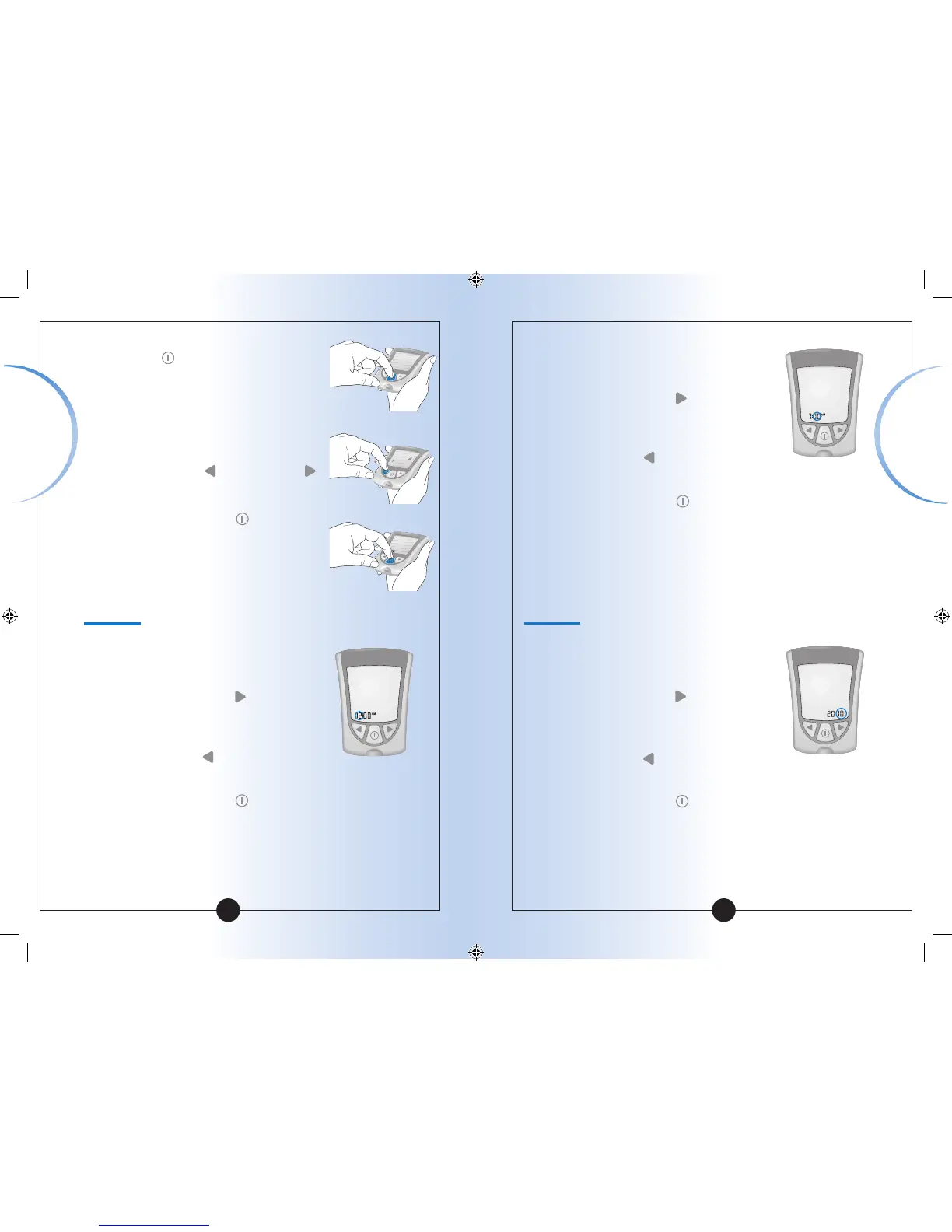
To turn your meter ON, Press and
Hold the
button.
The beeper ON message shows on
the display window. The musical
notes flash on and off, and the
meter beeps.
2
To change the beeper setting, Press
and Release the
button or the
button once.
3
Press and Release the
button to
save the beeper setting and to move
to Set Time (Hour).
10
Set Time
Hour:
The Hour flashes on and off.
1
Press and Release the button to
move the hour forward.
2
If you go past the correct hour, Press
and Release the
button to move
the hour back.
3
Press and Release the
button to
save the hour and to move to
Set Minutes.
Minutes:
The Minutes flash on and off.
1
Press and Release the button to
move the minutes forward.
2
If you go past the correct minute, Press
and Release the
button to move the
minutes back.
3
Press and Release the
button to save
the minutes and to move to Set Date.
Set Date
Year:
The Year flashes on and off.
1
Press and Release the button to
move the year forward.
2
If you go past the correct year, Press
and Release the
button to move the
year back.
3
Press and Release the
button to save
the year and to move to Set Month.
Setting Up
Your Meter
Setting Up
Your Meter














 To Next Page