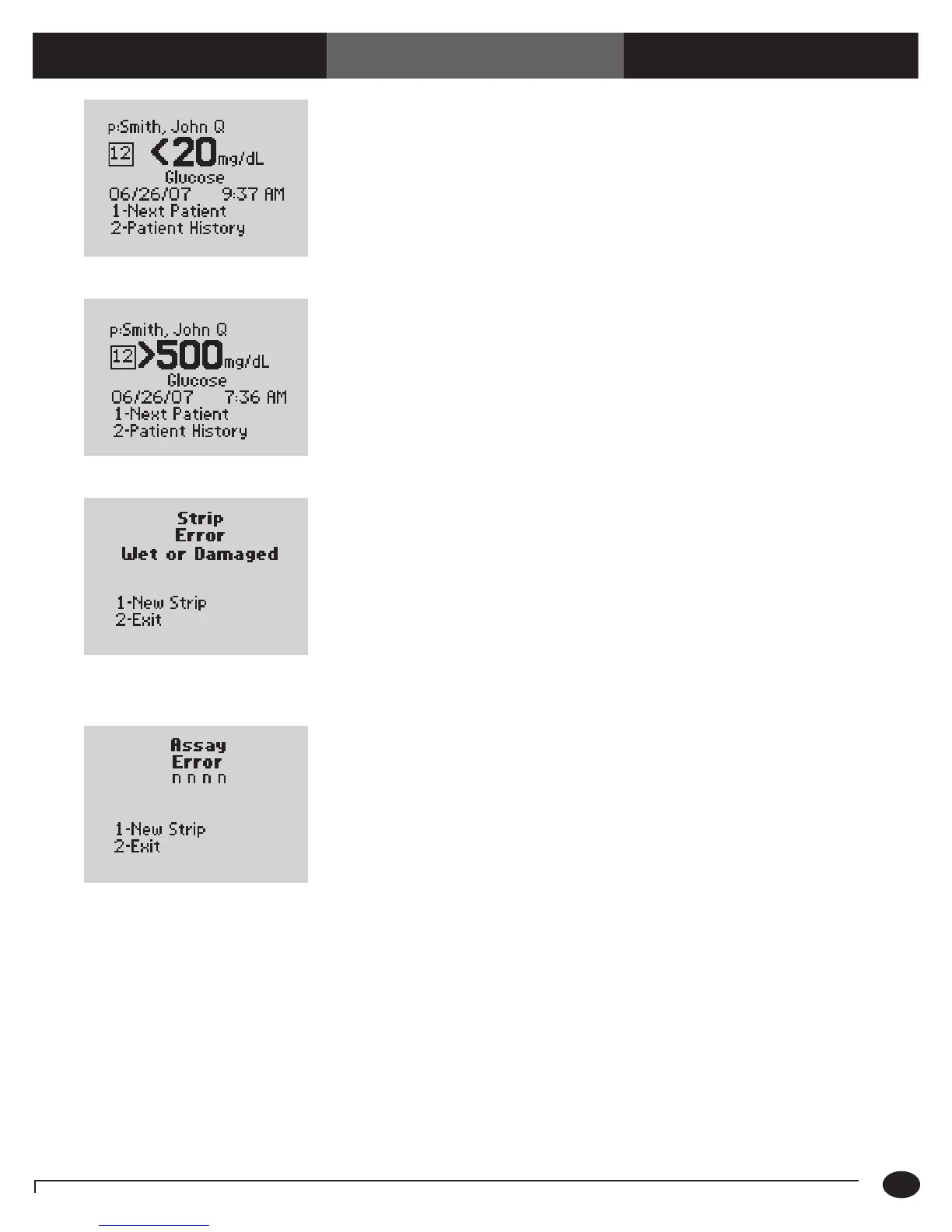
The test result is below the measuring
limit of the system.
1. Repeat the test with a new test strip.
2. If the result persists, follow your institution's
policy.
The test result is above the measuring
limit of the system.
1. Repeat the test with a new test strip.
2. If the result persists, follow your institution's
policy.
The test strip or the test strip port is wet,
defective, contaminated or the
wrong test strip was inserted.
1. Remove the old test strip.
2. Press 1 to continue testing with a
New Strip.
Or,
Press 2 to Exit to the Test Menu.
ere may be a problem with the test strip.
One of several 4-digit error codes may
be displayed. ese codes provide Abbott
personnel additional information about the
problem. Errors include:
1. Press 1 to repeat the test with a New Strip
or 2 to Exit.
2. If the error occurs again, record the
four-digit error code and contact Abbott
Technical Support.
4327 - e strip was removed during testing. Repeat the test with a new test strip.
4330 - Blood glucose may be too high to be
read by the system or there may be a problem
with the test strip.
Repeat the test with a new test strip. If the
error occurs again, conrm the result by
performing a laboratory reference test.
Symptom/Error Message Explanation How To Respond
Chapter 10: Troubleshooting
1.1 mmol/L
10-7
Questions? Refer to Page 10-9 For Technical Support Instructions.
>27.8 mmol/L














 To Next Page