Chapter 10: Troubleshooting
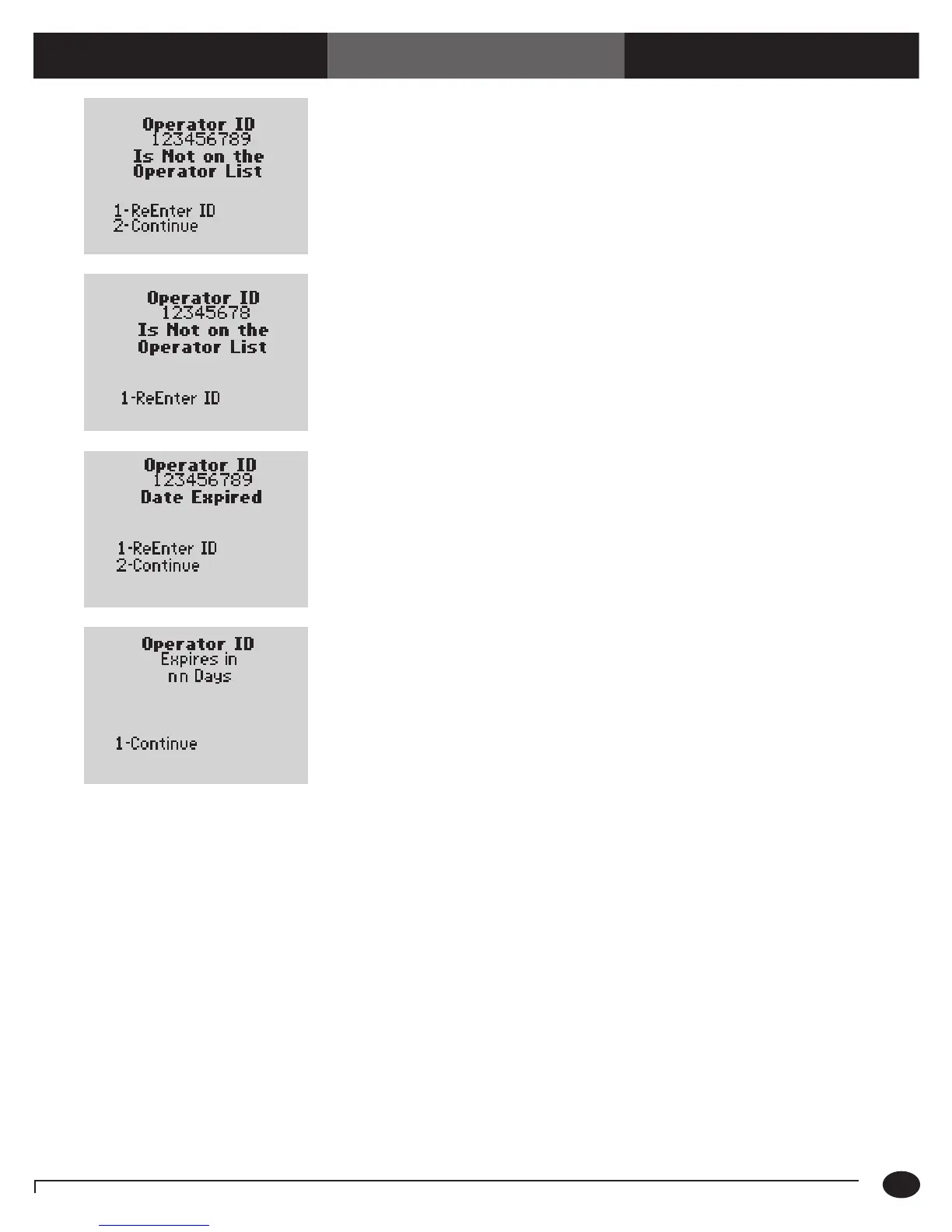
The Operator ID just entered is not on the
list of acceptable Operator ID’s defined
for this monitor.
(The menu items 2 – Continue appear
only if this option is set to Warn.)
1. P r e s s 1 to ReEnter the ID using the
barcode scanner or keypad.
Or,
Press 2 to Continue.
2. If the problem persists, notify the system
administrator.
The Operator ID entered is not on the list of
acceptable Operator ID’s defined for
this monitor.
1. P r e s s 1 to ReEnter the Operator ID.
2. If the problem persists, contact the system
administrator for further information on
operator certification.
The Operator ID entered has expired.
(The menu item 2 – Continue appear only
if this option is set to Warn.)
1. P r e s s 1 to ReEnter the ID using the
barcode or keypad.
Or,
Press 2 to Continue testing using the
Operator ID already entered.
2. If the problem persists, notify the system
administrator.
The Operator ID is due to expire. At this time,
testing is still allowed.
1. P r e s s 1 to Continue with testing.
2. Contact your manager or the system
administrator for further information on
operator certification.
Symptom/Error Message Explanation How To Respond
10-6
Questions? Refer to Page 10-9 For Technical Support Instructions.














 To Next Page