14 Initial Setup
Set PIN
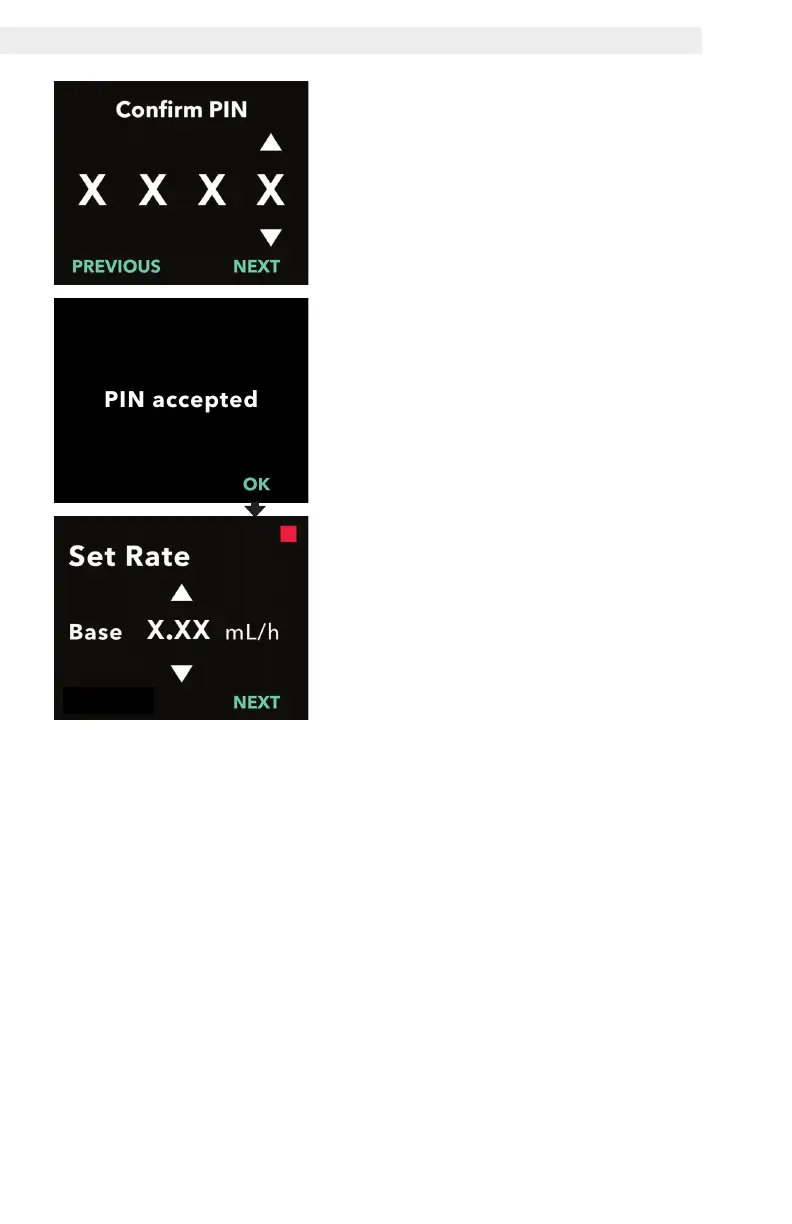
4. Re-enter and confirm the PIN.
a. Use the arrow keys to choose the
number.
b. Use the NEXT and PREVIOUS
buttons to select which digit you
wish to change.
c. Once the same PIN has been
entered, press NEXT to save
the PIN and advance to the next
screen.
d. After the PIN is saved, press OK to
continue. You will be prompted to
enter all of the patient settings.
5. Set the base continuous infusion
rate.
a. After saving the PIN, the rst
setting is the base continuous
infusion rate.
Note: The up arrow, used to increase
values, will not be displayed when the
rate cannot be increased. The down
arrow, used to decrease values, will
not be displayed when the rate cannot
be decreased. This occurs when
the rate is at the pump maximum or
minimum. It also occurs because the
high rate cannot be less than base
and the low rate cannot be greater
than base.


 To Next Page