27Change Therapy Settings
Adjust Continuous Infusion Rates
3.4 Adjust Continuous Infusion Rates
Discuss and establish a frequency for changing syringes with your
patient based on the patient's needs. Any time the continuous infusion
rate is changed, revisit this schedule with the patient.
Up to 3 different continuous infusion rates (base, high, and low) can be
set to allow the patient to choose up to 3 pre-set rates throughout the
day. The base rate should be used as the standard continuous infusion
rate. The high and low rates are optional alternative rates to the base
rate. The pump prevents low from being higher than base and prevents
high from being lower than base.
For patients who will not need different continuous infusion rates, the
high and/or low rates can be turned off. To turn off (disable) the high and/
or low rate, set the high and/or low rate to the same value as the base
rate.
The continuous infusion rates can range from 0.15 mL/h to 1.25 mL/h
and can be set in increments of 0.01 mL/h.
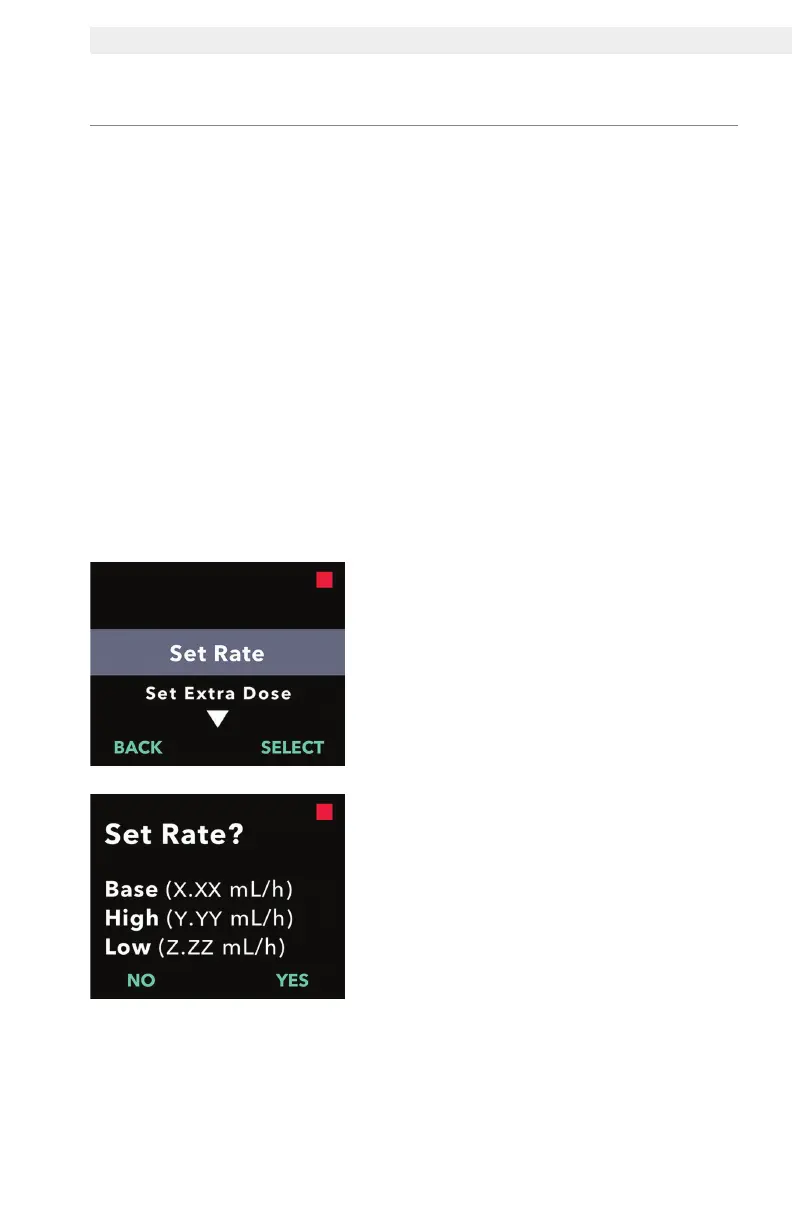
1. Navigate to Set Rate in the Clinician
Settings menu.
a. Use the arrow keys to navigate to
Set Rate.
b. Press SELECT to change the rate.
Note: To return to the status screen,
press BACK.
2. Set the Continuous Infusion Rate.
a. To change a rate, press YES.
Note: The Set Rate? screen will
display the current set values. If you
choose not to change the rate, press
NO.


 To Next Page