19Initial Setup
Set Loading Dose
The delivery of a loading dose can be enabled. The loading dose range
is from 0.1 mL to 3.0 mL and can be adjusted in increments of 0.1 mL.
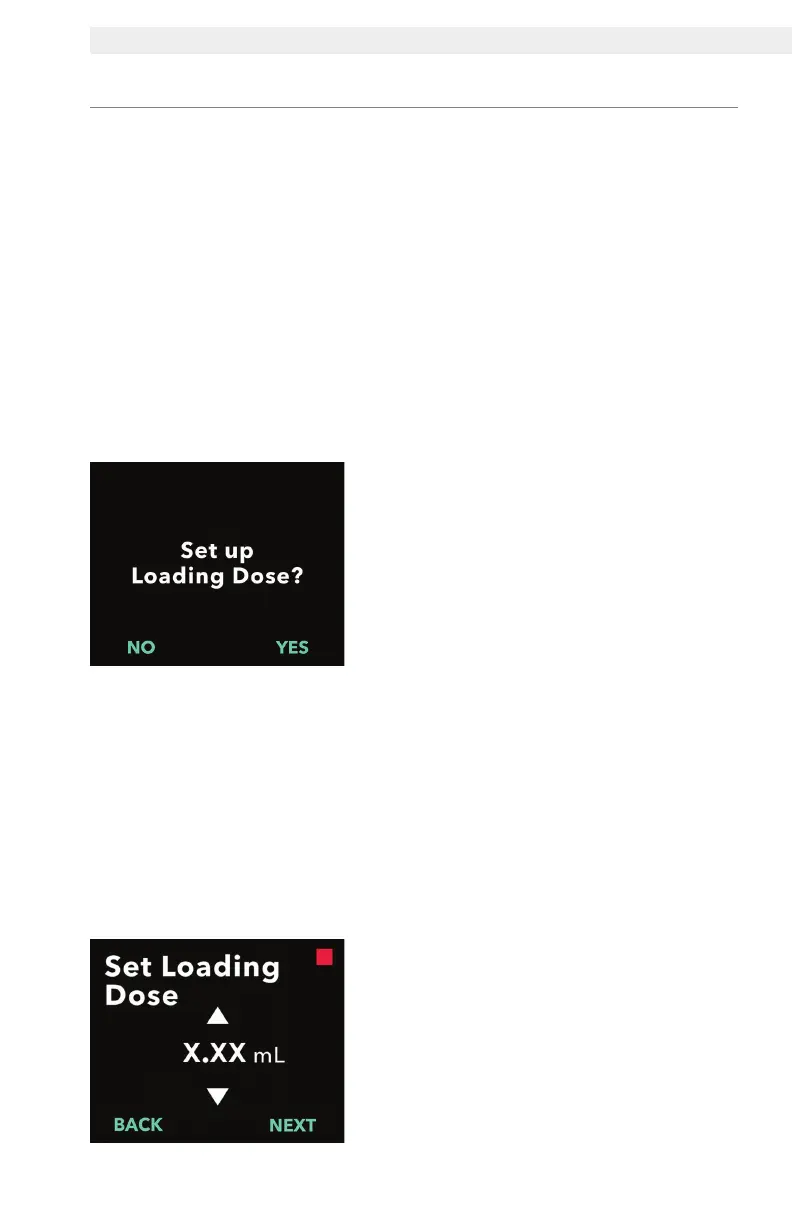
Note: If the patient is not going to receive a loading dose, when prompted
to "Set up Loading Dose?", select "NO". If you accidentally select "YES"
and do not want to set a loading dose, set the loading dose value to
0 mL.
A loading dose lock-out time is the interval from the time the pump is
stopped until the time the pump is able to deliver a loading dose. During
the lock-out time, no loading dose deliveries can be performed by the
pump. The lock-out time prevents delivery of a loading dose too soon
after the last infusion. The lock-out time range is 3 hours to 8 hours in
increments of 1 hour.
1. Set up loading dose.
• Press NO to skip loading dose set
up and disable loading dose.
• Press YES to set up loading dose
parameters and enable loading
dose.
Note: By pressing NO to skip setting
the loading dose, the pump will
display that the loading dose was
not set. If acknowledged by pressing
OK, the pump displays that the initial
setup is complete. At this point the
PIN and all dose values will be saved,
the pump automatically exits the initial
setup, exits clinician settings, and will
display the patient status screen in
stopped mode.
2. Set the loading dose value.
a. Use the arrow keys to set the
value.
b. Press NEXT once loading dose is
set to the correct value.
2.6 Set Loading Dose


 To Next Page