20 Initial Setup
Set Loading Dose
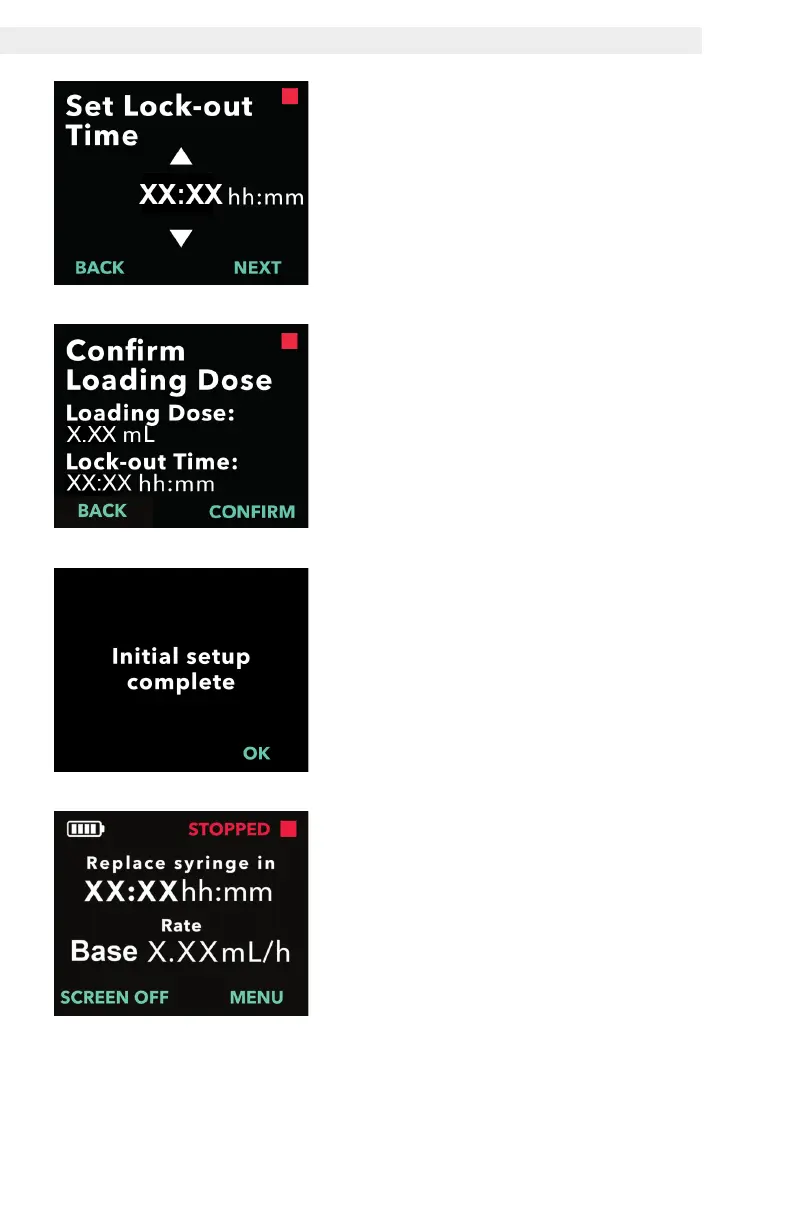
3. Set the lock-out time.
a. Use the arrow keys to set the time
in hours.
b. Press NEXT once lock-out time is
set to the correct value.
Note: The minimum lock-out time is
3 hours.
4. Confirm loading dose values.
a. Press CONFIRM.
Note: To change any value, press
BACK until you reach the desired
screen.
Note: By pressing CONFIRM, and
then acknowledging “Initial setup
complete,” the loading dose will be
conrmed and the PIN and all of the
dose values (continuous rate(s), extra
dose and loading dose) will be saved.
b. After pressing OK, the pump
automatically exits Initial Setup
and displays the status screen in
stopped mode.


 To Next Page