45Reset PIN (Forgotten PIN)
Disable Loading Dose
1. Recover access to Clinician
Settings.
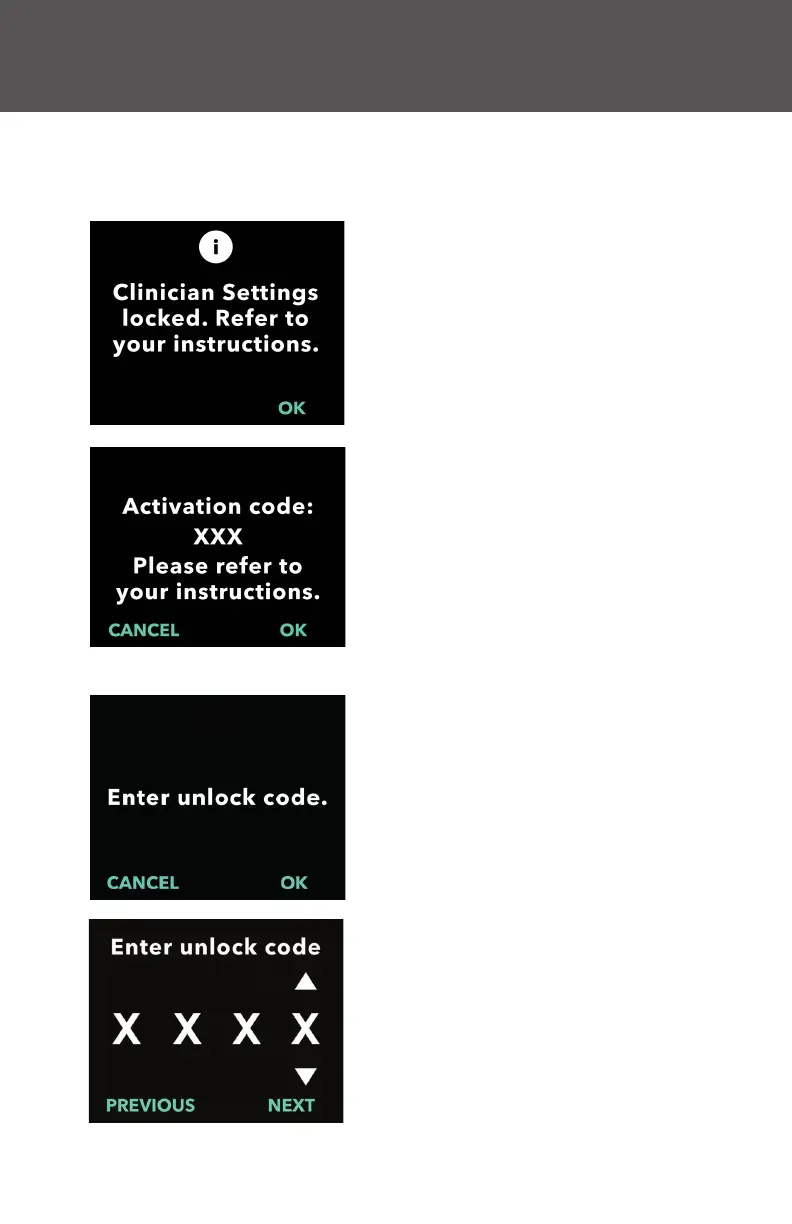
a. When clinician settings are locked,
press OK to proceed.
3. Use the Arrow Keys to enter the
4-digit unlock code.
a. Use the arrow keys to enter the
4-digit unlock code.
b. Use the NEXT and PREVIOUS
buttons to select each digit.
c. After entering the 4-digit unlock
code, press NEXT to continue.
6. Reset PIN (Forgotten PIN)
2. Continue to obtain unlock code.
a. Document the 3-digit activation
code that is displayed on the pump
screen. This is the number that
must be used to receive the unlock
code.
Note: The 3-digit activation code will
not remain on the screen after you
press OK.
b. To obtain the unlock code, call
VYALEV Support at
(866) 4-VYALEV or (866) 489-2538.
Explain that you need to reset
the PIN and give them the 3-digit
activation code. They in turn will
provide you with a 4-digit unlock
code.
If the incorrect PIN is entered 5 times or if you forgot the PIN and need
to reset it, the clinician settings will be locked. You will need to contact
VYALEV Support to reset the PIN.


 To Next Page