46 Reset PIN (Forgotten PIN)
Reset PIN (Forgotten PIN)
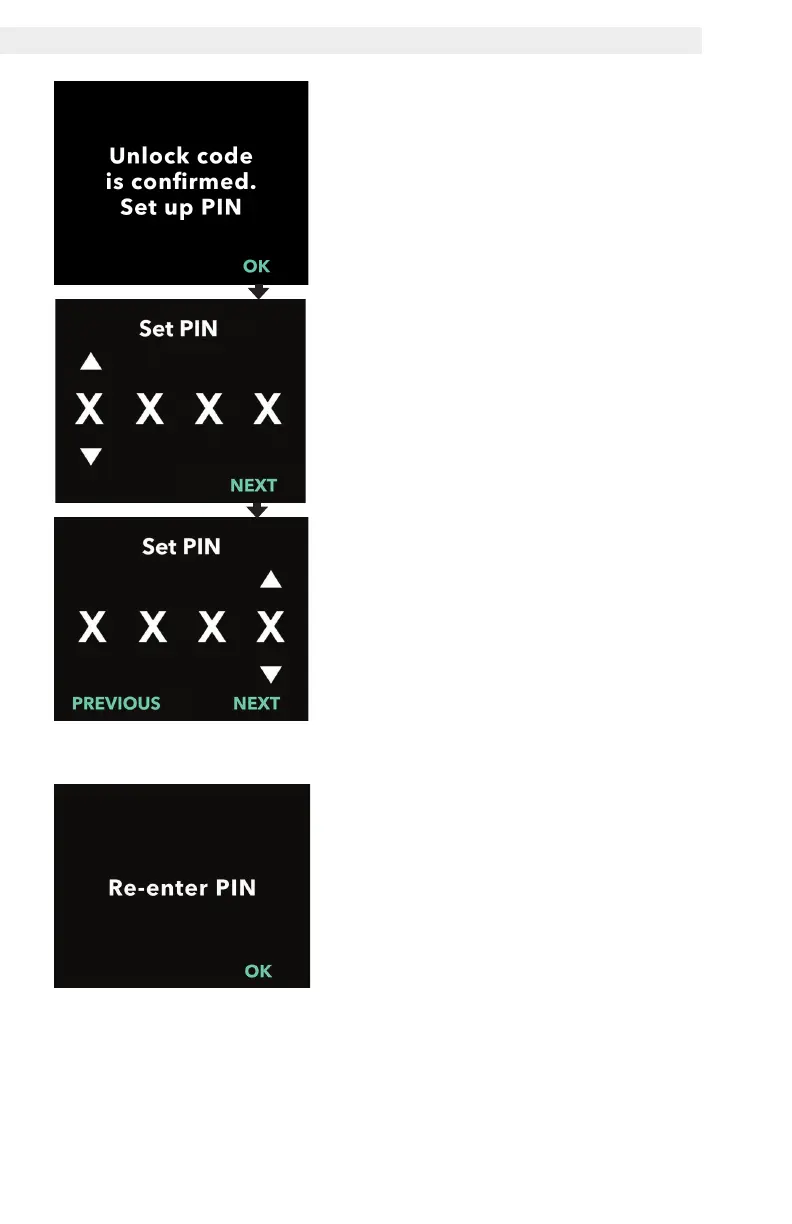
4. Unlock code is confirmed. Set your
new PIN.
Note: If the correct unlock code has
been entered, the pump will display
a message conrming the correct
unlock code has been entered.
a. Press OK to advance to the next
screen to set your new PIN.
Note: If an incorrect unlock code was
entered, you can try up to 3 times,
after which a different 3-digit activation
code will be generated.
5. Set your new PIN.
a. Use the arrow keys to choose the
PIN number.
b. Use the NEXT and PREVIOUS
buttons to select each digit.
c. Once the desired PIN is displayed,
press NEXT to advance to the next
screen.
Note: If the screen displays "Invalid
PIN," re-enter the PIN and ensure
that all 4 digits are not the same (e.g.,
5555) and that the 4 digits are not in
consecutive order (e.g., 5678).
6. Press OK to re-enter and confirm
the new PIN.


 To Next Page