30 Change Therapy Settings
Adjust Extra Dose
3.5 Adjust Extra Dose
A disabled extra dose can be enabled and an enabled extra dose can
be adjusted by changing the volume or the lock-out time. The extra
dose volume range is 0.1 mL to 0.3 mL, and can be set in increments of
0.05 mL.
Note: Setting the extra dose volume to 0.00 disables the extra dose
delivery feature.
The extra dose lock-out time is the interval from the end of the delivery
of the most recent extra dose (or loading dose) to the next extra dose
becoming available. During the extra dose lock-out time, no extra dose
deliveries can be performed by the pump. The lock-out time prevents the
delivery of too many extra doses. The extra dose lock-out time range is
from 1 hour to 24 hours, in 15-minute increments.
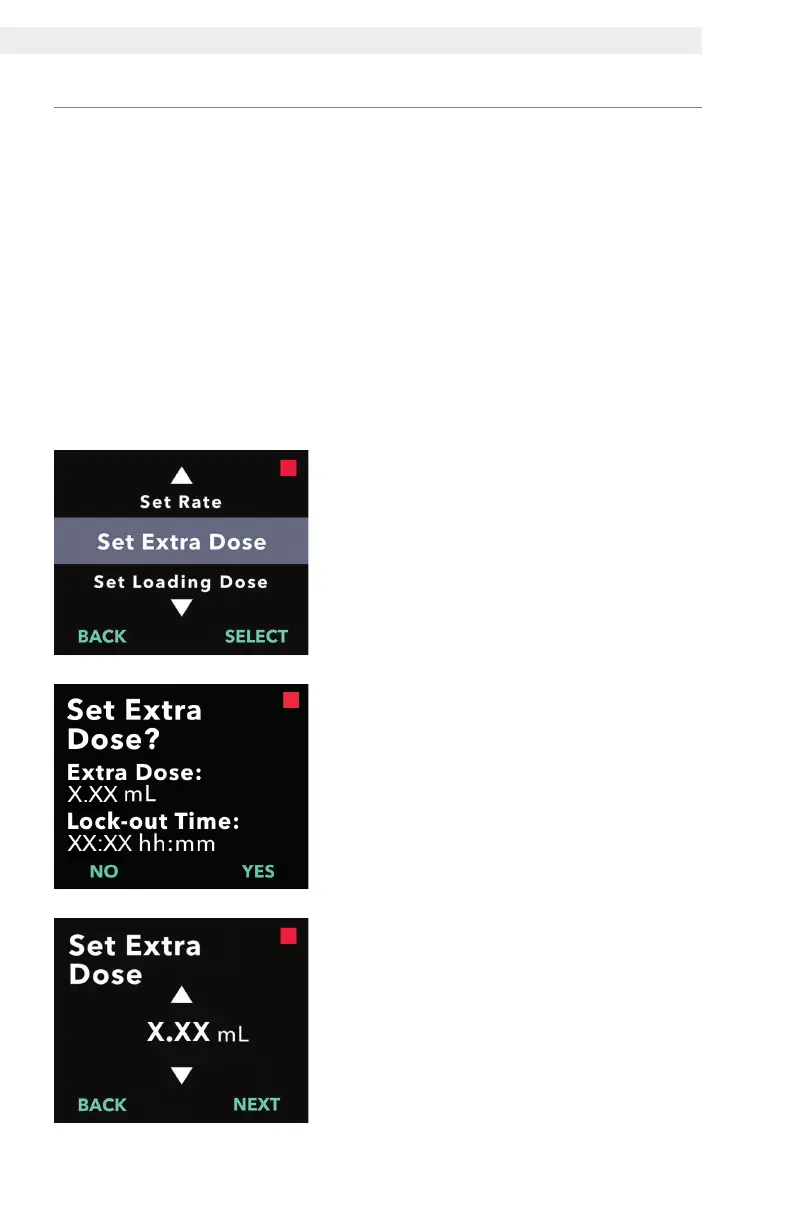
1. Navigate to Set Extra Dose in the
Clinician Settings menu.
a. Use the arrow keys to navigate to
Set Extra Dose.
b. Press SELECT to continue.
2. Set Extra Dose.
a. Press YES.
Note: The Set Extra Dose? screen
will display the current set values.
3. Adjust the Extra Dose volume.
a. Use the arrow keys to choose the
value.
b. Press NEXT once the extra dose is
adjusted to the desired value.


 To Next Page