25
6.17 Mixes
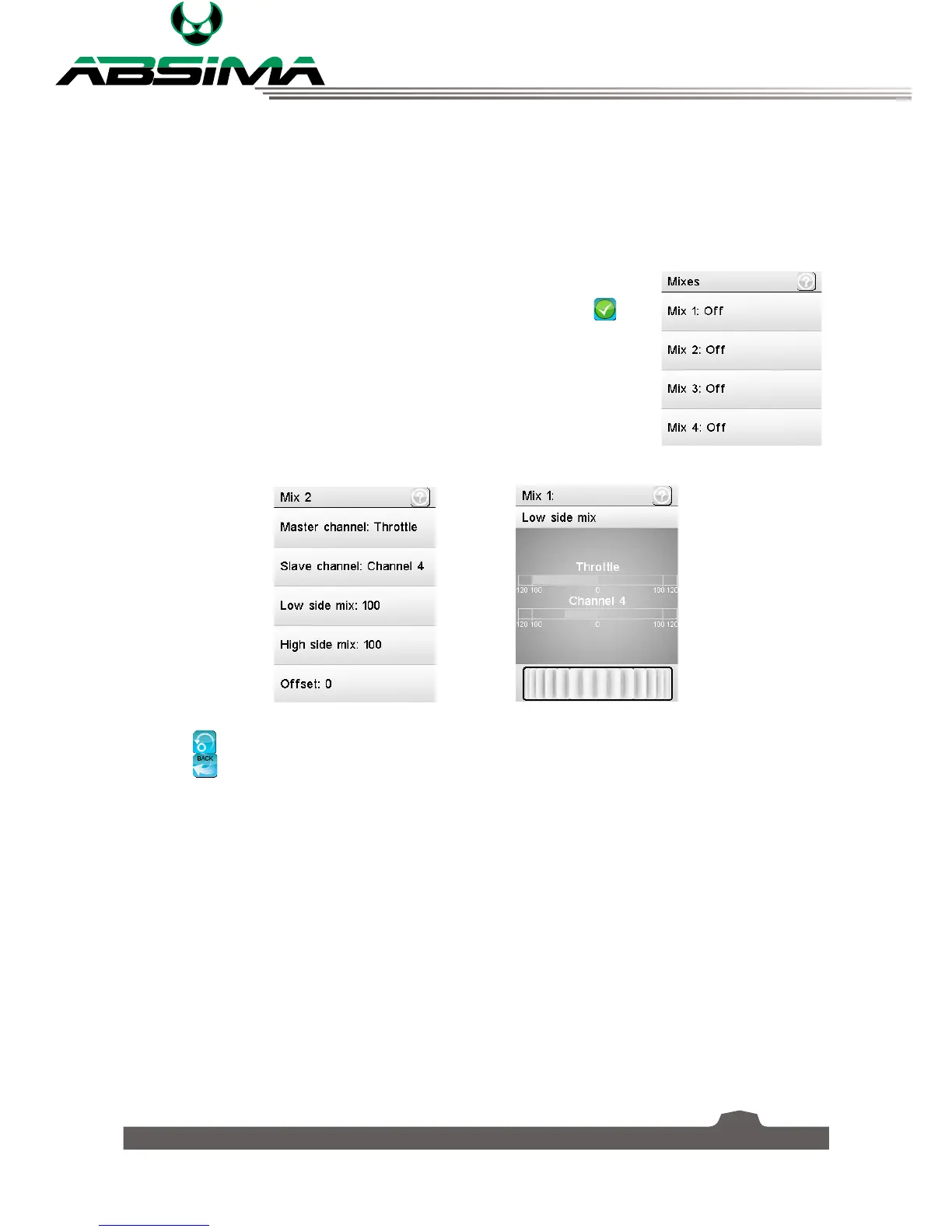
This function is used to create a mix between channels and control methods. For example, if you wish to
light up the turn signal lamp which is assigned to CH3 whenever steering left or right, you can create a
mix to do this.
You can set up to 4 mixes. To set a mix:
1. Select a mix you want to set, [
Mix 1
], [
Mix 2
], [
Mix 3
] or [
Mix 4
].
2. Select the bottom left icon to activate the mix. Make sure that the
icon
is displayed.
3. Select [
Master channe
l] and then choose the master channel to designate
the slaves output.
4. Select [
Slave channel
] and then choose a slave.
5. Select [
Low side mix
] or [
High side mix
] as desired and move the wheel
to change the value.
6. Select [
Offset
] to offset the channel in relation to the master.
Select the icon to reset the function.
Select the
icon to return to the previous menu.



 To Next Page