3-11Chapter 3: Tags, IDTAD, & TTS
Activating/Deactivating Tags
The IDTAD can activate and deactivate tags to
conserve power and prevent nuisance alarms.
Deactivating
1) Unlock the IDTAD as previously
instructed. If the IDTAD is unlocked, it
will display "IDTAD in unlocked mode" on
the top of the screen (a)
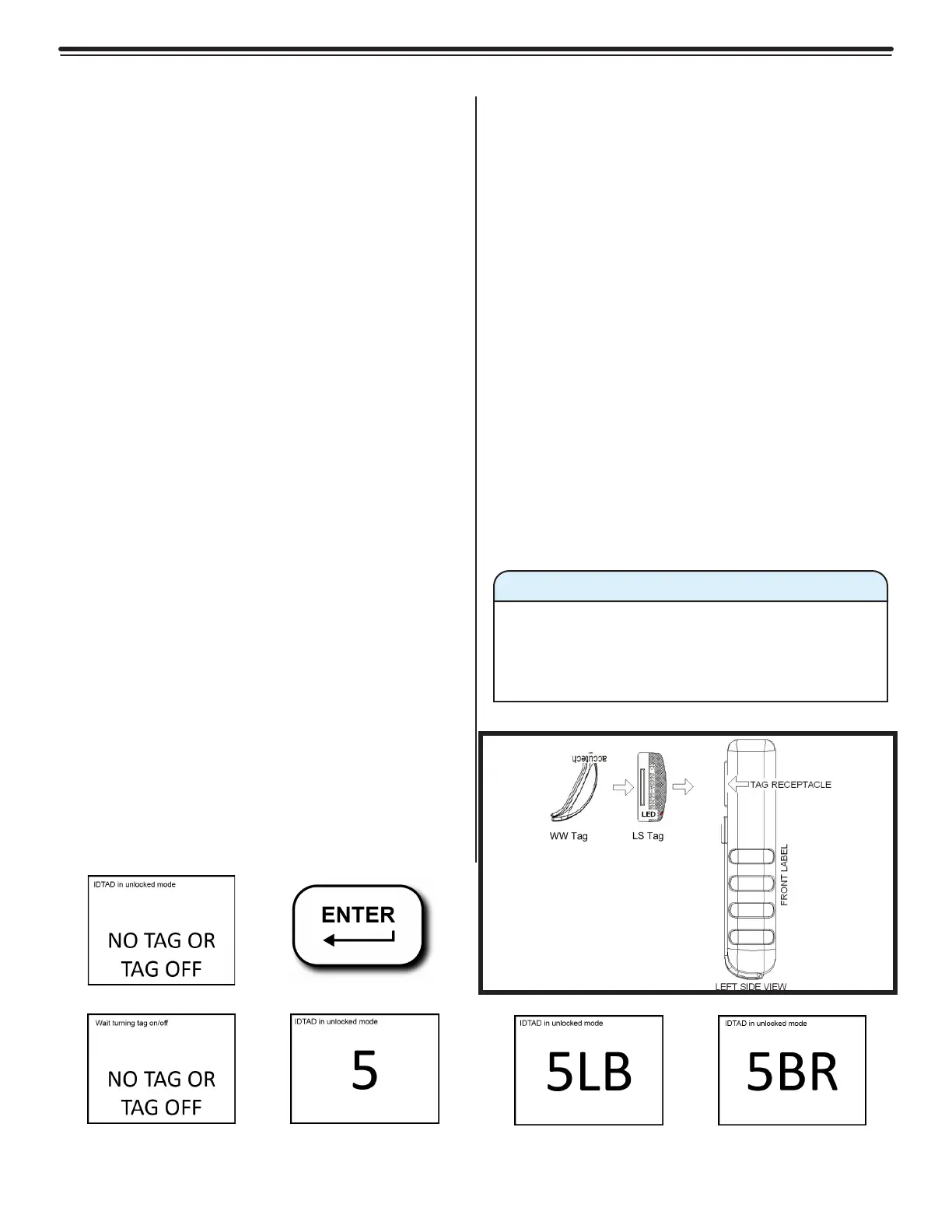
2) With the LCD screen displaying “IDTAD
in unlocked mode NO TAG OR TAG OFF”
(a), place the tag in the correct orientation
within the tag receptacle on the back of
the IDTAD (c).
3) Press the Enter button (b). The screen
will display “Wait turning tag on/off NO
TAG OR TAG OFF” (d), then "IDTAD in
unlocked mode NO TAG OR TAG OFF" (e).
This means the tag is deactivated.
4) Verify the tag is deactivated by making
sure the tag's LED light is off.
Activating
1) Turn on and unlock the IDTAD. The LCD
screen will display “IDTAD in unlocked
mode NO TAG OR TAG OFF” (a).
2) Hold the top side of the tag (the side with
the Accutech logo) up against the IDTAD
and within the tag receptacle (c). Position
the tag in the orientation displayed within
the receptacle.
3) Press the Enter button (b). The screen will
display “Wait turning tag on/off NO TAG
OR TAG OFF” (d). Do not remove the tag
during this process.
4) Once the tag number is displayed on-
screen, the tag has been activated (e).
Verify this by making sure the tag's LED
light is flashing.
5) If a low battery is detected, the letters
"LB" will display next to the tag number
(f). In this case, you must replace the tag
immediately. Never use a tag with a low
battery.
6) If a band removal alarm condition is
detected, then BR will display next to the
number (g).
(a) (b)
(g)(f)
(e)(d)
(c)
Figure 3.14a-3.14g
Screens that Appear During IDTAD Activation and Deactivation
A band alarm condition can take precedence
over a low tag battery condition. Be sure to
handle the tag appropriately to properly
check for a low battery condition.
Warning



 To Next Page