SP8026-1909
EVOLUTION ELECTRIC STEAMER
26
S1
S6
S3
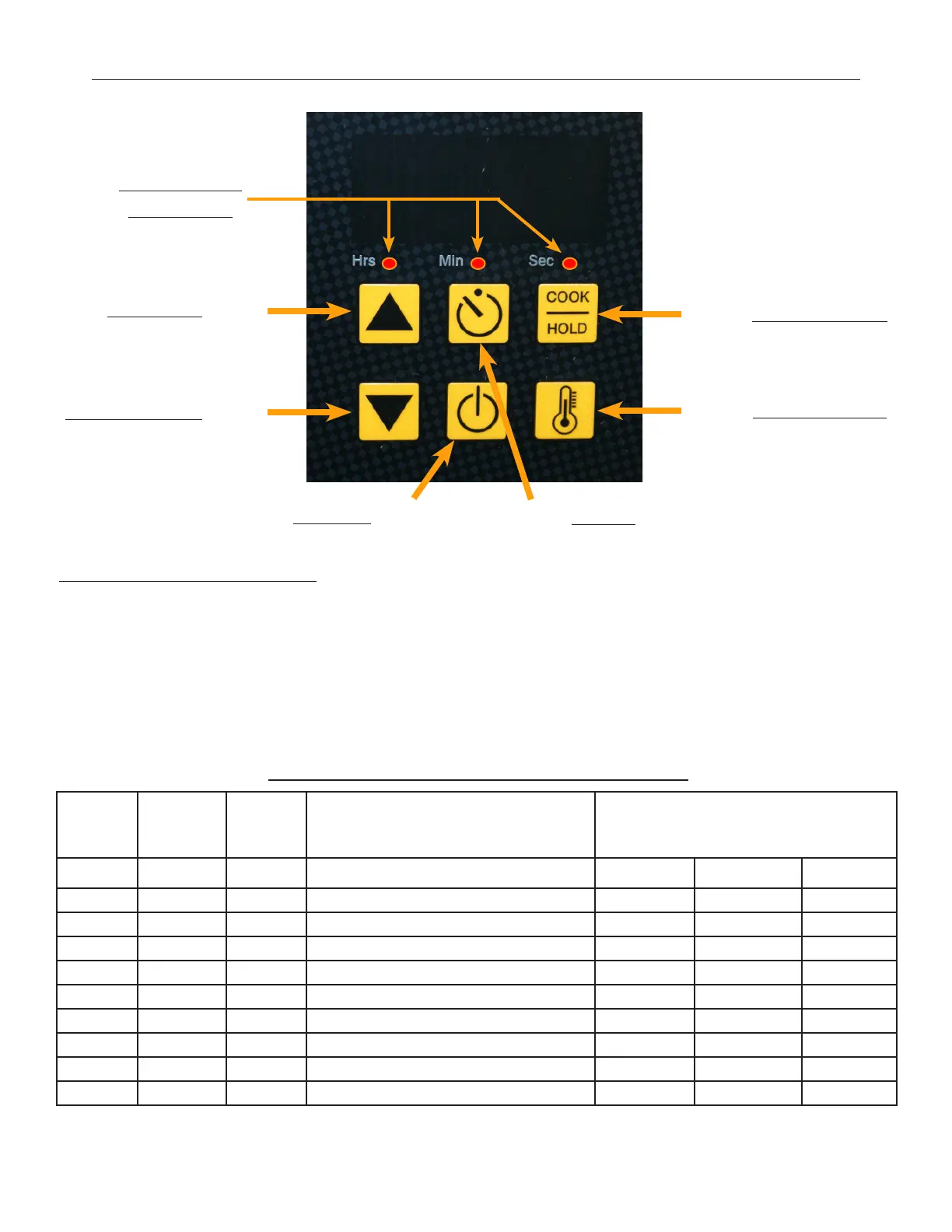
UP Arrow
S4
DOWN Arrow
TEMP Display
COOK/HOLD
S5
POWER
S2
TIMER
Hrs/Min/Sec
LED Lights
S1 - Increase Program Item (Will cycle the Hrs/Min/Sec LED light)
S4 - Decrease Program Item (Will cycle the Hrs/Min/Sec LED light)
S3 - Increase Program Value (Will change the Digital Readout display)
S6 - Decrease Program Value (Will change the Digital Readout display)
S2 - Exit & Save
ENTERING PROGRAM MODE: Simultaneously, depress and hold S4 & S6 for minimum of 8
seconds or until the Hrs LED blinks and the display shows a Hold Temp number (default is 180°F).
Now the Controller can operate under the Program Function Parameters.
Change PROGRAM Using Up/
Down Arrows
Change PROGRAM Settings using
Cook/Hold and Temp display but-
tons
Hrs LED Min LED Sec LED PROGRAM MIN MAX ELC
Blink OFF OFF HOLD Temp Value = Degree F MIN Temp MAX Temp 180
ON OFF OFF Default Timer Value = Hours 0 8 0
OFF ON OFF Default Timer Value = Minutes 0 59 30
OFF OFF ON TEMP Probe Oset = Degree F 0 50 0
ON ON ON TEMP Probe Oset = Neg/Pos Di NEG = 1 POS = 0 0
Blink Blink Blink Hysteresis 2 10 2
ON Blink Blink TEMP Regulating Mode On/O = 0 PID = 1 1
Blink ON Blink Proportioning BAND TIME 4 10 10
Blink Blink ON Proportioning BAND WIDTH 4 10 10
Program Mode Function Parameter Table
3.3 MODIFYING CONTROL / KEYPAD PROGRAM SETTINGS


 To Next Page