01010101100110101010110011010101011001101010101100110101010110011010101011001101010101100110
1001101010101100110101010110011010101011001101010101100110101010110011010101011001101010101100110101010110110101010
11
10101010110011010101011011010101001101010100110101101101101010100101
1011010101100110011010101011010101111010111
11010101101101010100111110
1101110110110011
0111011110
111101
011
11
1
PC-3000 EXPRESS / UDMA / PORTABLE Seagate
ACE Lab F3 architecture
Technical support: ts@acelab.ru
Phone: +7 863 201 50 06
ts.acelaboratory.com 13
Unfortunately, there are no universal methods "releasing" the heads. You should rely on your experience and the
expertise of your colleagues.
5.3. HDD returns HDD ID (the host system detects it), but reports
capacity = 0
This malfunction can be caused by the following reasons:
♦ non-native controller board;
♦ damaged read/write heads in the HDA;
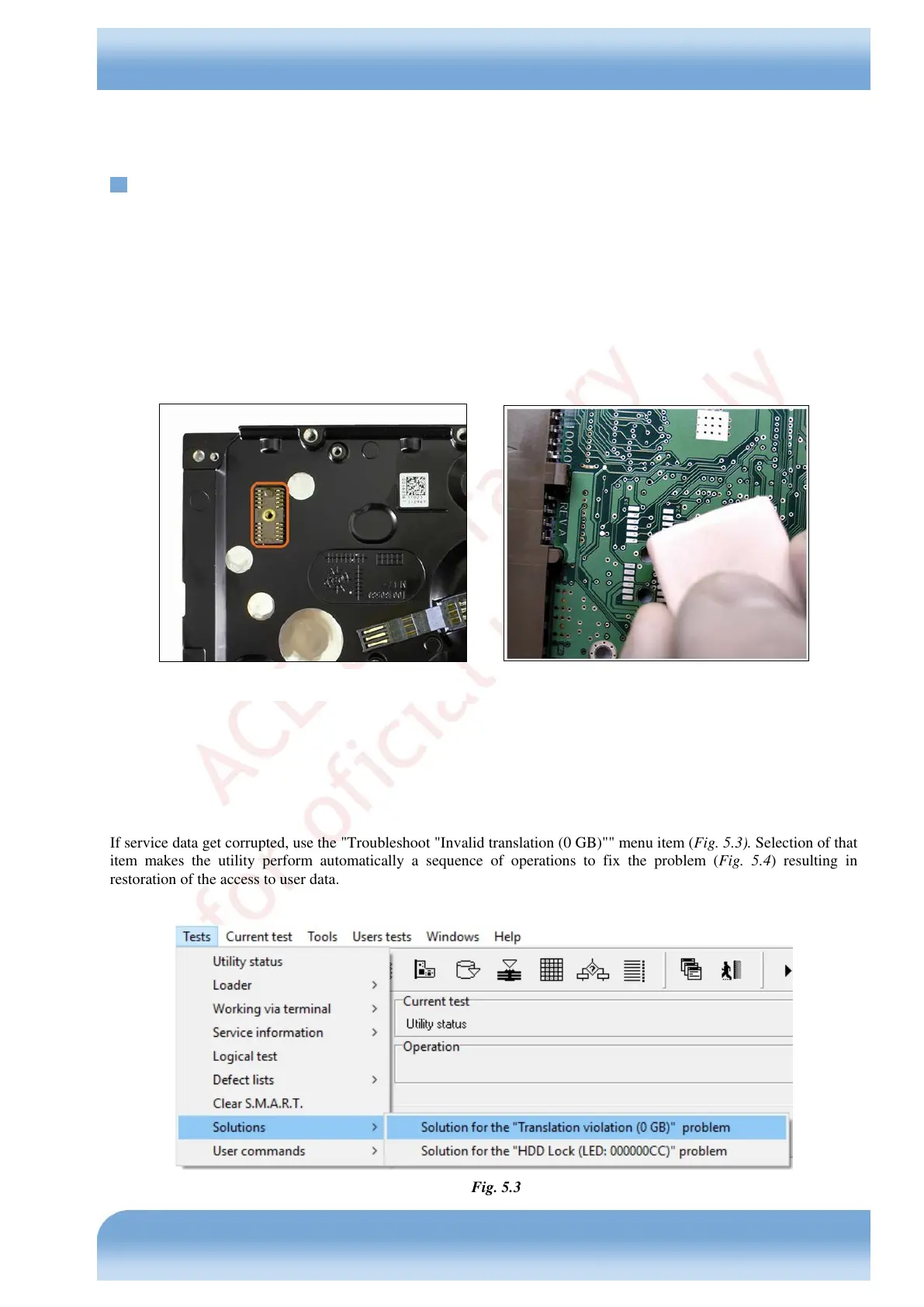
♦ broken contact between the controller board and HDA in the connector of the commutator preamplifier
(oxidized contacts, etc.) (Fig. 5.2);
♦ damaged service information (SMART, G-List, translator…).
Section 0 of this manual describes the method that can be used to ensure that the board is native. At present there are no
methods for drive restoration if its native board is lost.
If a contact is broken, try cleaning the connector, for example, using a common office eraser (see Fig. 5.1).
If magnetic heads are damaged, a drive usually produces knocking sounds when powered up. In that case it is
recommended to replace the malfunctioning heads stack.
If service data get corrupted, use the "Troubleshoot "Invalid translation (0 GB)"" menu item (Fig. 5.3). Selection of that
item makes the utility perform automatically a sequence of operations to fix the problem (Fig. 5.4) resulting in
restoration of the access to user data.
Fig. 5.3


 To Next Page