01010101100110101010110011010101011001101010101100110101010110011010101011001101010101100110
10011010
1010110011010101011001101010101100110101010110011010101011001101010101100110101010110011010101011011010101011
10101010110011010101011011010101001101010100110101101101101010100101
1011010101100110011010101011010101111010111
11010101101101010100111110
0110110011
Seagate PC-3000 EXPRESS / UDMA / PORTABLE
F3 architecture ACE Lab
Technical support: ts@acelab.ru
Phone: +7 863 201 50 06
32 ts.acelaboratory.com
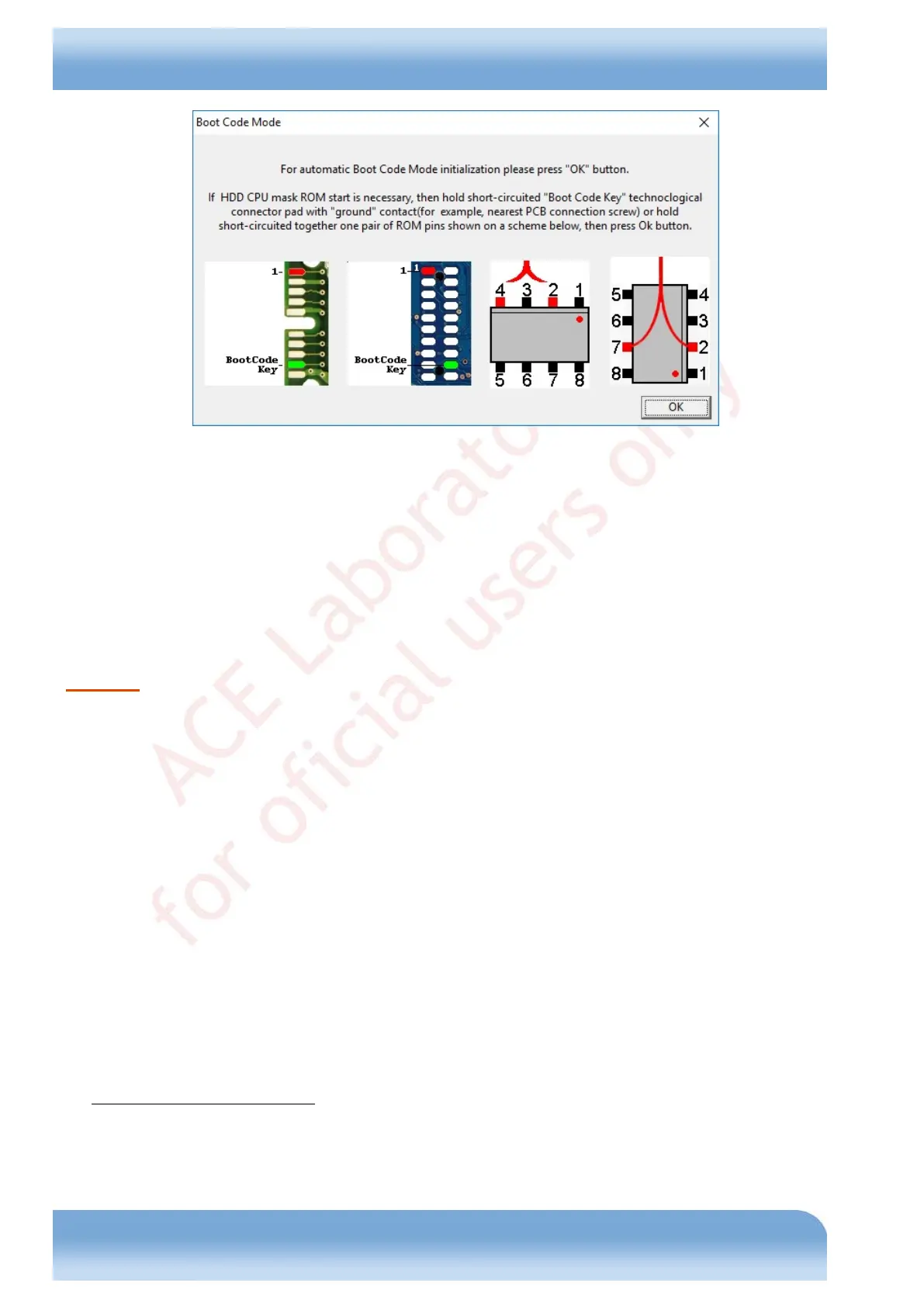
Fig. 6.8
Click OK for automatic switching. If the utility is unable to switch the HDD to Boot Code mode automatically, you
need to either short-circuit the pad of the drive controller indicated in the figure with the HDD "ground" contact, or
bridge the ROM contacts indicated above (see Fig. 6.8). The need to use a forced switch may be indicated by an error
message output to log and containing the "Bogus ISR" text.
Write ROM...
Flash size is: 0x00080000
Flash type is: STM
Erasing...
Bogus ISR
CPSR = 0x600000D3
R14 = 0x00100A83
Attention! Reading in Boot Code mode is performed through the terminal! The operation requires selecting a
supported baud rate. If during Boot Code initialization the utility outputs a message about terminal switching error, try
selecting a lower baud rate.
6.6.3. Work with RAM
The menu contains features for operations with the HDD service information:
♦ DT (Drive Tables) reading
♦ DT (Drive Tables) writing
♦ RAM head map editing
♦ RAM logical head map changing
♦ RAM physical head maps editing
♦ SAP (Servo Adaptives Parameters) control flags editing (in RAM)
♦ HDD ID editing (in RAM)
As the name implies, DT reading and writing allow to read and write Drive Tables
1
. The operations for modification of
the heads map in RAM allow editing the corresponding heads maps in drive RAM
2
. The 'RAM physical head maps
editing' feature allows you to modify the active map in RAM on-the-fly (provided the HDD FW supports that) and
combine heads into pairs, if necessary. The 'RAM logical head map changing' feature allows you to modify the map of
1
DT (Drive Tables) used to be referred to earlier as CP – Config Pages.
2
The drives in question contain several maps of heads. For details on their structure and operation please see section
6.6.3.1, Heads maps in Seagate F3 drives.


 To Next Page