01010101100110101010110011010101011001101010101100110101010110011010101011001101010101100110
10011010
1010110011010101011001101010101100110101010110011010101011001101010101100110101010110011010101011011010101011
10101010110011010101011011010101001101010100110101101101101010100101
1011010101100110011010101011010101111010111
11010101101101010100111110
0110110011
Seagate PC-3000 EXPRESS / UDMA / PORTABLE
F3 architecture ACE Lab
Technical support: ts@acelab.ru
Phone: +7 863 201 50 06
12 ts.acelaboratory.com
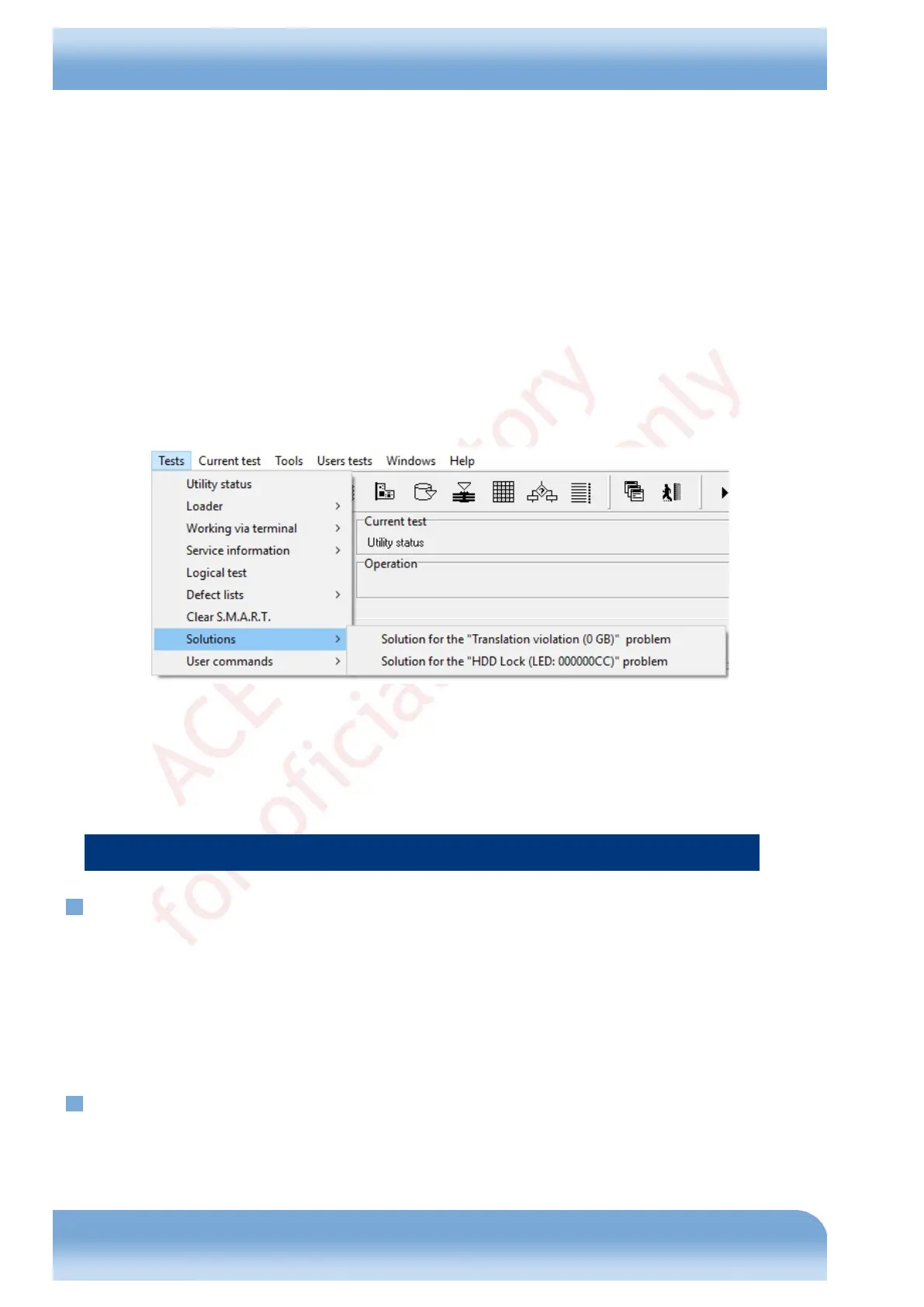
utility status dialog (which allows, among other things, to re-read the lists of modules and DT);
reconnection to COM port (necessary when the USB to COM adapter freezes);
detection and switching of the rate of data exchange with HDD via terminal;
ROM reading/writing menu;
group of features for operations with the controller: DT reading/writing, modification of the heads map,
SAP flags, and HDD ID in drive RAM;
group of features for operations with the service area (backup of service information, reading/writing of
HDD modules and system files, HDD ID modification, translator recalculation and restoration, resetting
of passwords);
logical scanning of disk surface;
work with HDD defect lists: Non Resident G-List, P-List, Non Resident Primary DST List;
group of features for automatic repair of typical malfunctions;
a set of custom commands;
switch between PC-3000 windows;
We should separately mention the list of automated solutions for HDD problems available in the utility (Fig. 4.4):
Fig. 4.4
♦ A drive may be detected in the system, but report zero capacity (0 Gb) (except for the situations when zero
capacity is caused by a damaged controller board / heads or non-native controller).
♦ Host system cannot detect HDD presence because the drive permanently remains in the BSY state - HDD is
locked (LED: 000000CC).
5. Frequent malfunctions
5.1. Motor seizure
If a drive motor seizure occurs, then a HDD cannot spin up the disks even if the controller board and motor winding are
functional (confirmed by replacing the board with a known good board from another drive of the same family having the
same revision and checking the coils (as described in section 11, Appendix 3. Testing the motor winding coils). That
malfunction can be identified by typical tactile vibration of the HDA when power is switched on. When the HDA is
opened and the heads inside are not stuck, it is very difficult or impossible to turn the disks manually.
To solve the problem, move the disks stack into a donor HDA. In that case you can use the controller board, heads and
magnets from the damaged drive (if native heads get damaged, they can be replaced).
5.2. "Stuck" heads
"Stuck" heads have manifestations identical to the motor seizure case. When HDA is opened, the heads turn out to be
outside the parking area. They stick to the disk surface because of molecular attraction forces.


 To Next Page