01010101100110101010110011010101011001101010101100110101010110011010101011001101010101100110
10011010
1010110011010101011001101010101100110101010110011010101011001101010101100110101010110011010101011011010101011
10101010110011010101011011010101001101010100110101101101101010100101
1011010101100110011010101011010101111010111
11010101101101010100111110
0110110011
Seagate PC-3000 EXPRESS / UDMA / PORTABLE
F3 architecture ACE Lab
Technical support: ts@acelab.ru
Phone: +7 863 201 50 06
28 ts.acelaboratory.com
attempts to work with these items should be performed in the terminal. 'ATA(direct)' option means that the drive
features a native command for access to Sys Files; therefore, the utility will use it for further work. 'ATA(indirect)'
option means that the firmware has no internal factory commands for operations with Sys Files. In that case the utility
will attempt to access the service information using the commands for operations with modules as a "bypass".
6.2. Loader
The submenu contains two commands: Create loader and Update Microcode.
6.3. Create loader
This menu item allows you to build from the service information of a connected HDD a data file in Update Microcode
command format; the file will consist of the Disk FW Overlay (ROM overlay) and firmware overlays. That *.lod file
can be used then to restore corrupted overlays in a compatible drive or to load some of them to HDD memory. At
present Disk FW Overlay recording is only possible to disk surface while the firmware overlays can be loaded to HDD
RAM without their recording to the SA. The fact allows in some cases to start a drive with impaired writing
functionality. The generated file does not contain complete or partial ROM data; therefore, the loader created by the
utility cannot be employed for automatic firmware updates.
6.4. Update Microcode
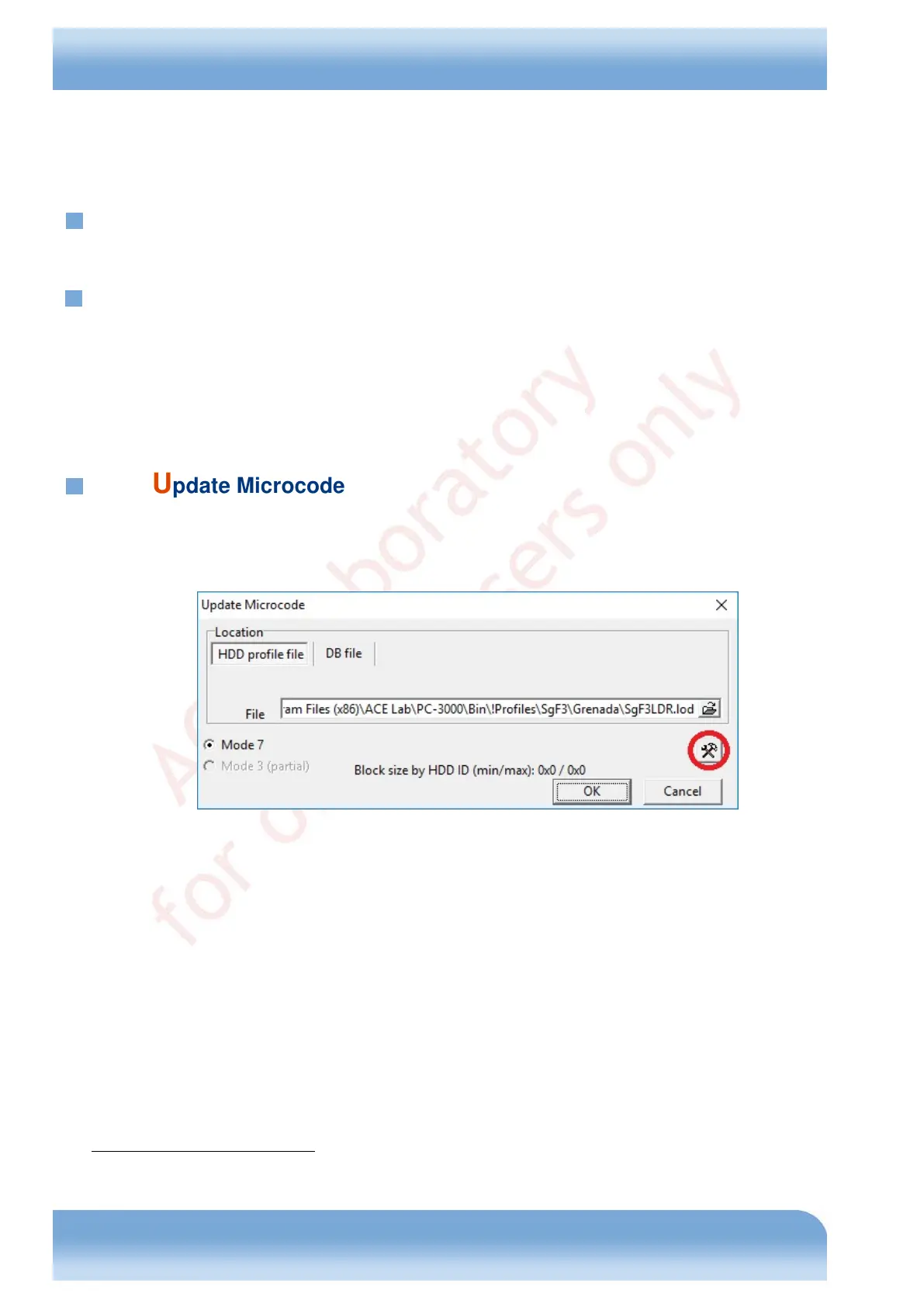
This menu item can be used to start the files loading / updating the drive firmware with the standard Update Microcode
(92h) ATA command. Files in that format include both native Seagate firmware update files and the overlay loading
files generated by the utility documented here.
Fig. 6.2
The dialog allows to choose the source file in a profile or database, and the mode that will be used to upload it - mode
7
1
(loading in a single block) or mode 3 (multiple blocks). The latter mode has been introduced in the ATA standard to
support large update files, which a drive cannot apply completely in one cycle. Support of that mode is indicated in the
HDD ID, which the utility checks to enable or disable the block loading mode. In addition, the dialog allows to open
the content editor for Seagate Arch F3 *.lod files (the button in red circle). Below you can see a sample editing dialog
containing a file for a 7200.12 Pharaoh drive update to СС49 version.
1
Please refer to the ATA standard for the Update Microcode (92h) command specification.


 To Next Page