16
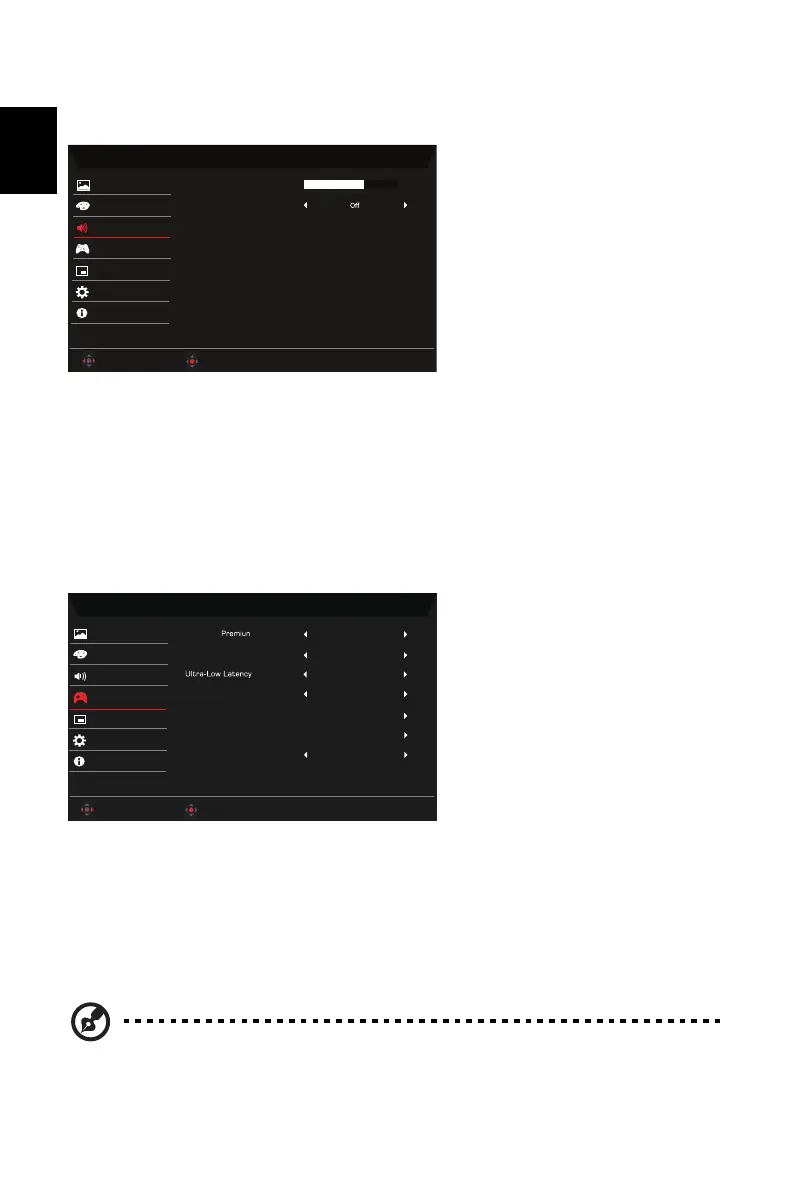
Audio
1. Press the MENU key to open the OSD.
2. Using the button, select Audio from the OSD. Then navigate to the setting you
wish to adjust.
3. Use the button to select the setting.
4. Volume: Adjusts the volume.
5. Mute: Select On or Off.
Gaming
1. Press the MENU key to open the OSD.
2. Using the button, select Gaming from the OSD. Then navigate to the setting you
wish to adjust.
3. Use the button to select the setting.
4. FreeSync Premium: Default is On, can choose Off.
5. Refresh Rate Num: Display the panel’s current refresh rate on the screen.
Note: If FreeSync Premium set "On" you can see the V Frequency to changes in the
OSD.
Mode - Standard
Volume
Mute
Color
Gaming
OSD
Picture
System
Information
Audio
70
Adjust
OK
Ř
Ř
/
Mode - Standard
On
FreeSync
AimPoint
Color
Gaming
OSD
Picture
System
Information
Audio
OffRefresh Rate Num
Adjust
OK
On
Black Boost Pro
Off
Sniper Mode
Timer
Off
Ř
Ř
/


 To Next Page