33
Display
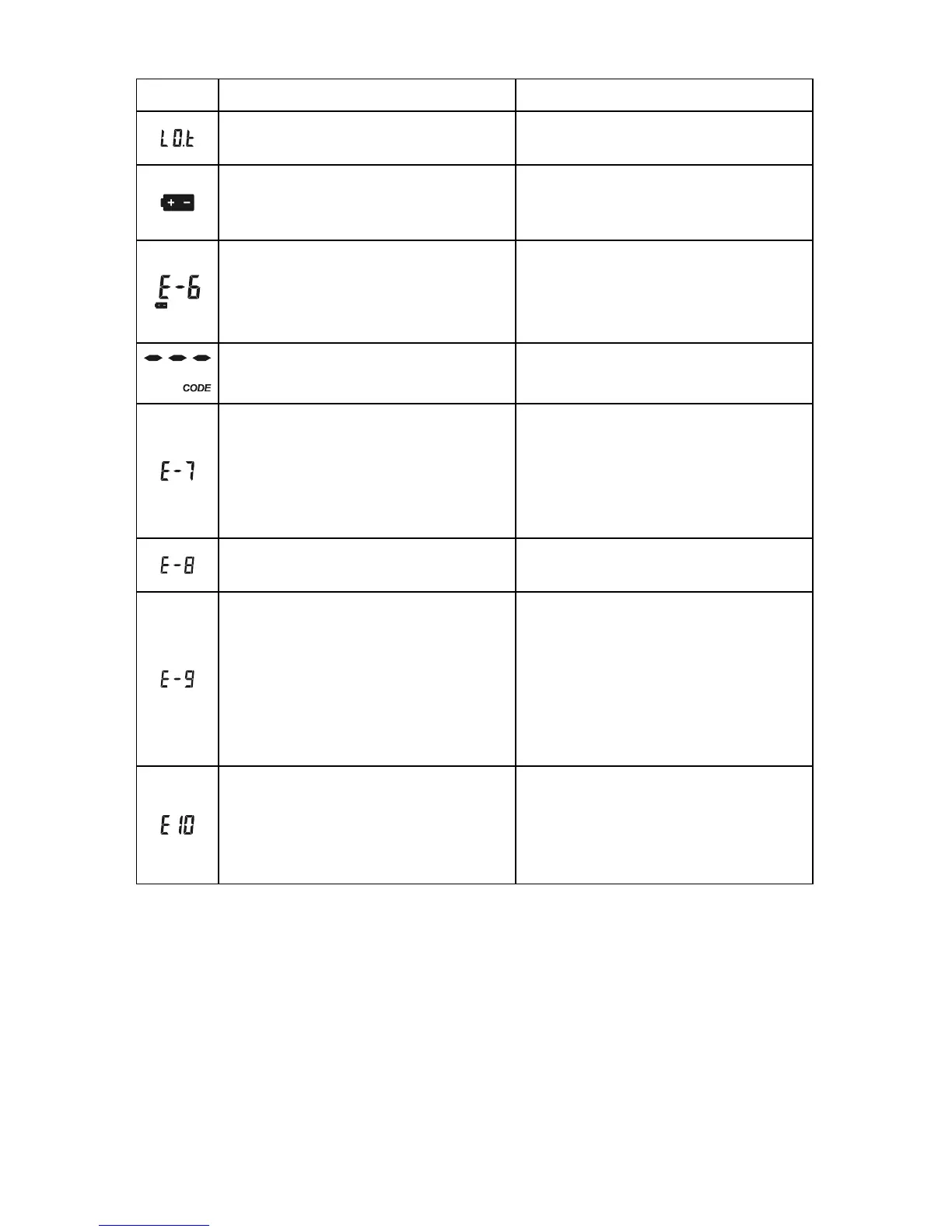
Causes Solution
Temperature is below the operating
temperature of the system
Move to a warmer environment and
repeat the test.
Battery is discharged but has enough
power to run 10 more tests
Test results will still be accurate, but
replace the battery as soon as
possible.
Battery has discharged and meter
does not allow more tests until
discharged battery is replacement
with a new battery
Replace the battery and repeat the
test.
No code chip in the meter
Insert the code chip that
accompanied the box of test strips.
Damaged code chip or the code chip
was removed during a test
If the code chip is damaged, use a
new code chip with the correct code
number and run the test. If the chip is
removed during a test, confirm the
code chip matches the test strip code
and repeat the test.
Meter electronics failure
If the problem persists, contact
customer support.
Incorrect code chip
inserted in the meter
Indicates an incorrect brand of code
chip was inserted in the meter.
Please make sure you use the On
Call
®
Plus brand of test strip with the
On Call
®
Plus Blood Glucose Meter.
If the problem persists, contact
customer support.
Communications failure
There is an error in transferring data
to the PC.
See the package insert included with
the Diabetes Management Kit for
troubleshooting.
For help with any additional questions or issues, please contact Customer Support
at 1-800-838-9502, 24 hours a day, 365 days a year


 To Next Page