3
On Call
®
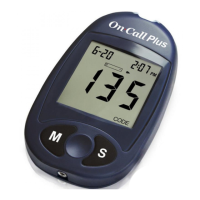
Plus Blood Glucose Meter
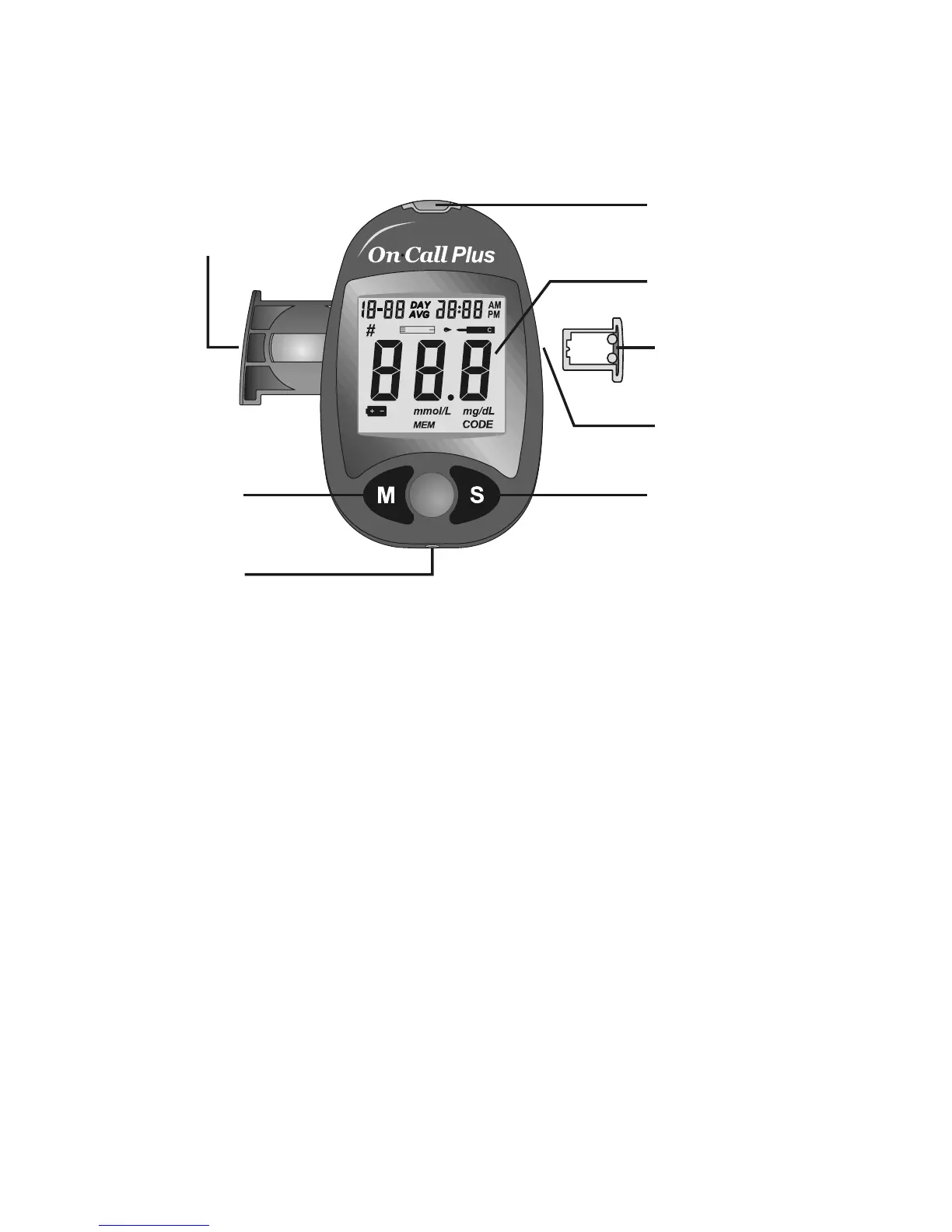
The meter reads the test strips and displays the blood glucose concentration. Use
this diagram to become familiar with all the parts of your meter.
Liquid Crystal Display (LCD): Shows your test results, and helps you through the
testing process.
M Button: Recalls previous test results from the meter memory and performs
other menu selection functions.
S Button: Selects meter settings and performs other menu selection functions.
Strip Port: Test strips are inserted into this area to perform a test.
Battery Carrier: The battery carrier is located on the back of the meter.
Code Chip Slot: Insert the code chip here.
Code Chip: For coding the meter. A new code chip comes with every box of test
strips.
Data Port: Sends information to a computer via an optional data transfer cable.
Allows you to view, analyze and print stored data in the meter. The data transfer
cable is available for order as an optional add-on.
Strip Port
Battery Carrier
Code Chip
Liquid Crystal
Display (LCD)
Code Chip Slot
M Button
S Button
Data Port


 To Next Page