32
Troubleshooting Guide
The meter has built-in messages to alert you of problems. When error messages
appear, note the error number, turn off the meter and then follow these
instructions.
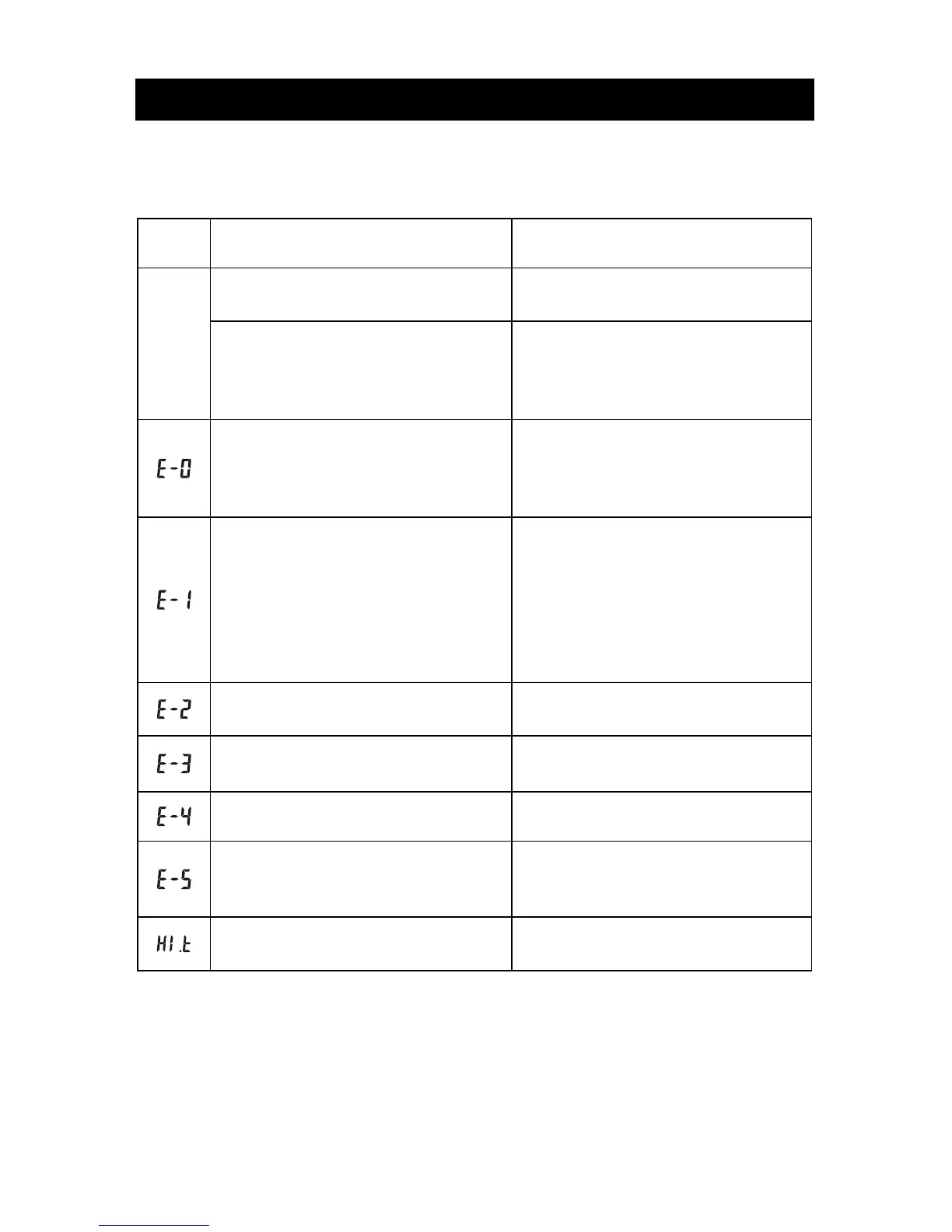
Display Causes Solution
Battery may be damaged or not be
charged
Replace battery.
Meter
fails to
turn on
Meter is too cold
If meter has been exposed to or
stored in cold conditions, wait 30
minutes to allow meter to reach room
temperature then repeat test.
Power On self check error
Remove battery for 30 seconds and
then put battery back and turn meter
on again. If problem persists, please
contact customer support.
Internal calibration check error
If a cell phone, radio frequency
source or a high On/Off electrical
source is nearby, place more
distance between the meter and any
of these sources then retest.
If the problem persists, please
contact customer support.
Test strip was removed during the
test
Repeat the test and ensure test strip
remains in place.
Sample was applied to the test strip
too soon
Repeat test and apply sample after
blood drop/test strip icon appears.
Test strip is contaminated or used Repeat test with a new test strip.
Insufficient sample
Repeat test and apply enough
sample to fill the test strip check
window.
Temperature has exceeded the
operating temperature of the system
Move to a cooler environment and
repeat the test.


 To Next Page