22
Step 2 – Testing Blood Glucose
Note: Insertion of a new test strip at any time, except while in the data
transfer mode (detailed on page 28), will cause the meter to automatically
enter the test mode.
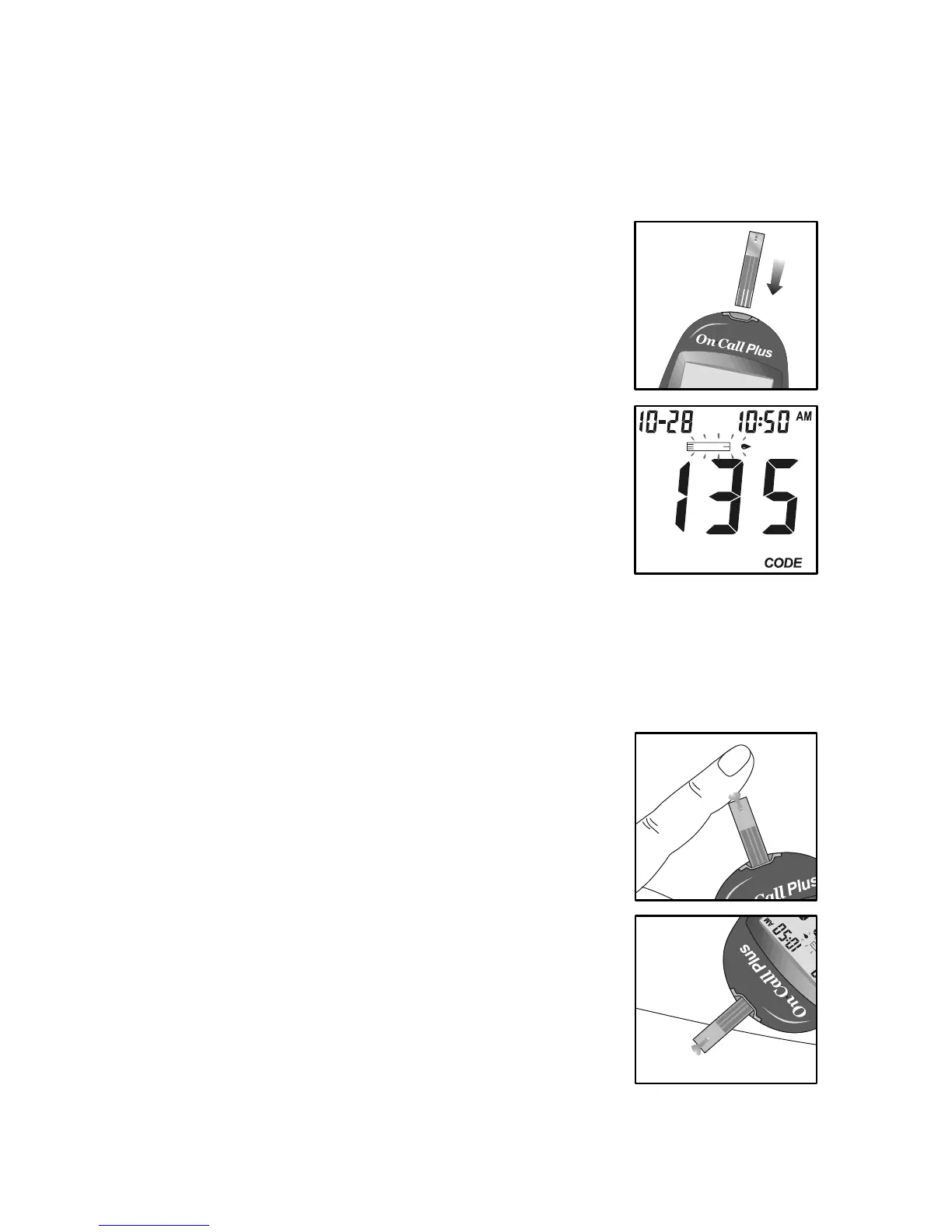
1. Insert a test strip into the strip port, contact bars end
first and facing up, to turn on the meter and display all
the display segments. If the audio option is on, the
meter will beep, signaling the meter is turned on.
Make sure that the code number that appears on the
display matches the code number (CODE) on the test
strip vial (or on foil pouch). If not, make sure to locate
and insert the code chip that came with the box of
strips. If the codes still do not match, do not perform a
test. You will need a new package of test strips to
perform a test.
2. The blinking test strip and blood drop icon will indicate
that the test strip is inserted correctly and a drop of
blood can be added.
3. Touch the sample to the tip at the end of the test strip.
If the audio option is on, the meter will beep to indicate
that the sample is sufficient and that the measurement
has started. The meter will not turn on if the test strip
has been inserted incorrectly.
DO NOT:
• Apply sample to the front or back of the test strip.
• Smear the blood drop onto the test strip.
• Press your finger against the test strip.
• Apply a second drop of blood.


 To Next Page