©2018 ACP, Inc.
Cedar Rapids, IA 52404 Page 15 of 80
Part No. 16400033
Original Instructions
Grounding/Earthing Instructions
Oven MUST be grounded. Grounding reduces risk of electric shock
by providing an escape wire for the electric current if an electrical short
occurs. This oven is equipped with a cord having a grounding wire
with a grounding plug. The plug must be plugged into an outlet that is
properly installed and grounded.
Consult a qualied electrician or servicer if grounding instructions are not completely understood, or if doubt exists as to whether
the oven is properly grounded.
Do not use an extension cord.
If the product power cord is too short, have a qualied electrician install a three-slot receptacle. This oven should be plugged into
a separate circuit with the electrical rating as provided in the product specications. When the combination oven is on a circuit
with other equipment, an increase in cooking times may be required and fuses can be blown.
External Equipotential Earthing Terminal (export only)
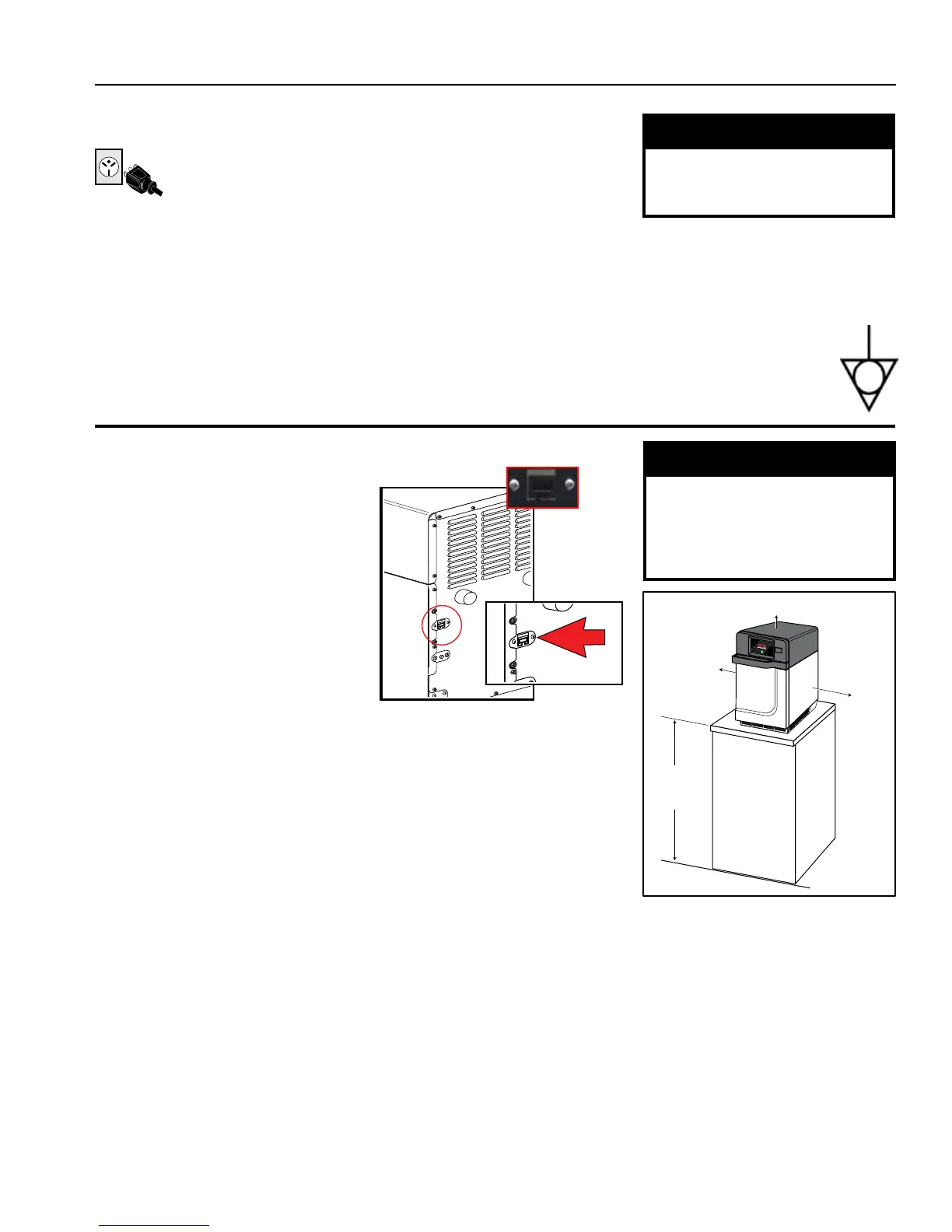
The oven has a secondary earthing terminal. The terminal provides an external earthing connection used in addition to
the earthing prong on plug. Located on outside of oven back, the terminal is marked with symbol shown at right.
Installation
STEP 1 - Unpack Oven
• Inspect oven for damage, such as
dents in door or inside oven cavity.
• Report any dents or breakage to
source of purchase immediately.
Do not attempt to use oven if
damaged.
• Remove all packing materials from
oven interior.
• If oven has been stored in an
extremely cold area, wait a few hours
before connecting power.
• If you plan to program via Ethernet, remove plastic plug from port on the right
rear of oven. Gently use pliers if necessary.
STEP 2 - Place Oven on Counter
• Recommended countertop surface depth is 28” (71 cm).
• Do not install oven next to or above source of heat, such as pizza oven
or deep fat fryer. This could cause oven to operate improperly and could shorten
life of electrical parts.
• Do not block or obstruct oven lters. Allow access for cleaning.
• Install oven on level countertop surface.
• Outlet should be located so that plug is accessible when oven is in place.
STEP 3 - Install Cook Plate
• Install oven cook plate
1. Oven cavity must be cool to touch.
2. Place cook plate in oven with curved edge toward the front of cavity.
⚠
CAUTION: DO NOT cook food directly on oor of oven.
Oven Clearances
A. Allow at least 2” (5.1 cm) of
clearance around top of oven.
Proper air ow around oven
cools electrical components. With
restricted air ow, oven may not
operate properly and life of electrical
parts is reduced.
B. There is not an installation
clearance requirement for the back
of the oven.
C. Allow at least 1/2” (1.27 cm) of
clearance around sides of oven.
D. Install oven so oven bottom is at
least 3 feet (91.5 cm) above oor.
⚠
WARNING
Excessive Weight Hazard
Use two or more people to move and
install oven.
Failure to do so can result in back or
other injury
⚠
WARNING
To avoid risk of electrical shock or
death, this oven must be grounded
and plug must not be altered.
Grounding and Installation
MIN. 2" (5.1 cm)
MIN.
1/2"
(1.27 cm)
MIN.
1/2"
(1.27 cm)
MIN.
36"
(91.5 cm)





 To Next Page