©2018 ACP, Inc.
Cedar Rapids, IA 52404 Page 25 of 80
Part No. 16400033
Original Instructions
Manually Create a Recipe Tab
Note: You may also add recipe tabs using the ACP Programming Application.
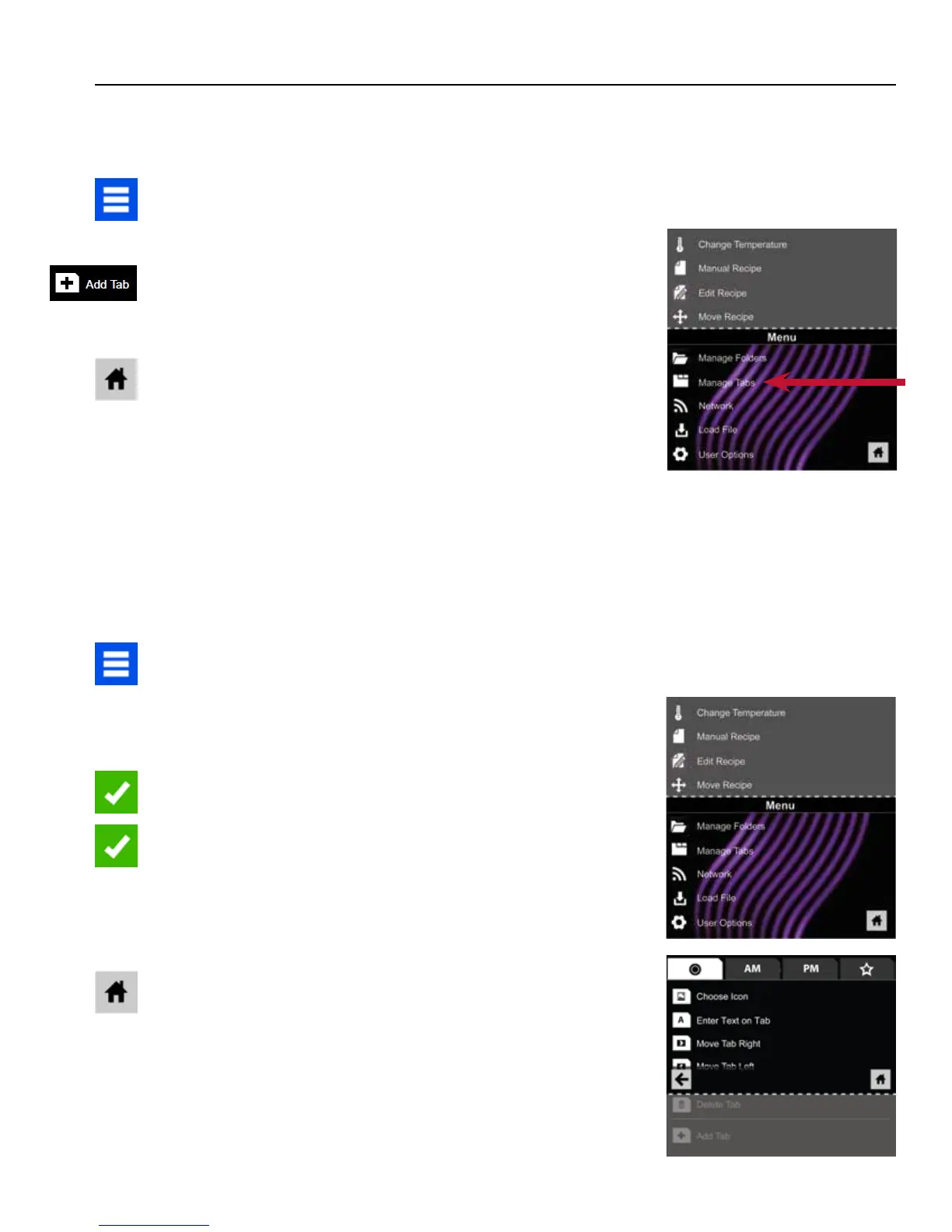
1. Press the Blue Menu Icon at the bottom of the screen.
2. Press the “Manage Tabs” option in the Menu Screen.
3. Press the “Add Tab” option.
4. A new tab will appear at the top of the screen.
5. Press the Home Icon to return to the Main Screen.
Manual Organization: Tabs
Manually Edit an Existing Recipe Tab
Note: You may also edit tabs using the ACP Programming Application.
1. Press the Blue Menu Icon at the bottom of the screen.
2. Press the “Manage Tabs” option in the Menu Screen.
3. Press the desired tab to be edited.
Change the image on the tab: Press the “Choose Icon” option.
Select an image. Press the Green Check Mark Icon.
Add text to the tab: Press the “Enter Text on Tab” option. Enter
the desired text. Press the Green Check Mark Icon to Save.
Relocate the tab: Press the “Move Tab Right” or “Move Tab
Left” option.
Delete the tab: Press the “Delete Tab” option.
4. After changes have been made, press the Home Icon to Save
and return to the Main Screen.
2
2
3





 To Next Page