©2018 ACP, Inc.
Cedar Rapids, IA 52404 Page 18 of 80
Part No. 16400033
Original Instructions
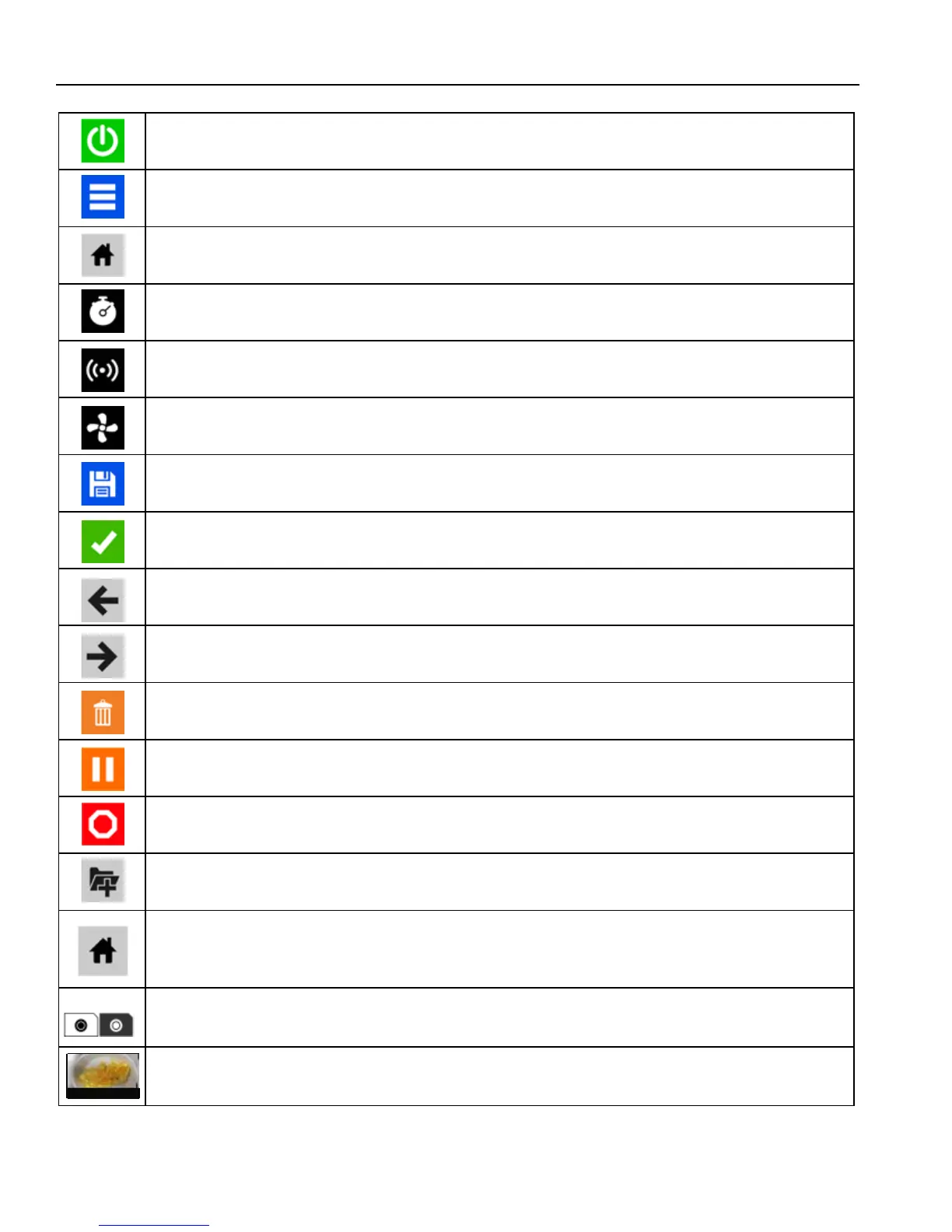
POWER ON ICON
• Press to preheat oven.(Fan will continue to run if temperature is over 200°F / 95°C).
MENU ICON
• Press to access a Menu Screen for manually editing recipes, changing user options, etc.
HOME ICON
• Press to return to the Home Screen.
TIME ENTRY
• Indicates the Time entry column in Manual Cooking entry.
MICROWAVE POWER ENTRY
• Indicates the Microwave Power entry column in Manual Cooking entry.
FAN POWER ENTRY
• Indicates the Fan Power entry column in Manual Cooking entry.
SAVE ICON
• Press to Save a manually programmed recipe and return to the Main Screen.
GREEN CHECK MARK ICON
• Press to begin cooking after manually entering a recipe. Press to Save changes.
BACK ICON
• Press to return to previous Screen.
NEXT ICON
• Press to move to next Screen.
DELETE ICON
• Press to delete Menu Item, Folder, or Network.
•
PAUSE ICON
• Press to pause a Cook Cycle.
STOP ICON
• Press to cancel a Cook Cycle. Press to Stop and Return to the Main Screen.
NEW FOLDER ICON
• Press to add new Folder.
FOLDER ICONS
• Used to organize programmed recipes. Can be customized with color, icon, or image
Example: Pizza Folder - cheese pizza, pepperoni pizza, etc.
TAB ICONS
• Used to organize programmed recipes. Example: AM or PM Menus.
PROGRAMMED RECIPE ICON
• Press to begin the Cook Cycle for the desired recipe.
Touch Screen Icon Descriptions
Breakfast Casse...
Salmon
Breakfast Sand...
Omelet
Tuna Melt
Crab Cakes
Pizza
Reuben Panini
Muffaleta Panini
Fish Tacos





 To Next Page