- 42 - OMNIVERSA
®
ULTRASOUND / ELECTROTHERAPY SYSTEM USER MANUAL
COPYRIGHT © 2017-2020, ACCELERATED CARE PLUS CORP., ALL RIGHTS RESERVED
Remote Control Connected Conformation
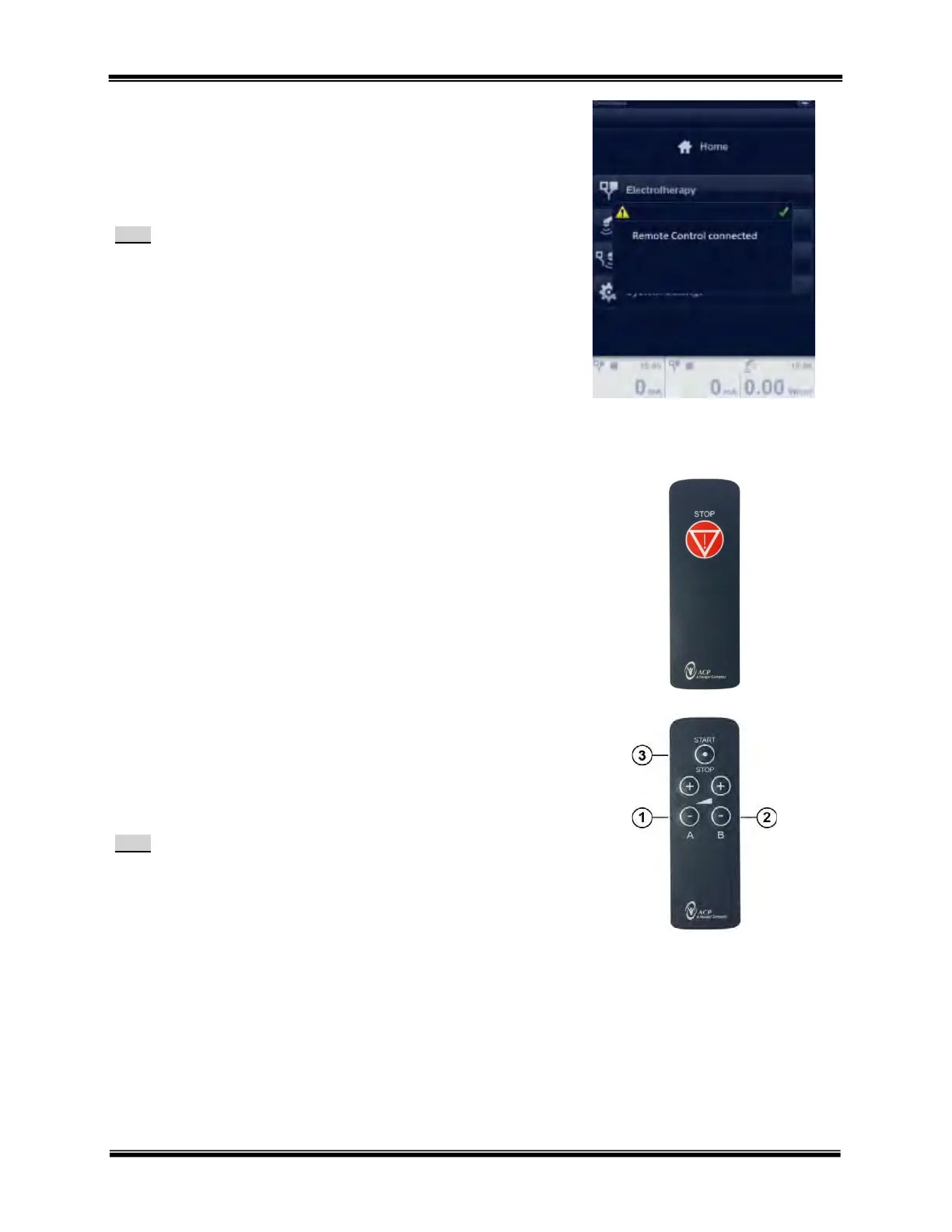
When the Remote Control is connected to the OmniVersa a visual
confirmation will appear saying “Remote Control connected”.
To confirm and clear this message press the green check mark.
Note:
When the Remote Control is removed a similar confirmation message
will appear saying “Remote Control disconnected”. Press the green
check mark to confirm and clear the message.
Patient Safety Switch Function
The Patient Safety Switch has only 1 function, to Stop the treatment
session. Press the STOP button to stop output and end a treatment
session.
Clinician Hand Control Function
The Clinician Hand Control has three primary functions
1. Setting Channel A output intensity up or down
2. Setting Channel B output intensity up or down
3. START ESTIM and STOP ESTIM control.
Note:
The OmniVersa is designed to allow all Clinician Hand Control
functionality accessible on the Main Touchscreen Display.



 To Next Page