Copyright © 2016 Access Control Technology Ltd. Part No. 18-00099 Issue 1.0
9
ACTpro 1520e and ACTpro 1500e Operating & Installation Instructions
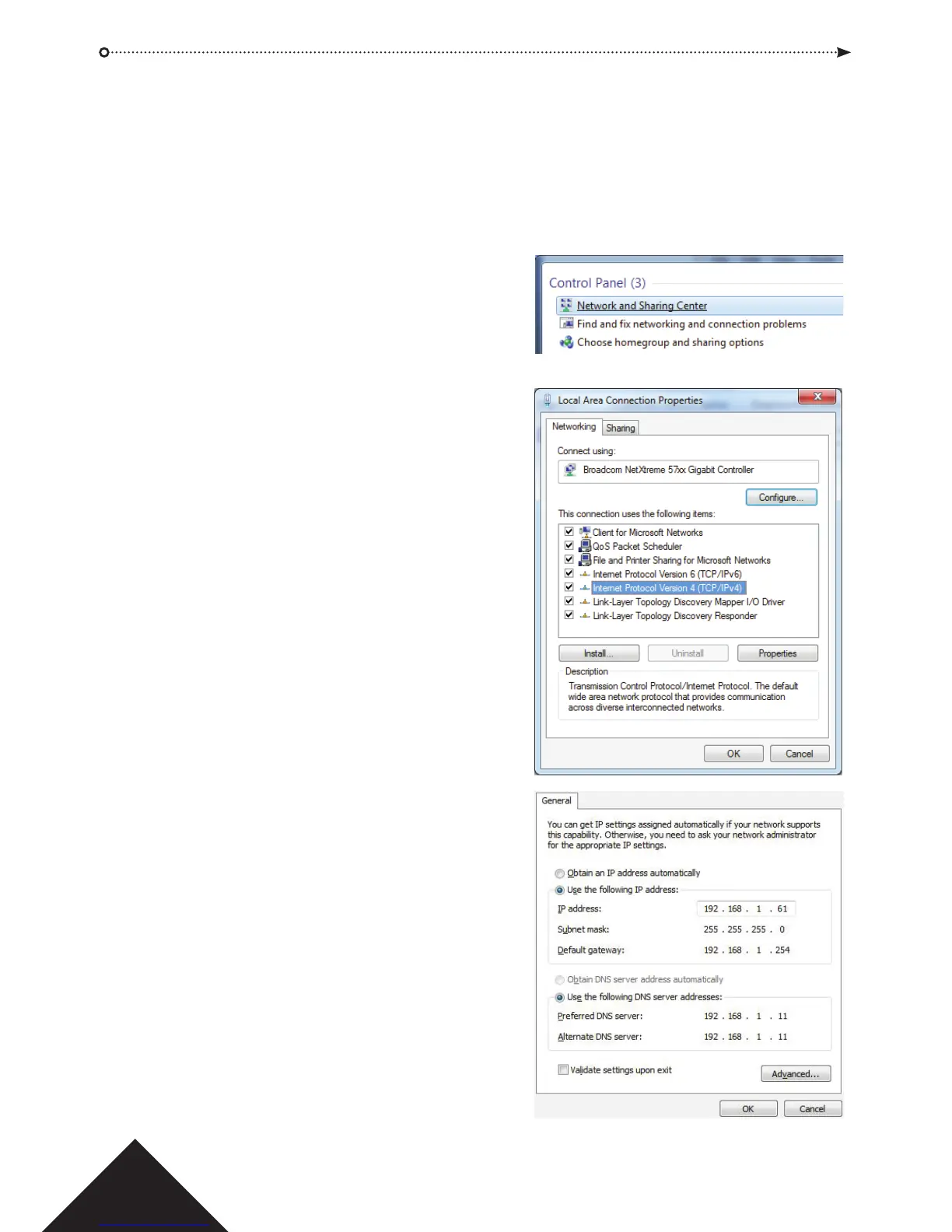
5.0 Confi guring the PC/Laptop for Static IP address
For Microsoft Windows 7 users; go to Start and enter the “Network and Sharing” in the
search box.
For Microsoft Windows 8 or 10 users; start typing “Network and Sharing” from the main
screen.
1. Select “Network and
Sharing Centre”.
2. Select “Change adapter
setting” and Right click
on the “Local Area
Connection” and select
“Properties”.
3. Highlight “Internet Protocol
Version 4 (TCP/IPv4)” and press the
“Properties” button.
4. Select “Use the following IP address”
and enter the following:
Set IP address to “192.168.1.61”
Subnet mask to “255.255.255.0”
5. Press OK then Close.



 To Next Page