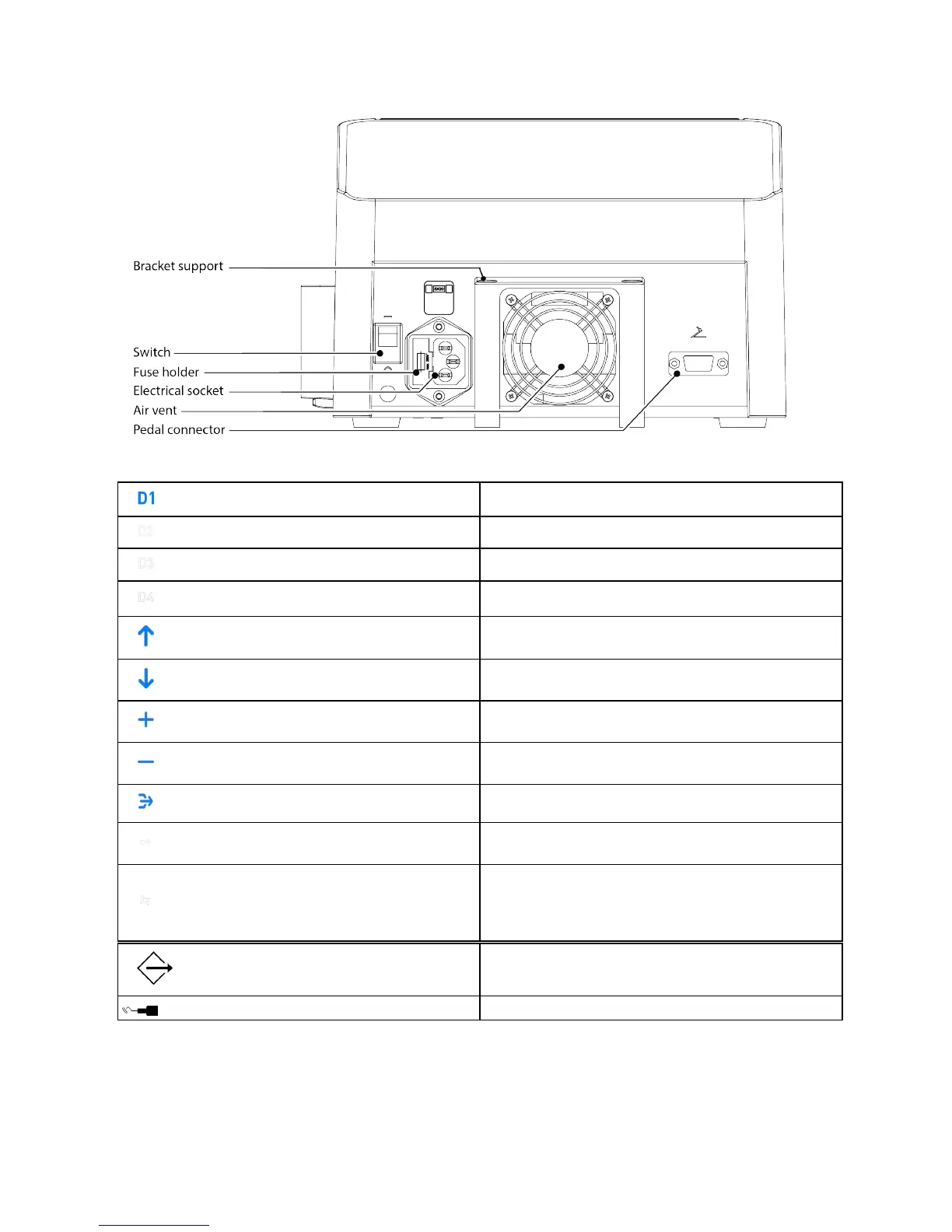
7.3 Rear view of the medical device
7.4 Overview of the interface
D1 mode. The active mode is the illuminated mode.
D2 mode.An inactive mode is not lit.
D3 mode
D4 mode
Tactile zone.Press to change the mode.
Tactile zone.Press to change the mode.
Tactile zone.Press to increase irrigation in steps of 10
ml/min.
Tactile zone.Press to decrease irrigation in steps of 10
ml/min.
Tactile zone.Press and hold the purge time.
Indicator. Lights on when the handpiece-cord assembly is
not connected to the unit.
Indicator.Lights on when communication between the
motherboard and the front-panel board is not
established.The tactile zones of the front face and the
buttons of the pedal are inactive.
Press to switch from one mode to another:
Press to activate the ultrasound.
Page 18/39 - User Manual | Piezotome Cube | J50101 | V4 | (17) | 03/2018 | NO37EN010D














 To Next Page