Fisheye Dewarping Type
This item is for users to choose a method to dewarp the fisheye source images.
The options are <Front End Camera Dewarping> and <Back End Software
Dewarping>. Please see below for more details. After a dewarping type is
selected, click <Save> to confirm the setting.
Front End Camera Dewarping
Front End Camera Dewarping is a dewarping method that corrects
fisheye source images only by the camera. Dewarping images by the
camera can reduce network usage and image processing load of the
backend device. It also allows the camera to record or take snapshots of
the dewarped images.
With this method, when viewing the dewarped images from the
camera’s web browser configuration interface, the video format of
stream needs to be set. Refer to the following instructions to view the
dewarped images.
Step 1. Select the camera’s installation method at <Installation> and
click <Save>. For more details, please refer to sub-section
Installation below.
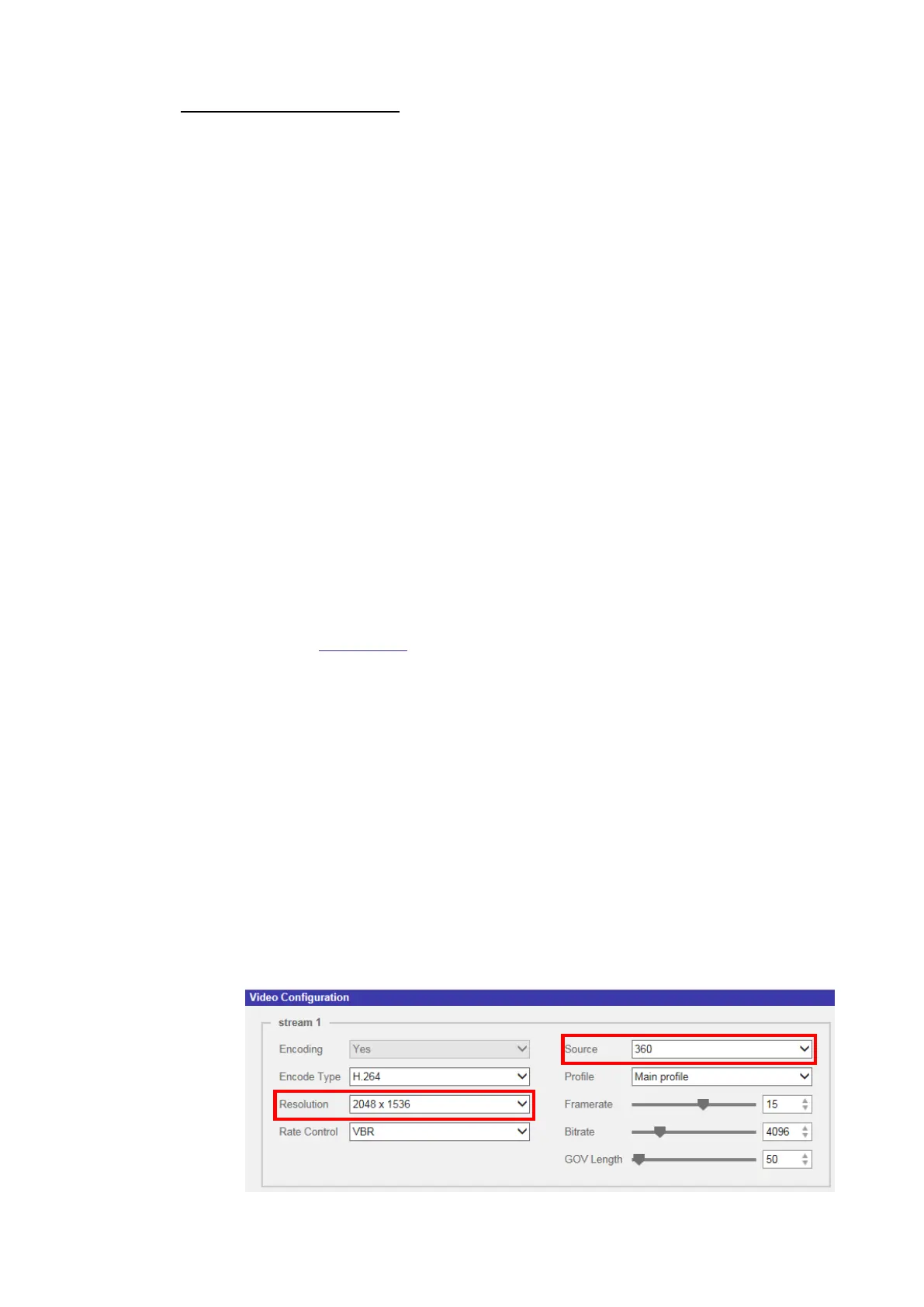
Step 2. Go to <Streaming> tab→<Video Configuration> page to set the
video format of the stream.
Step 3. Select one of the viewing modes from [Source] drop-down list.
Then, select a desired resolution for the stream and click
<Save>.
Step 4-1. To enable 360° Panoramic or 180° Panoramic
viewing mode, users must select “360” or “180”
option from [Source] drop-down list first. Then,
select the desired resolution for the stream and
click <Save>.



 To Next Page