573102 | REV. A | 07.2015
Bosch Automotive Service Solutions Inc.
CP9680
AutoScanner® Plus
|
User guide | 23
|
en
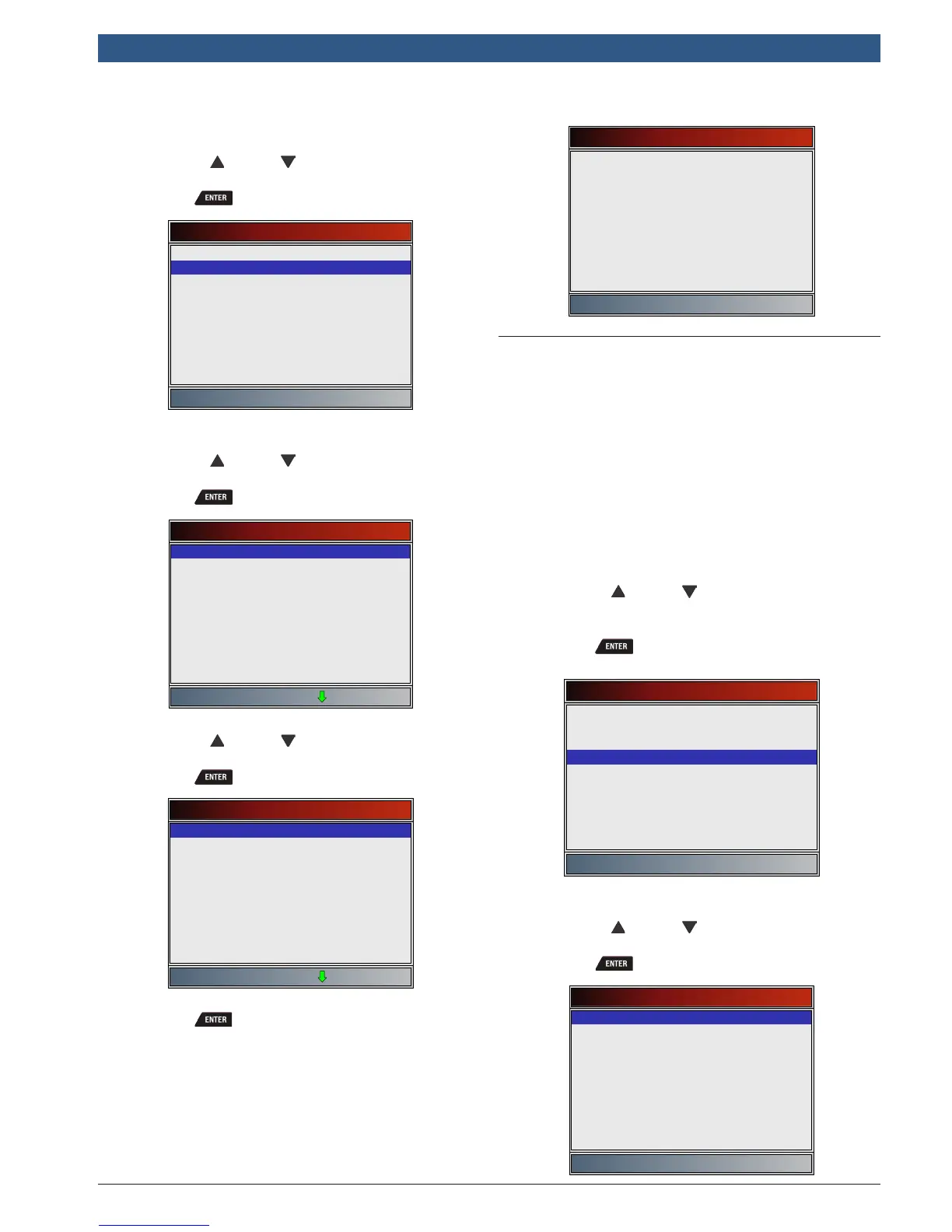
From the Main Menu or Diagnostic Menu.
1. Select Acronyms.
• Use the UP and DOWN keys until Acro-
nyms is highlighted.
• Press .
Main Menu
Vehicle Diagnostics
Acronyms
Review Data
Print Data
Code Lookup
System Setup
2. Select the alphabetical group range for the desired
acronym.
• Use the UP and DOWN keys until the
desired group range is highlighted.
• Press .
Acronyms
# - 24X C
24X S - 5
A - AF 1/1
AF 1/2 - AI
Al - B-
BA - CA
Ca - CL
Cl - c
C - DIA
3. Select the acronym.
• Use the UP and DOWN keys until the
desired acronym is highlighted.
• Press .
Acronyms
# Of Emiss
# Of Pwrt
#CMP/CKP LOSS
#TRP SNC MISF
#TRPS SNC MISF
% Alcohol
% GRADE
% METHANOL
% of Pdl
4. View selected acronym.
• Press to return to the Diagnostic Menu.
# Of Emiss
Number Of Emission Related DTC
4.14 Component Locator
Component Locator provides a vehicle-specific location
of components found on the selected vehicle. It is a
useful companion function to CodeConnect®. CodeCon-
nect® will indicate components that repaired a problem
associated with a DTC, and Component Locator pro-
vides the location of the component
Component Locator can be selected from the Diagnos-
tic Menu. Because Component Locator provides vehicle-
specific component locations, a previous vehicle must
be stored in the scan tool.
From the Diagnostic Menu.
1. Select Component Locator.
• Use the UP and DOWN keys until Compo-
nent Locator is highlighted.
• Press .
Diagnostic Menu
Datastream
Diagnostic Codes
Special Tests
Component Locator
Acronyms
Review Data
Print Data
Code Lookup
System Setup
2. Select the alphabetical group range for the desired
component.
• Use the UP and DOWN keys until the
desired group range is highlighted.
• Press .
Component Locator
A - Fuel Injector (No 4
Fuel Injector (No 5 - K
M - W










 To Next Page