en
|
24
|
User guide
| CP9680
AutoScanner® Plus
573102 | REV. A | 07.2015
Bosch Automotive Service Solutions Inc.
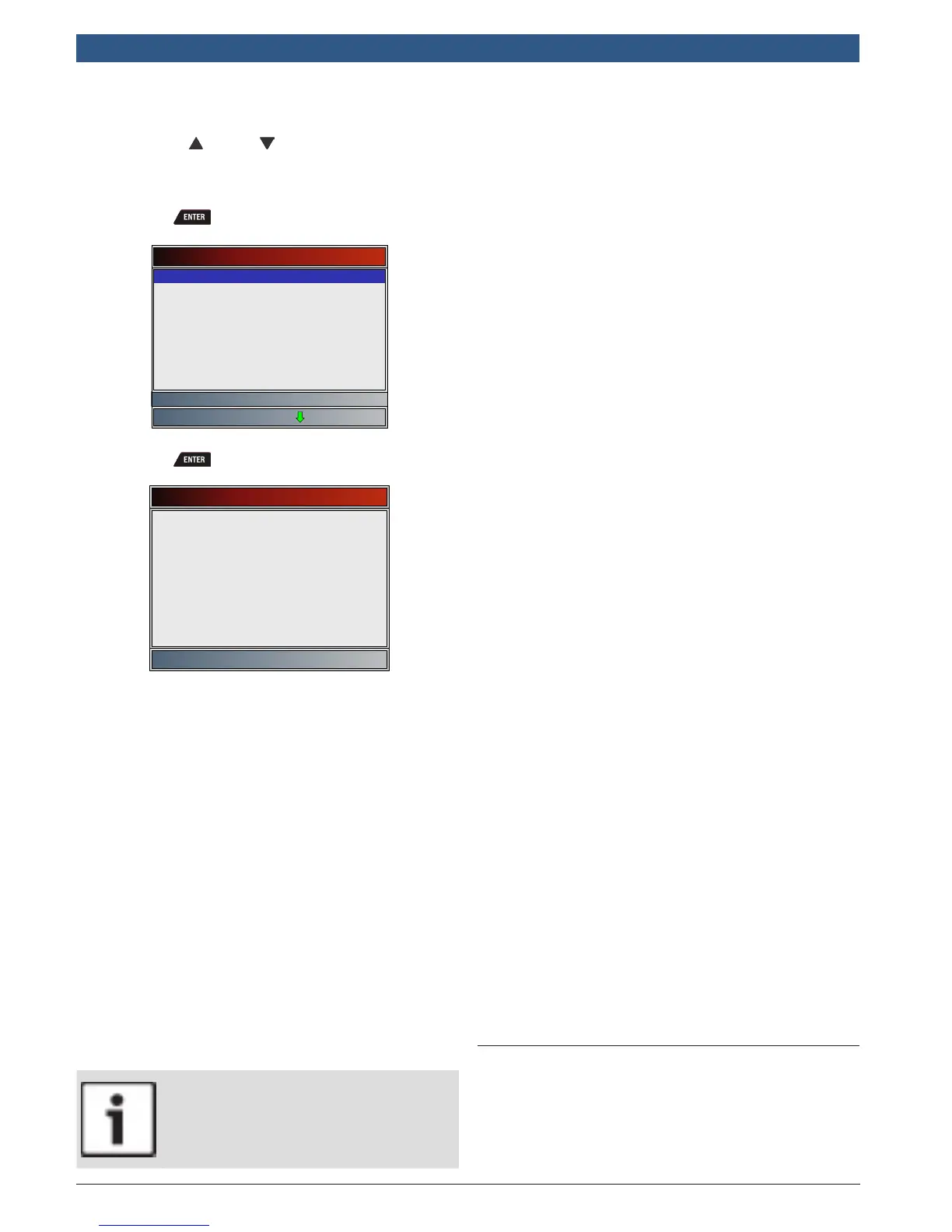
3. Select the component.
• Use the UP and DOWN keys until the
desired component is highlighted.
• Full component name will scroll on bottom of
screen for the highlighted component.
• Press .
Component Locator
Accelerator Pedal position Sens
Camshaft Position Sensor (Early
Camshaft Position Sensor (Late
Crankshaft Position Sensor
Electronic Brake Control Module
Electronic Brake Control Module
Engine Coolant Temperature Sens
Engine Coolant Temperature Sens
Accelerator Pedal Position Senso
4. View selected component location.
• Press to return to the Diagnostic Menu.
Component Locator
Accelerator Pedal Position
Sensor
Behind Gas Pedal
--------------------------------
5 Diagnostic Menu
The first time the scan tool links to the vehicle, the
communication protocol is automatically detected, and
is used until the scan tool is turned off or another vehi-
cle is diagnosed.
If an error message displays, make sure the OBDII con-
nector is attached and the ignition key is on. Cycle
ignition key to OFF for 10 seconds, then ON. This may be
required to reset computer. If required, select YES to try
again. If problem still exists, refer to “Error Messages” in
Troubleshooting.
The scan tool keeps data received from the previous 5
vehicle’s selected until any of the following occurs:
• A new vehicle is selected when you already have 5 in
your garage forcing you to select which vehicle you
want to remove from your garage to create space.
• Scan tool is flash programmed to update software.
On initial link to vehicle, scan tool checks the status of
I/M Monitors no matter which function is selected.
IMPORTANT
Review Data, Print Data, Code Lookup, and
System Setup are covered in Section 4 of this
manual. These items are not covered in this
section.
The Diagnostic Menu is broken down into the following
selections:
• Datastream
– View Data
– Record Data
– Component Locator
– Acronyms
– Review Data
– Print Data
– Code Lookup
– System Setup
• Diagnostic Codes
– Read Codes
– Erase Codes
– View Freeze Data
– Component Locator
– Acronyms
– Review Data
– Print Data
– Code Lookup
– System Setup
• Special Tests
– I/M Monitors
– Drive Cycle Monitor
– State OBD Check
– MIL Status
– O2 Monitor Tests
– Diagnostic Monitor Tests
– On-Board Systems
– Vehicle Information
– Oil Light Reset
– Battery Reset
– Charging System Monitor
– Modules Present
– Component Locator
– Acronyms
– Review Data
– Print Data
– Code Lookup
– System Setup
• Component Locator
• Acronyms
• Review Data
• Print Data
• Code Lookup
• System Setup
Not every function will be on the menus for every vehi-
cle. Some functions are vehicle specific, so they will not
appear on every menu.
5.1 I/M Monitors (Emissions)
The I/M Monitors (Inspection / Maintenance) function is
used to view a snapshot of the operations for the emis-
sion system on OBDII vehicles. I/M Monitors is a very
useful function. To guarantee no faults exist make sure
all monitors are ok or n/a and no DTCs exist. Refer to the
vehicles service manual for the drive cycle operation.










 To Next Page