573102 | REV. A | 07.2015
Bosch Automotive Service Solutions Inc.
CP9680
AutoScanner® Plus
|
User guide | 37
|
en
Special Tests
I/M Monitors
Drive Cycle Monitor
State OBD Check
MIL Status
O2 Monitor Tests
Diagnostic Monitor Tests
On-Board Systems
Vehicle Information
Charging System Monitor
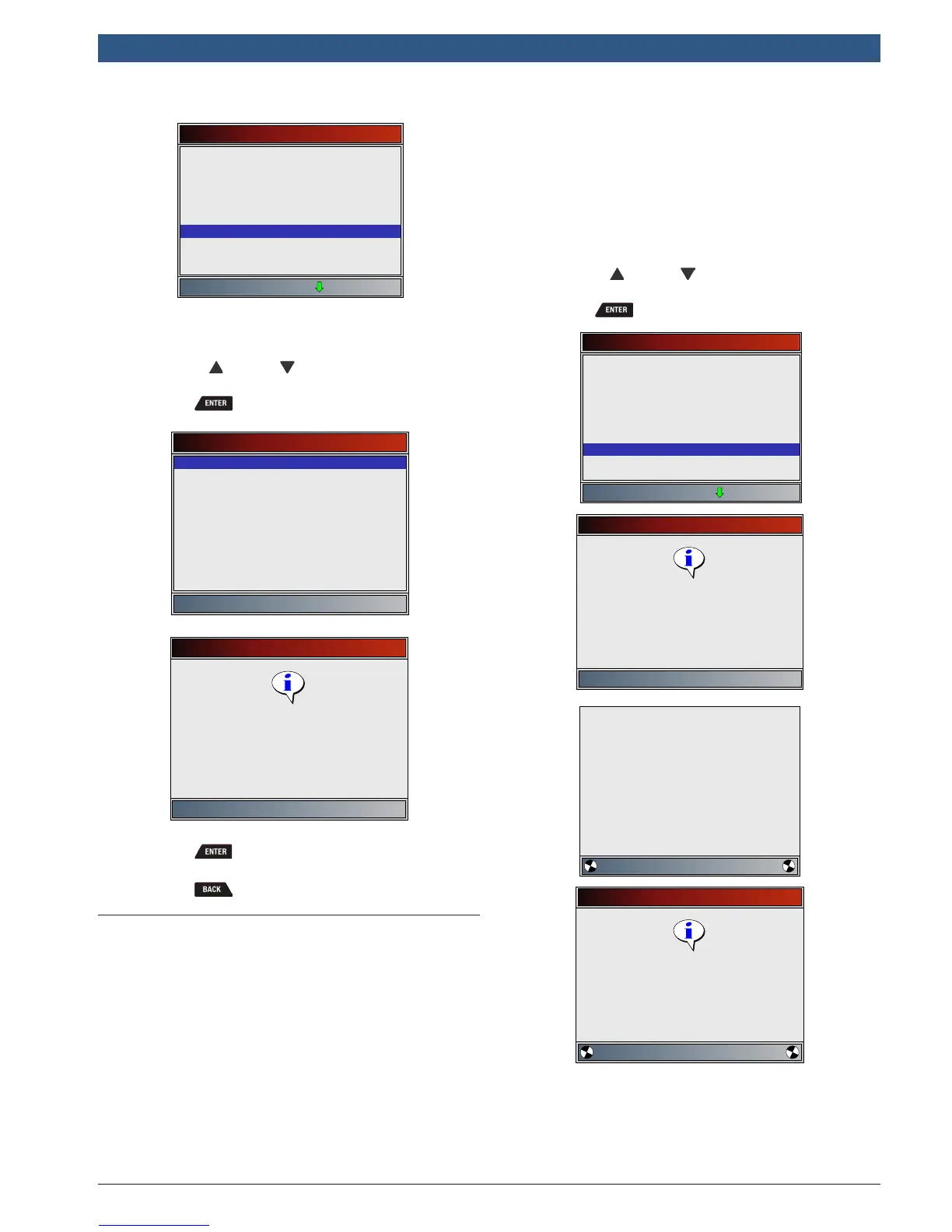
• A list of on-board systems and components
available for testing are shown on the display.
2. Select test.
• Use the UP and DOWN keys until desired
test is highlighted.
• Press .
On-Board Systems
EVAP System Test
On-Board Systems
Press ENTER to continue
Command sent
3. Return to On-Board Systems menu.
• Press .
4. Return to Special Tests Menu.
• Press .
5.13 Vehicle Information
The Vehicle Information function allows the scan tool to
request the vehicle’s VIN number, calibration ID(s) which
identifies software version in vehicle control module(s),
calibration verification numbers (CVN(s)) and in-use
performance tracking.
• Vehicle Information function applies to model year
2000 and newer OBDII compliant vehicles.
• The scan tool cannot verify if data is correct for
scanned vehicles.
• CVNs are calculated values required by OBDII regulations.
• The CVN calculation may take several minutes.
• CVNs are reported to determine if emission-related
calibrations have been changed. Multiple CVNs may
be reported for a control module.
• In-use performance tracking, tracks performance of
key I/M Monitors.
From Special Tests Menu:
1. Select Vehicle Information.
• Use the UP and DOWN keys until Vehicle
Information is highlighted.
• Press .
Special Tests
I/M Monitors
Drive Cycle Monitor
State OBD Check
MIL Status
O2 Monitor Tests
Diagnostic Monitor Tests
On-Board Systems
Vehicle Information
Oil Light Reset
Vehicle Information
Press ENTER to continue
Verify key ON
Engine OFF.
Please Wait
Communicating with the
vehicle
WORKING
Vehicle Information
Press BACK to exit
Retrieving VIN data. It may
take up to 1.5 minutes.










 To Next Page