573102 | REV. A | 07.2015
Bosch Automotive Service Solutions Inc.
CP9680
AutoScanner® Plus
|
User guide | 35
|
en
5.10 O2 Monitor Tests
OBDII regulations require applicable vehicles monitor and
test oxygen (O2) sensors to determine problems related
to fuel and emissions. The O2 Monitor Tests allows
retrieval of completed O2 sensors monitor test results.
• The O2 Monitor Tests is not an on-demand test. O2
sensors are not tested when selected via the menu.
O2 sensors are tested when engine operating condi-
tions are within specified limits.
• If the vehicle communicates using a controller area
network (CAN), O2 Monitor Tests are not supported
by vehicle. A message is displayed. See “Diagnostic
Monitor Tests” in this section to see O2 monitor data.
• O2 sensors are located before (upstream) and after
(downstream) catalyst(s). Sensors are named (xy) for
their position to both cylinder banks and catalysts.
– The O2 sensor for cylinder bank 1 has prefix 1y
while O2 sensor for cylinder bank 2 has prefix
2y.
– The O2 sensor upstream of catalyst (closest to
engine) has suffix x1 while O2 sensor down-
stream of catalyst has suffix x2. If vehicle con-
tains more catalysts, O2 sensor downstream of
second catalyst has suffix x3 and O2 sensor
downstream of next catalyst has suffix x4.
– For example, O2S21 is upstream O2 sensor for
cylinder bank 2.
The following O2 Sensor Tests are available:
• Rich-to-lean sensor threshold voltage
• Lean-to-rich sensor threshold voltage
• Low sensor voltage for switch time
• High sensor voltage for switch time
• Rich-to-lean sensor switch time
• Lean-to-rich sensor switch time
• Minimum sensor voltage test cycle
• Maximum sensor voltage test cycle
• Time between sensor transitions
• Sensor period
• Manufacturer specific tests
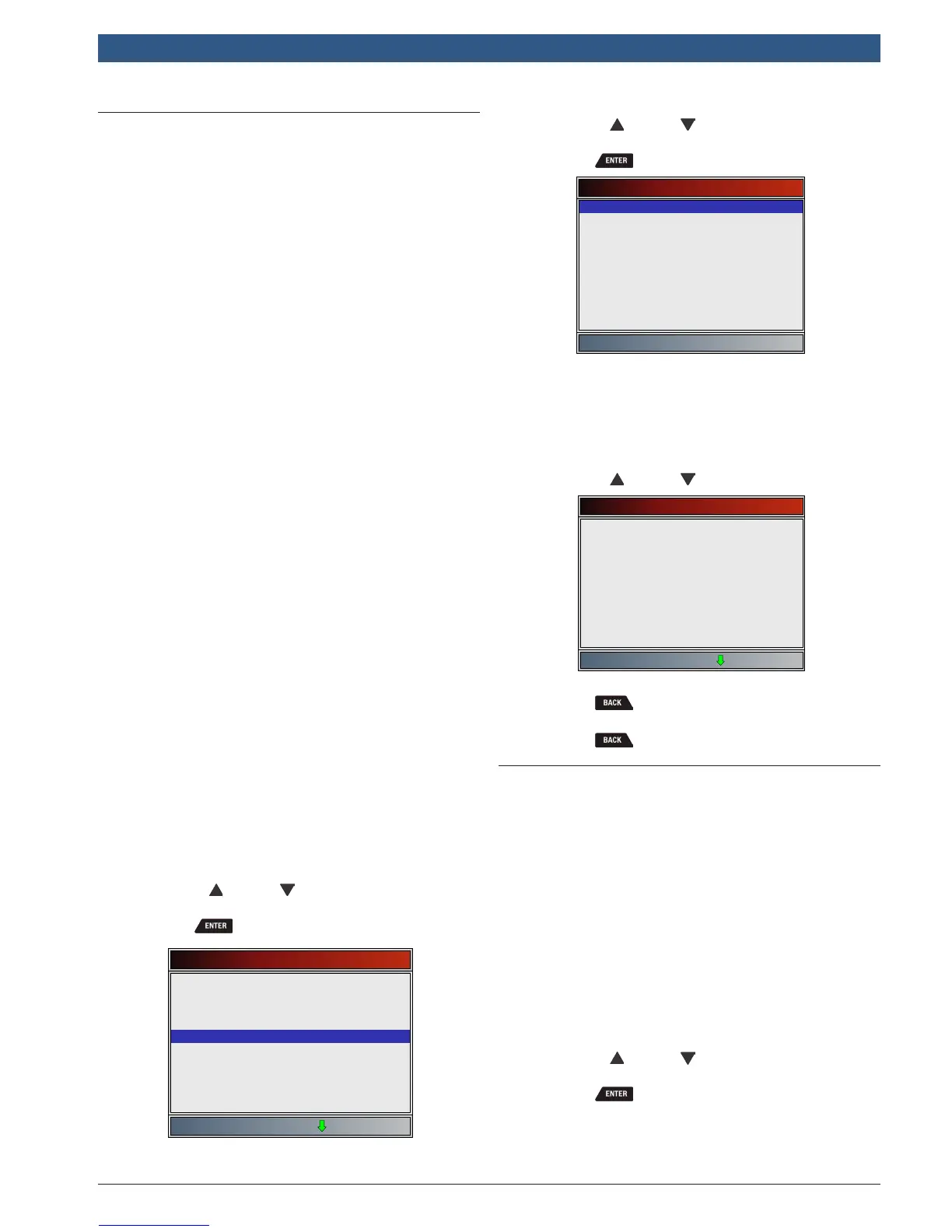
From Special Tests Menu:
1. Select O2 Monitor Tests.
• Use the UP and DOWN keys until O2
Monitor Tests is highlighted.
• Press .
Special Tests
I/M Monitors
Drive Cycle Monitor
State OBD Check
MIL Status
O2 Monitor Tests
Diagnostic Monitor Tests
On-Board Systems
Vehicle Information
Charging System Monitor
2. Select O2 sensor.
• Use the UP and DOWN keys until the
desired O2 monitor is highlighted.
• Press .
Select O2 Sensor
O2 Bank1 Sensor1
• The O2 sensors located upstream (before cata-
lyst) may perform differently than ones located
downstream (after catalyst).
• Test IDs are shown for unknown O2 sensor
tests.
3. View results of selection.
• Use the UP and DOWN keys.
O2 Bank1 Sensor1
Test $86
MOD
MAX
MEAS
MIN
$09
128
128
128
Test $8D
MOD
MAX
MEAS
MIN
$09
255
128
128
4. Return to O2 Sensor Tests menu.
• Press .
5. Return to Special Tests Menu.
• Press .
5.11 Diagnostic Monitor Tests
The Diagnostic Monitor Test function is useful after
servicing or after erasing a vehicle’s memory. Test
results do not necessarily indicate a faulty component or
system.
• Non-CAN vehicles Diagnostic Monitor Test receives test
results for emission-related powertrain components
and systems that are not continuously monitored.
• CAN vehicles Diagnostic Monitor Test receives test
results for emission-related powertrain components and
systems that are and are not continuously monitored.
• Vehicle manufacturer is responsible for assigning
test and component IDs.
From Special Tests Menu:
1. Select Diagnostic Monitor Tests.
• Use the UP and DOWN keys until Diagnos-
tic Monitor Tests is highlighted.
• Press .










 To Next Page