en
|
30
|
User guide
| CP9680
AutoScanner® Plus
573102 | REV. A | 07.2015
Bosch Automotive Service Solutions Inc.
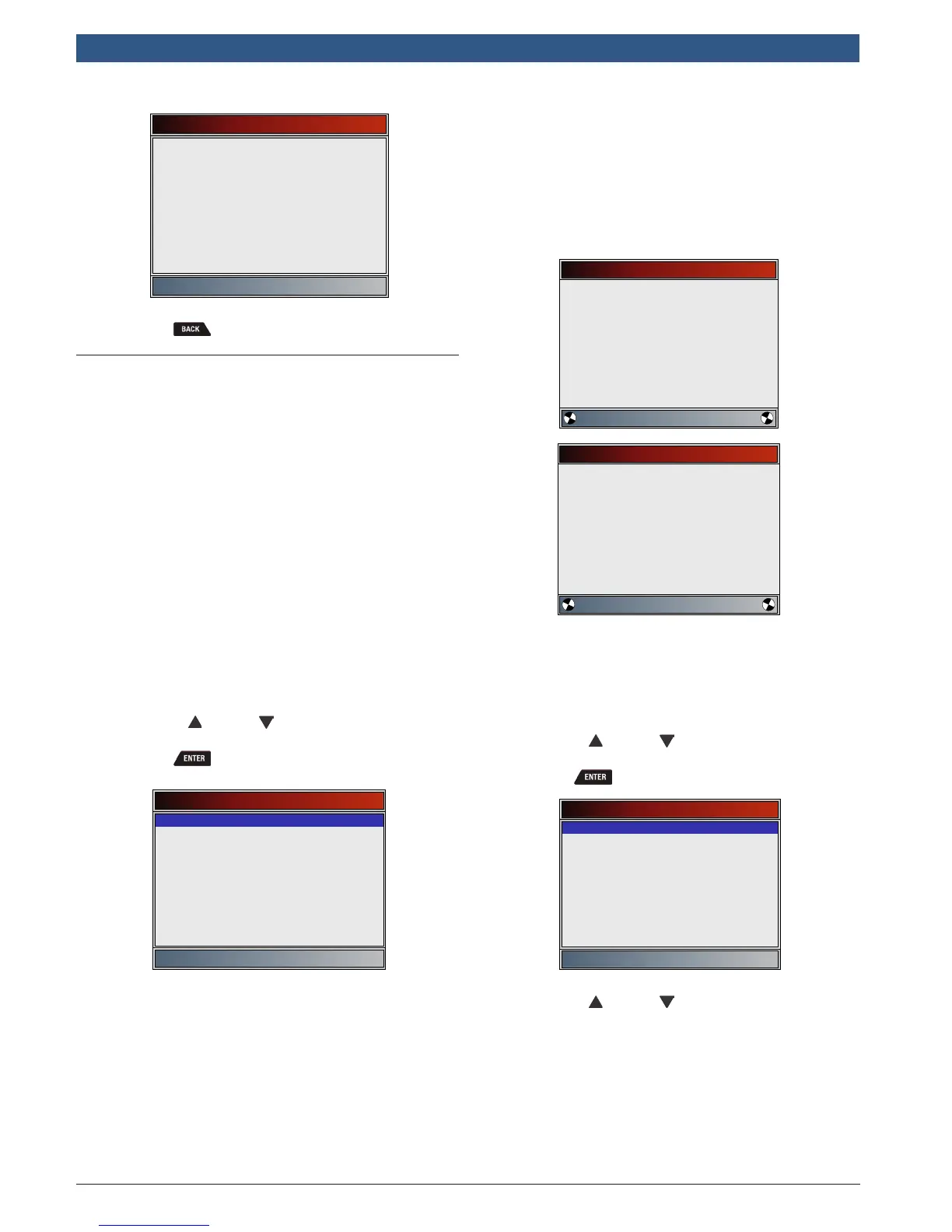
State OBD Check
MIL Status
Codes Found
Monitors OK
Monitors Inc
Monitors N/A
OFF
0
3
4
4
3. Return to Special Tests Menu.
• Press .
5.6 View Data
The View Data function allows real time viewing of the
vehicle’s computer module’s parameter identification
(PID) data. As the computer monitors the vehicle, infor-
mation is simultaneously transmitted to scan tool.
View Data allows the following items to be viewed on
the scan tool:
• Sensor data
• Operation of switches
• Operation of solenoids
• Operation of relays
View Data can be shown as:
• Entire Data List
• Custom Data List
Apart from Read Codes, View Data is the most useful
diagnostic function for isolating the cause of a vehicle
operation problem.
From Datastream Menu:
1. Select View Data.
• Use the UP and DOWN keys until View
Data is highlighted.
• Press .
Datastream
View Data
Record Data
Component Locator
Acronyms
Review Data
Print Data
Code Lookup
System Setup
2. Observe while the scan tool validates PID MAP.
• PID MAP validation is the tool asking the vehicle
which PIDs are supported. See Appendix A for a
complete list of PIDs supported by the tool.
• Multiple PIDs may be sent if vehicle is equipped
with more than one computer module (for
example a powertrain control module [PCM]
and a transmission control module [TCM]). The
scan tool identifies them by their identification
names (ID) assigned by manufacturer (i.e. $10
or $1A).
• If one or more control module stops responding,
the scan tool displays a message.
– If continuing, dashes will replace data in
right-hand column.
– If NO is selected, then the scan tool
attempts to re-establish communication
with that module.
Validating PIDs
Please Wait
Waiting for vehicle to
respond
Validating PIDs
Please Wait
Validating PID List
PID 19/329
View Entire List
View Entire List shows all supported PID data for the
vehicle being tested
From Select Data to View menu:
1. Select Entire Data List.
• Use the UP and DOWN keys until Entire
Data List is highlighted.
• Press .
Select Data to View
Entire Data List
Custom Data List
English/Metric
2. View PIDs on scan tool.
• Use the UP and DOWN keys.
• See Appendix A for PID definitions.










 To Next Page