Pocket Pro Gobo Replacement
ADJ Products, LLC - www.adj.com - Pocket Pro User Manual Page 28
The gobos in this unit are interchangable. Please be very careful when replacing the gobo. 4
Gobos are included.
Caution! Never open the unit when in use. Always disconnect the main power before attempt-
ing to change the gobos.
1. To change a gobo, rotate the moving head so that the single middle screw is pointing up. Unscrew
the single middle screw.
2. Once you loosen the single screw you are able to swing the head back. You will now be able to
access the gobo wheel. Turn the wheel with your hand until you come across the gobo you would
like to change.
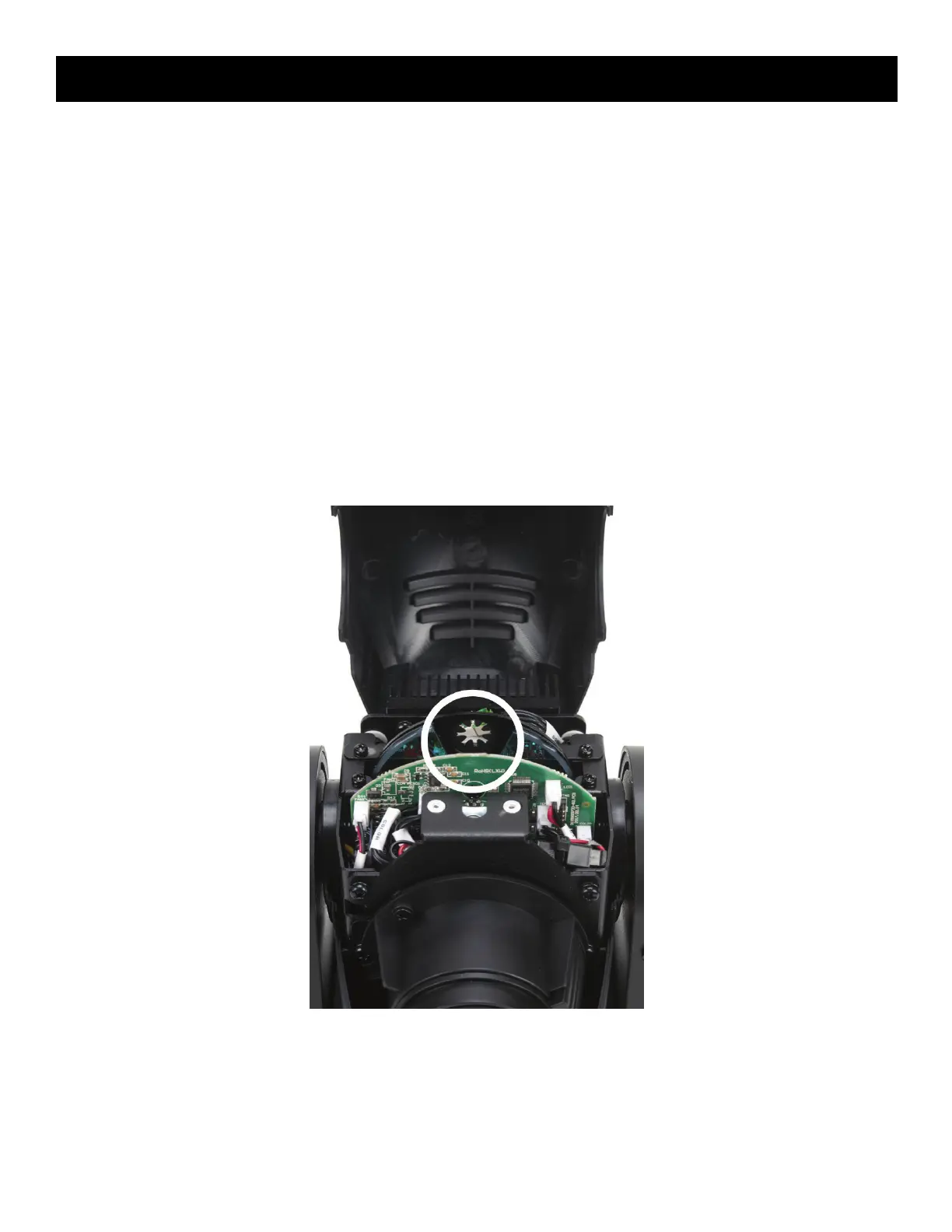
3. Carefully rotate the color wheel to the until the gap in the color wheel is positioned in front of the
gobo you would like replace. See picture below for visual aid.
4. Gently and carefully slide the gobo up and out of its holder.
5. Carefully slide your gobo back into the housing slot.
6. Reassemble the unit.











 To Next Page