576
Advanced Diagnostics USA Manual for MVP & TCODE PRO – Copyright 2014 Advanced Diagnostics USA INC.
Prius ‘04-’09 Special Instructions
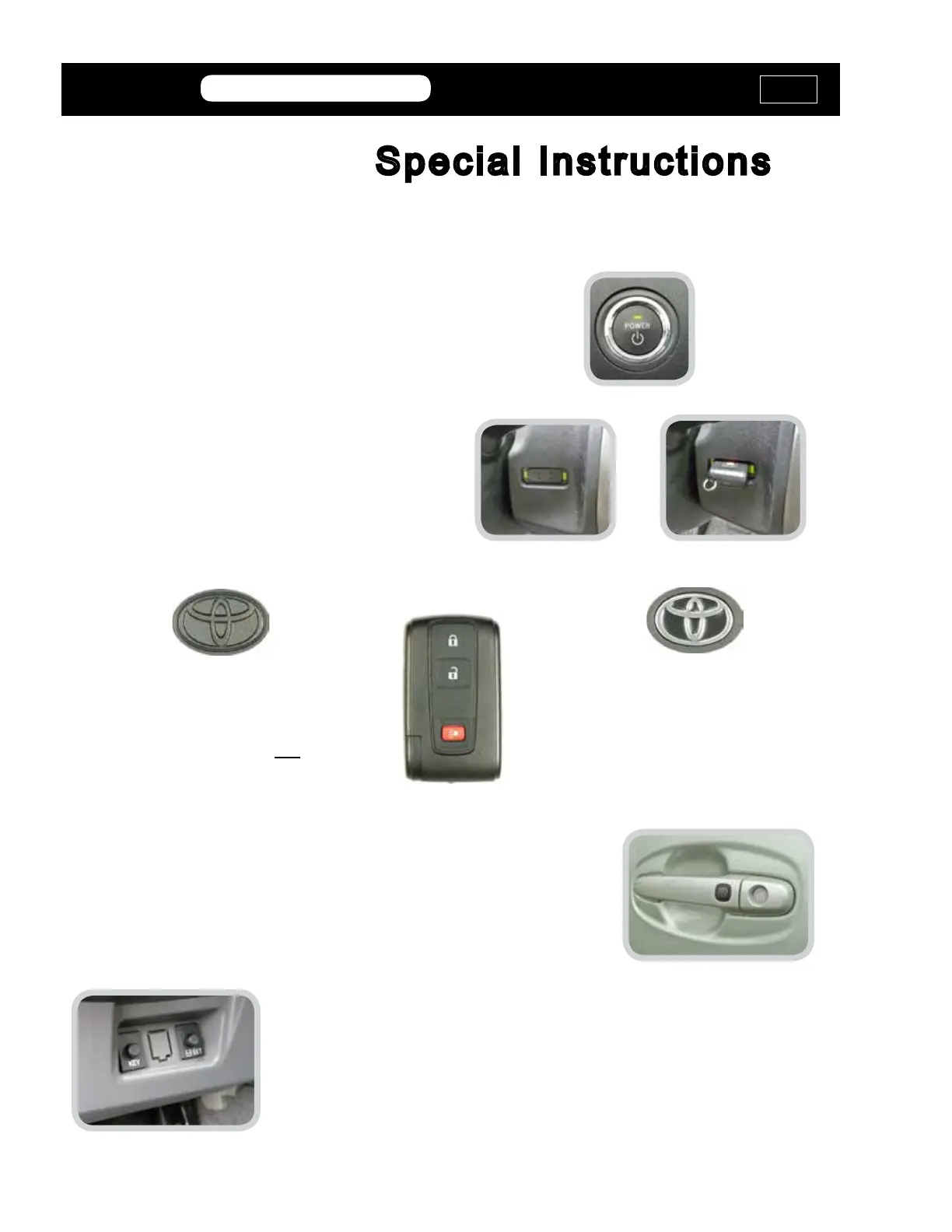
Dealer Part# 89994-47061
Chrome logo on back is for
Smart Access
Proximity Prius models.
Dealer Part# 89070-47180
Black logo on back is for basic Prius
models and do not
have Smart Access Proximity.
Smart Access Proximity Prius models have a Rubber Push
Button on the front door handles.
This makes it easy to tell by just looking at the car which FOB
to use.
The different Fobs shown above are NOT interchangeable.
Security Components
All Prius 2004-2009 models have a
Push Start Button on the dash.
Models with the Smart Access Proximity system have a
“Lock-Out” button on the bottom of the dash, below the steering
column.
Make sure the button is in the “Out” position (not depressed).
The Proximity / Remote Fob
“Learning Slot” is located on the
right side of the driver’s dash.
On models without the “Smart
Access” feature installed the Prox
must be inserted into the slot for
the vehicle to be driven.
MVP &
TCODE
PRIUS ‘04-’09
ADVANCED DIAGNOSTICS USA
powered
by
MVP &
TCODE
TOYOTA
ADVANCED DIAGNOSTICS USA
powered
by



 To Next Page