Maximum Series Portable Chiller : Air & Water-Cooled : MG Series Instrument
update 08/02/2021
Page: 38
ADVANTAGE ENGINEERING, INC.
525 East Stop 18 Road Greenwood, Indiana 46142
317-887-0729 Fax: 317-881-1277
Service Department Fax: 317-885-8683
Email: service@AdvantageEngineering.com
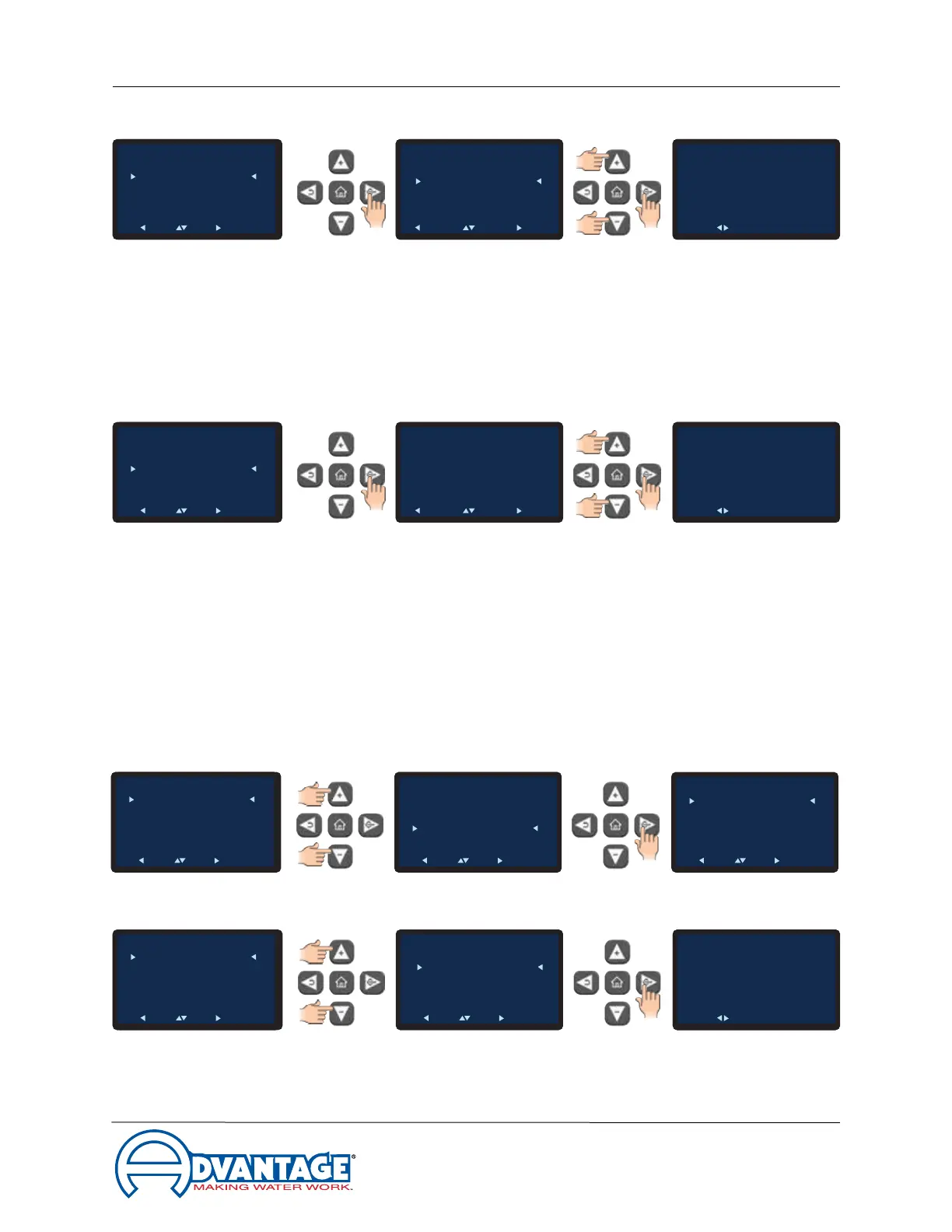
C. Baud Rate: This is the data transfer rate between the unit and the host computer.
1. Press the Select button to select Baud Rate.
2. Use the Up or Down arrow buttons to select the baud rate. The available rate
units are 1200, 2400, 9600, 19200 and 38400.
3. PresstheSelectbuttontosavetheselectionandconrmsuccess.
D. Address: This is the number assigned to the unit in a network.
1. Press the Select button to select Address.
2. Use the Up and Down arrow keys to select the address for this unit. The factory
default is 1. The selection range is from 1 - 10.
3. PresstheSelectbuttontosavetheaddressandconrmsuccess.
3.8 INSTRUMENT : FLOW MENU (Option)
A. TheFlowMenuisonlyfunctionalwhentheoptionalowmeterisinstalled.Itemsinthe
Flow Menu are Enable, Offset and Calibration.
B. AdvancetotheFlowEnable/Disablescreen.SelectEnabledtoenabletheowoption.
To Process
Setpoint
: 50°F
Circulating
50°F
To Process
Setpoint
: 50°F
Circulating
50°F
Main Menu
Setpoints
Utilities
Network
Flow
Options
Machine
Back Pick Go
To Process
Setpoint
: 50°F
Circulating
50°F
Main Menu
Setpoints
Utilities
Network
Flow
Options
Machine
Back Pick Go
FLow
Enable
Offset
Calibration
Back Pick Go
To Process
Setpoint
: 50°F
Circulating
50°F
To Process
Setpoint
: 50°F
Circulating
50°F
Flow
Enable
Disable
Back Pick Go
To Process
Setpoint
: 50°F
Circulating
50°F
Flow
Enable
Offset
Calibration
Back Pick Go
FLow
Enable
Offset
Calibration
Back Pick Go
To Process
Setpoint
: 50°F
Circulating
50°F
Change Setting
Flow Enable
Success
Acknowledge
To Process
Setpoint
: 50°F
Circulating
50°F
To Process
Setpoint
: 50°F
Circulating
50°F
Baud Rate
Cancel Adjust OK
Network
Protocol
Baud Rate
Address
Back Pick Go
2400
9600
19200
38400
115200
To Process
Setpoint
: 50°F
Circulating
50°F
Change Setting
Baud Rate
Success
Acknowledge
To Process
Setpoint
: 50°F
Circulating
50°F
To Process
Setpoint
: 50°F
Circulating
50°F
Address
Cancel Adjust OK
Network
Protocol
Baud Rate
Address
Back Pick Go
1
To Process
Setpoint
: 50°F
Circulating
50°F
Change Setting
Address
Success
Acknowledge


 To Next Page