update 08/02/2021
Maximum Series Portable Chiller : Air & Water-Cooled : MG Series Instrument
Page: 39
ADVANTAGE ENGINEERING, INC.
525 East Stop 18 Road Greenwood, Indiana 46142
317-887-0729 Fax: 317-881-1277
Service Department Fax: 317-885-8683
Email: service@AdvantageEngineering.com
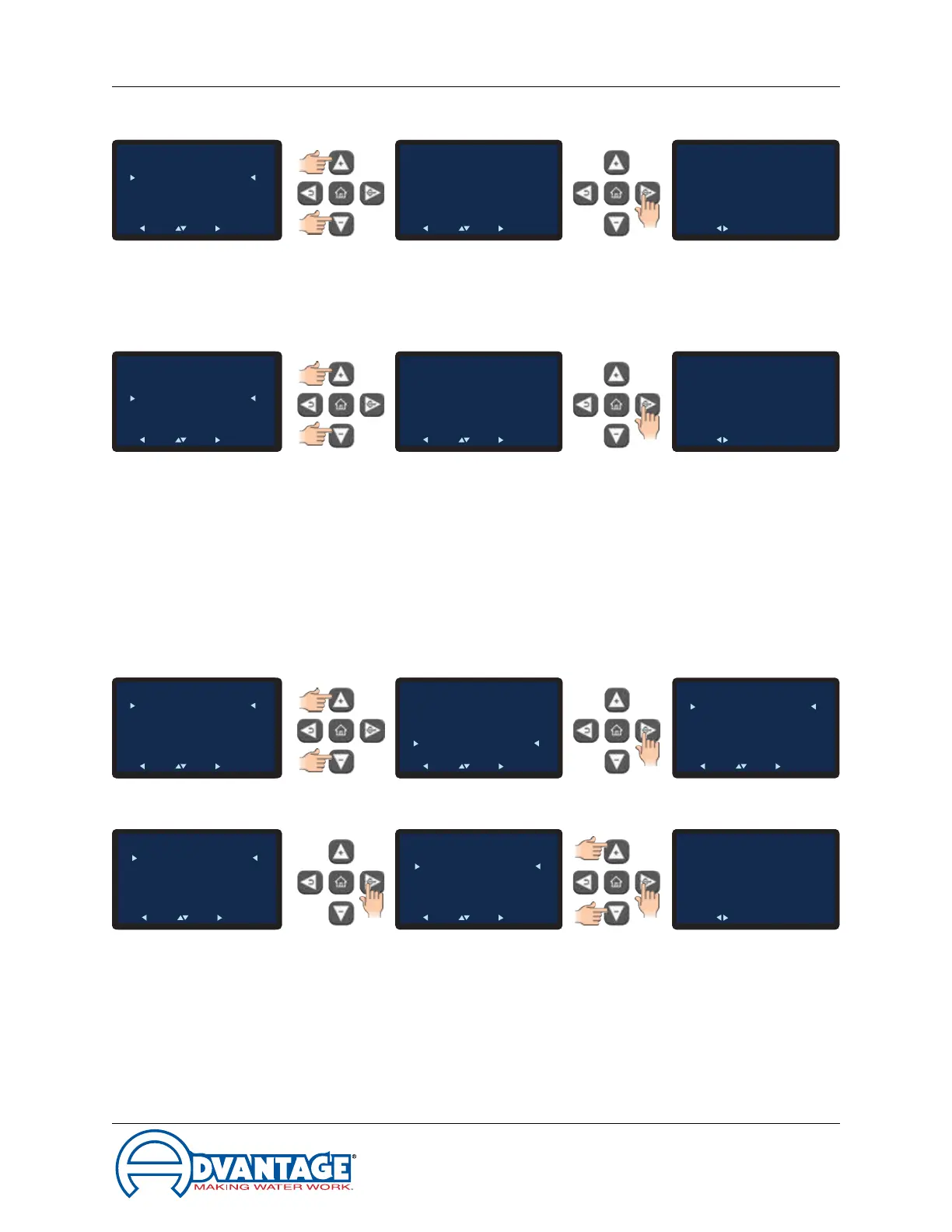
C. Offset. This allows the user to select the flow offset according to the pump horsepower.
1. These values should be factory set and should not be changed. Adjust only if
they are set to values other than the factory default.
D. Calibration. Thisallowstheusertocalibratetheunit’sflowmeter.
1. Usingareliableandaccurateexternalowmetertheusercaninputacalibration
constantvalueinthescreensothattheunitowdisplaymatchestheexternal
owmeter.
2 Use the Up or Down arrow keys to input the value and then press the Select
buttontosaveandconrmsuccess.
3.9 Instrument : Options menu
A. The single selection under the Options menu is the Remote Start.
B. Pleasenote:thisoptionrequiresfactoryoreldinstallationofoptionalequipment.
1. Select Remote Start from the Options menu.
2. Advance to the Remote Start Enable / Disable screen. Select Enabled to enable
the remote start feature. Select Disabled to disable the feature.
3. Once acknowledged, press the Back button repeatedly to return to the Options
screen or press the home button to return to the Home screen.
To Process
Setpoint
: 50°F
Circulating
50°F
To Process
Setpoint
: 50°F
Circulating
50°F
Remote Start
Enable
Disable
Back Pick Go
To Process
Setpoint
: 50°F
Circulating
50°F
Flow
Enable
Offset
Calibration
Back Pick Go
FLow
Enable
Offset
Calibration
Back Pick Go
To Process
Setpoint
: 50°F
Circulating
50°F
Change Setting
Remote Start
Success
Acknowledge
Options
Remote Start
Back Pick Go
To Process
Setpoint
: 50°F
Circulating
50°F
To Process
Setpoint
: 50°F
Circulating
50°F
Main Menu
Setpoints
Utilities
Network
Flow
Options
Machine
Back Pick Go
To Process
Setpoint
: 50°F
Circulating
50°F
Main Menu
Setpoints
Utilities
Network
Flow
Options
Machine
Back Pick Go
Options
Remote Start
Back Pick Go
To Process
Setpoint
: 50°F
Circulating
50°F
To Process
Setpoint
: 50°F
Circulating
50°F
Offset
-3 GPM
Back Pick Go
To Process
Setpoint
: 50°F
Circulating
50°F
Flow
Enable
Offset
Calibration
Back Pick Go
FLow
Enable
Offset
Calibration
Back Pick Go
To Process
Setpoint
: 50°F
Circulating
50°F
Change Setting
Offset
Success
Acknowledge
To Process
Setpoint
: 50°F
Circulating
50°F
To Process
Setpoint
: 50°F
Circulating
50°F
Calibration
770
Back Pick Go
To Process
Setpoint
: 50°F
Circulating
50°F
Flow
Enable
Offset
Calibration
Back Pick Go
FLow
Enable
Offset
Calibration
Back Pick Go
To Process
Setpoint
: 50°F
Circulating
50°F
Change Setting
Calibration
Success
Acknowledge


 To Next Page