67 SIMB-M21 User Manual
Chapter 3 BIOS Setup
Active LFP[Int-LVDS]
Select the active LFP configuration.
Configuration options: [No LVDS] [Int-LVDS] [eDP Port-A][eDP Port-D].
Panel Color Depth[18 Bit]
Select the LFP panel color depth.
Configuration options: [18 Bit] [24 Bit].
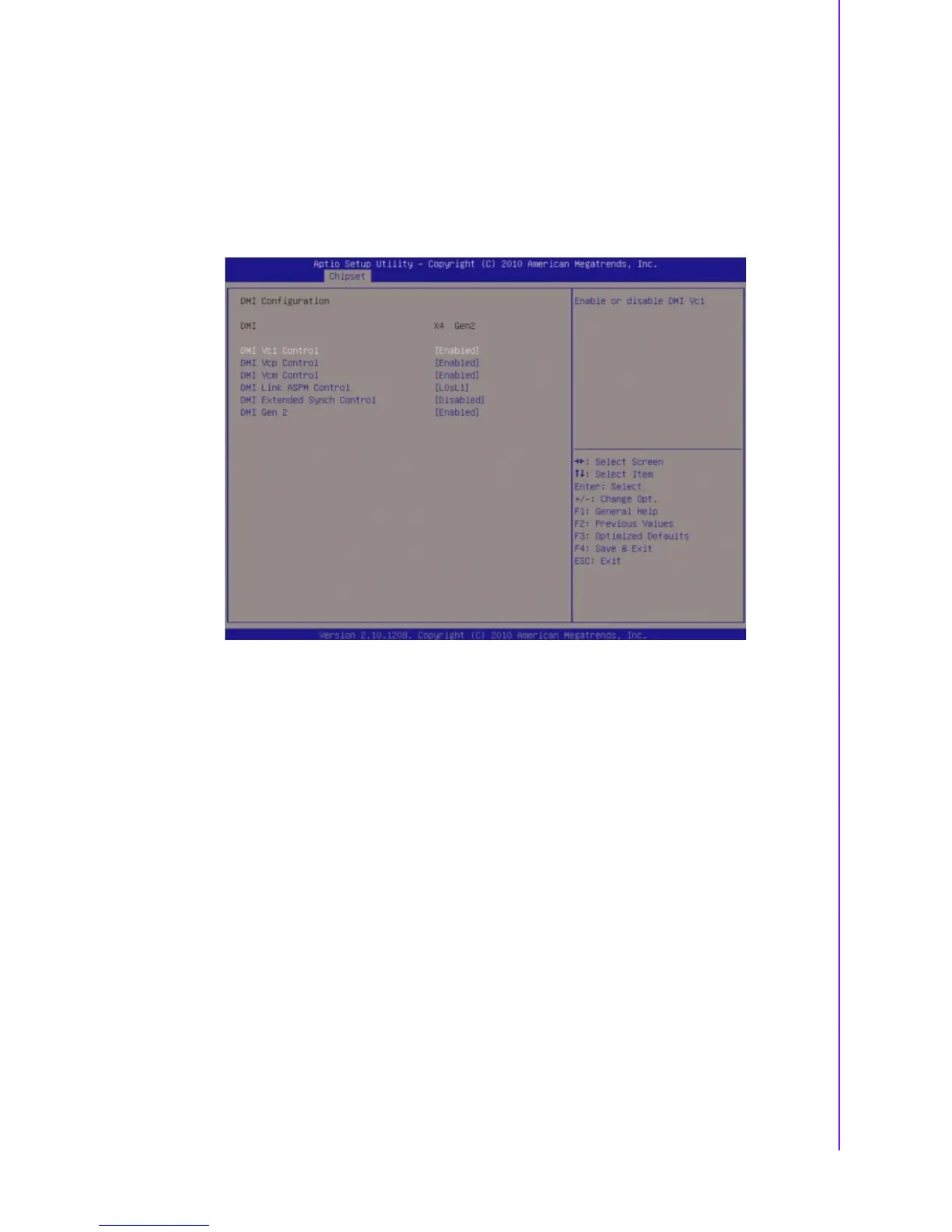
3.5.1.2 DMI Configuration
DMI Vc1 Contorl[Enable]
Enable or disable DMI Vc1.
Configuration options: [Disabled] [Enabled].
DMI Vcp Contorl[Enable]
Enable or disable DMI Vcp.
Configuration options: [Disabled] [Enabled].
DMI Vcm Contorl[Enable]
Enable or disable DMI Vcm.
Configuration options: [Disabled] [Enabled].
DMI Link ASPM Contorl[L0sL1]
Enable or disable the control of active state power management on SA side of
the DMI link.
Configuration options: [Disabled] [L0s] [L1] [L0sL1].
DMI Extended synch Contorl[Disable]
Enable or disable Extended synchronization.
Configuration options: [Disabled] [Enabled].
DMI Gen2 [Enable]
Set DMI Gen2 Enable or Disable.
Configuration options: [Disabled] [Enabled].








 To Next Page