75 SIMB-M21 User Manual
Chapter 3 BIOS Setup
3.6 Boot
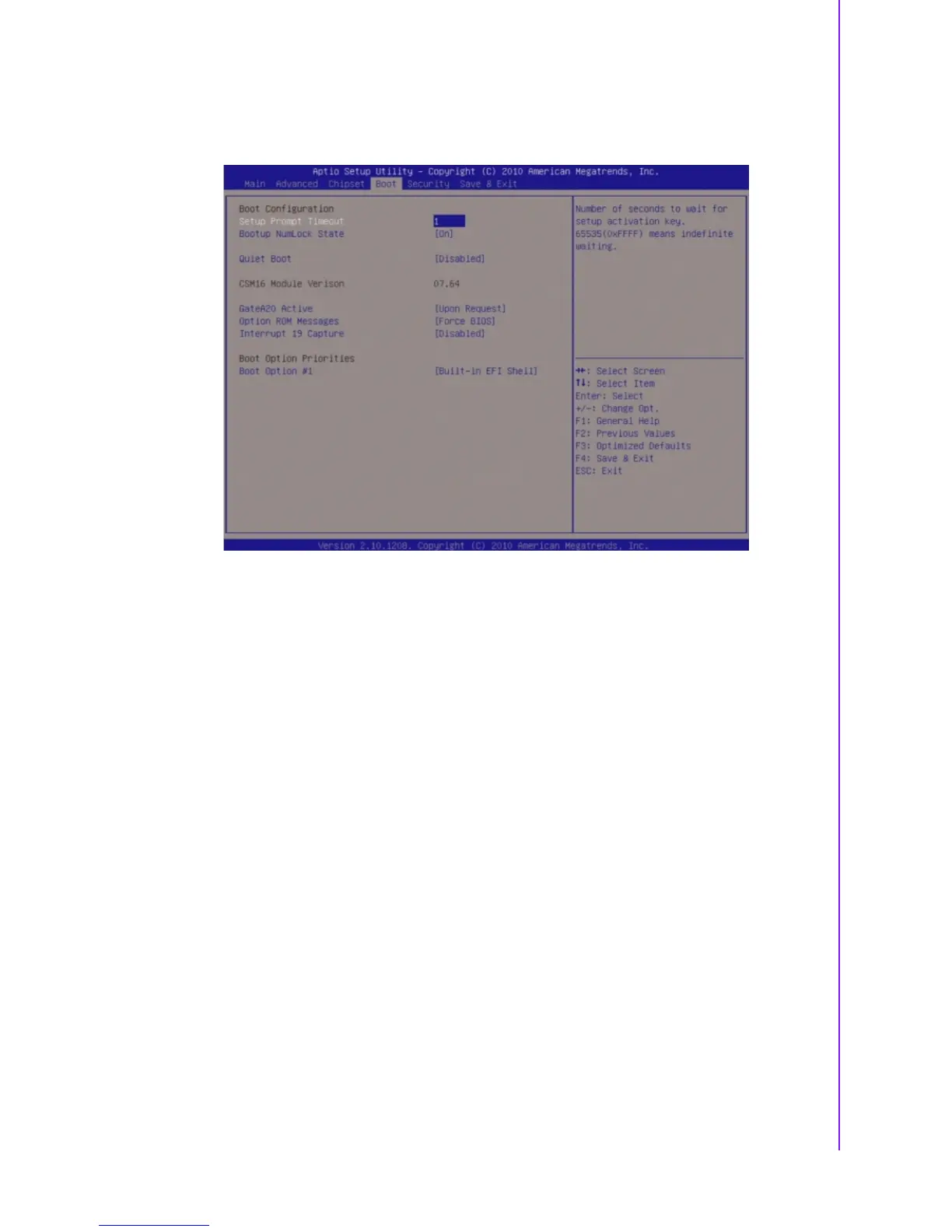
Boot Configuration
Setup Prompt Timeout [1]
Number of seconds to wait for setup activation key. 65535(0xFFFF) means
indefinite waiting.
Bootup NumLock State [On]
Select the keyboard NumLock state.
Configuration options: [On] [Off].
Quick Boot [Disable]
Configuration options: [Disable] [Enable].
Fast Boot [Disable]
Enable or disable boot with initialization of minimal set of devices required to
launch active boot option. Has no effect for BBS boot options.
Configuration options: [Disable] [Enable].
CSM16 Module Version [07.64]
Display CSM16 Module Version.
GataA20 Active [Upon Request]
Upon Request - GA20 can be disable using BIOS services.
Always - do not allow disabling GA20; this option is useful when any RT code is
ececuted above 1MB.
Configuration options: [Upon Request] [Always].
Option ROM Messages [Force BIOS]
Set display mode for option ROM.
Configuration options: [Force BIOS] [Keep Current].
Interrupt 19 Capture [Disable]
Enabled : Allow option ROMs to trap Int19.
Configuration options: [Disabled][Enabled].
Boot option priorities [Built-in EFI Shell]
Select the system boot order.
Configuration options: [Built-in EFI Shell][Disabled].








 To Next Page