EasyManua.ls Logo

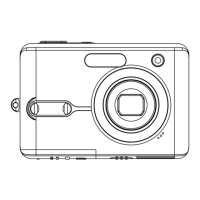
Advent MP82 - User Manual

Advent MP82
61 pages
Print Icon
To Next Page IconTo Next Page
Loading...
MP82
Instruction
Manual

Questions and Answers

  • J
    Joseph WagnerAug 14, 2025
    How to fix Advent MP82 Digital Camera when power does not turn on?
    • A
      andrew64Aug 14, 2025
      If your Advent Digital Camera isn't turning on, there could be a few reasons. First, ensure the battery is correctly inserted. If it is, the batteries might be dead, so try replacing or recharging them. Lastly, check that the battery compartment door is securely closed.
  • D
    derek58Aug 18, 2025
    What to do if my Advent MP82 Digital Camera does not take pictures?
    • M
      Maureen TorresAug 18, 2025
      If your Advent Digital Camera isn't taking pictures, it might be because the flash is charging; wait for it to complete. Alternatively, the memory could be full, so try inserting a new memory card. Finally, the memory card might be defective, so use a new card.
  • S
    Shawn LandryAug 21, 2025
    Why are my Advent MP82 Digital Camera images blurry or out of focus?
    • J
      Jeffrey AndersonAug 21, 2025
      If your Advent Digital Camera images are blurry, it could be because the camera was moving when the picture was taken, so hold it steady. Another reason might be the subject is too close or too far for the camera to focus properly. If the subject is within 15 cm (zoom out) or 40 cm (zoom in), turn the Macro mode on. Avoid using Macro mode for distant subjects.
  • L
    Lauren AllenAug 25, 2025
    What to do if image is not recorded when pressing the shutter button on Advent MP82 Digital Camera?
    • P
      Patrick LeonAug 25, 2025
      If your Advent Digital Camera isn't recording images when you press the shutter button, the flash might be charging, so wait for it to finish. Also, the memory may be full, so insert a new memory card.
  • L
    Lisa McdanielAug 27, 2025
    Why recorded images are not saved in memory on my Advent MP82 Digital Camera?
    • T
      Tracy RichAug 27, 2025
      If your Advent Digital Camera isn't saving recorded images, it's possible the camera was turned off before the image was fully stored. If the battery low indicator appears, replace the battery immediately.
  • D
    Dale FosterAug 31, 2025
    How to fix the flash on my Advent Digital Camera if it does not fire?
    • S
      samantha10Aug 31, 2025
      If the flash on your Advent Digital Camera isn't firing, check to see if the flash is set to OFF. If it is, set the flash to any mode except off.
  • A
    Alexandra PetersonSep 3, 2025
    Why can't I transfer images to my computer from Advent MP82 Digital Camera via USB cable?
    • R
      Rebecca HaleSep 3, 2025
      If you cannot transfer images to your computer from your Advent Digital Camera via USB, it might be because the USB driver isn't installed. Make sure to install the USB driver before connecting the camera to your computer or turning the camera on.
  • N
    Nancy CollinsSep 6, 2025
    What to do if image is not displayed on the LCD monitor of Advent MP82?
    • H
      Harold JohnsonSep 7, 2025
      This Advent Digital Camera cannot display non-DCIF images if a memory card with such images (recorded with another camera) is loaded.
  • F
    friveraSep 10, 2025
    How to fix 'Card error' on Advent MP82?
    • T
      Tina GreenSep 10, 2025
      To fix a 'Card error' on your Advent Digital Camera, the memory card format may not be correct. Re-format the memory card to the FAT format using a card reader in Windows.

Summary

Precautions

Before Use

Care and Maintenance

Guidelines for maintaining and caring for the camera body, lens, and avoiding damage.

About the LCD Monitor

Information on the LCD monitor, including potential issues like spots and condensation.

About the Lens

Instructions on handling the camera lens, including avoiding sun exposure.

About Condensation

Explanation of condensation formation and how to prevent or resolve it.

Long Period Storage

Recommendations for storing the camera and battery when not in use for extended periods.

Getting Started

Unpacking

List of items included in the camera package and what to expect upon unboxing.

Parts of the Camera

Identification and labeling of the camera's external buttons, ports, and key components.

Inserting the Batteries

Step-by-step guide on how to insert batteries into the camera.

Inserting the Memory Card

Step-by-step guide on how to insert memory cards into the camera.

Setting Display Language; Date & Time

Instructions for setting the camera's display language and current date and time.

Basic Operation

Turning the Power On and Off

Instructions on how to turn the camera on and off.

Power Saving Function

Explanation of the automatic LCD monitor turn-off feature and its exceptions.

Changing the Mode

How to switch between REC and PLAYBACK modes and select scene modes.

Basic Recording

Recording Still Images

Detailed steps for capturing still photographs using the camera.

Using the Q mode

Guide to using the Q mode for simplified camera operation and quick picture taking.

Setting Image Size and Quality

How to select image resolution and compression quality for capturing more images.

Using the Zoom Function

Instructions on utilizing both optical and digital zoom for framing subjects.

Using the Flash

Explanation of different flash modes and how to use the flash for better lighting.

Using the Macro

Guide to using the macro function for close-up photography.

Using the Self-timer & Burst

How to use the self-timer for delayed shots and burst mode for continuous shooting.

Recording Movie Clips

Setting the Movie Size

Options for selecting the resolution and frame rate for movie recordings.

Recording Audio Clips

Playing Back Audio Clips

Instructions on how to playback recorded audio clips.

Recording a Voice Memo to Still Images

Playing Back a Voice Memo

Steps to playback voice memos that have been attached to still images.

Other Recording Functions

Setting the Metering

Explanation of the different light metering options available for exposure control.

Setting the White Balance

Guide to adjusting white balance for various lighting conditions.

Setting the ISO

Information on adjusting ISO sensitivity for different light levels and image quality.

Setting the Exposure

How to manually adjust exposure value for challenging lighting situations.

Setting the Sharpness

Options for selecting image sharpness or softness for different purposes.

Playback

Playing Back Images

Steps to view still images and movie clips that have been recorded.

Magnifying & Trimming Still Images

How to zoom into images for detail and crop them to desired dimensions.

Deleting Files

Methods for deleting unwanted files from the camera.

Protecting Files

How to protect individual or multiple images from accidental deletion.

Software Installation

System Requirements

Minimum hardware and software specifications needed for installing the camera software.

Installing the Software

Step-by-step instructions for installing the camera software from the CD-ROM.

Installing the Software Driver

Guide to installing the necessary drivers for the camera to communicate with the computer.

Making Connections

Connecting the Camera to a TV

How to connect the camera to a television to display images and videos.

Connecting the Camera to a PC

Methods for transferring files from the camera to a computer via card reader or USB.

Appendix

Folder Structure & File Naming

Details on the camera's file organization and naming conventions.

Formatting the Memory

Procedure for erasing all data from the memory card or internal memory.

Troubleshooting

Common problems and their solutions for camera operation issues.

Specifications

Technical details and features of the digital camera model.

Advent MP82 Specifications

General IconGeneral
Optical Zoom3x
Digital Zoom4x
LCD Screen Size2.4 inches
Resolution3264 x 2448
Megapixels8 MP
Storage MediaSD Card
Battery TypeAA

Related product manuals