Page 60 AD Series Dehumidifying Dryers
8-7 Replacing/Cleaning the Regeneration
Heater/Cooling Coils
WARNING!
HAZARDOUS ELECTRICAL CURRENT PRESENT.
Disconnect and lock out power before you replace
heater elements!
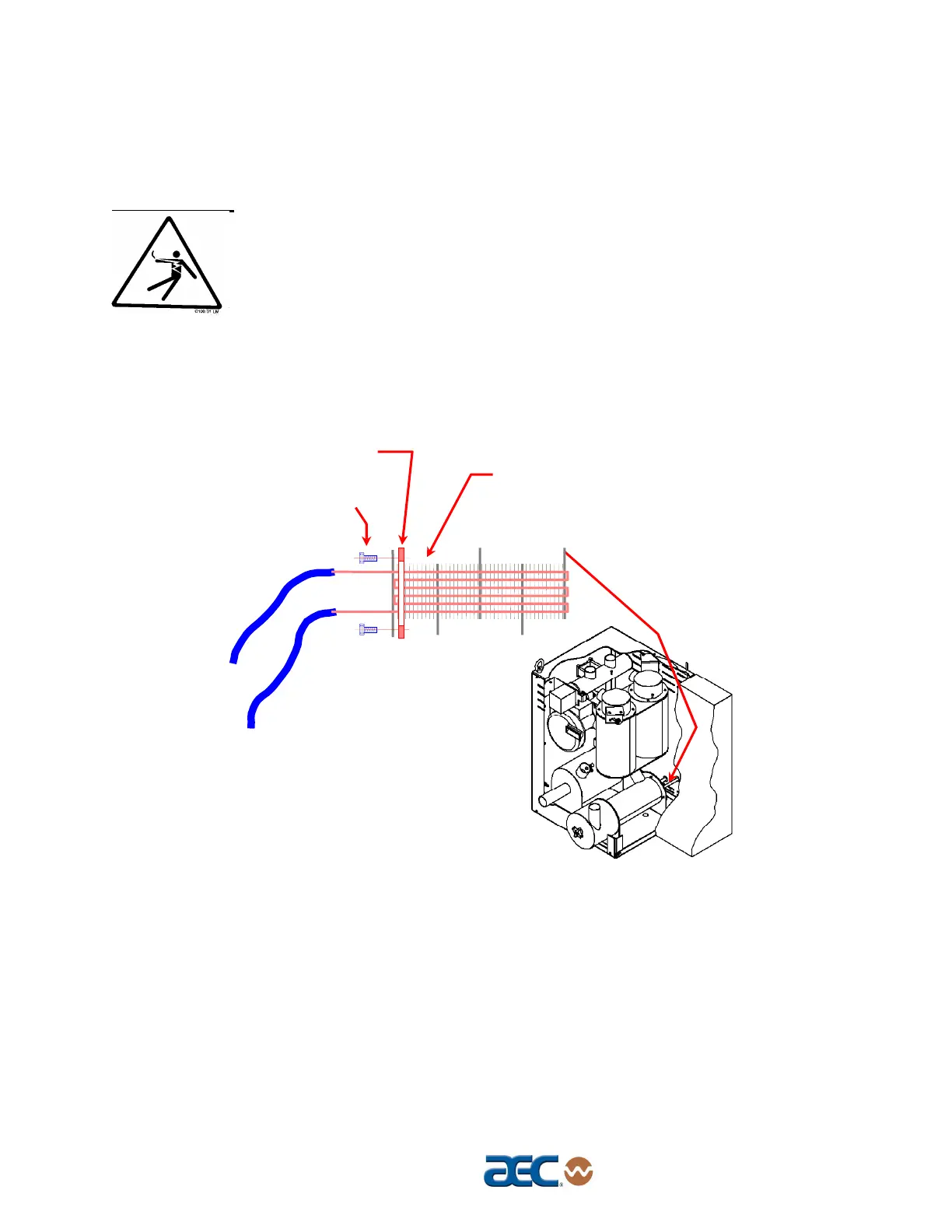
Figure 16
Heating/Cooling Coil Location and Disassembly
In order to gain access to the regeneration heater, the cover plate
on the side of the dryer must be removed. This cover plate is
secured by four (4) 10-32 bolts.
Sketch the heater wiring configuration so you can properly re-
assemble the heaters.
Disconnect the wiring for the heater being removed or replaced.
Remove the Cooler/Filter housing by undoing the bolts holding it
in place. Once the fastners are undone, take out the housing.
Undo (4) 10-32 Button
Head Screws using 1/8
Allen Wrench
Use compressed air or a steam
cleaner to blow the dust off or clean
any oily residue on the coil.
1" Wide x 1/8" Thick High
Temperature Gasket



 To Next Page