EasyManua.ls Logo

AEC AD Series - User Manual

Default Icon
80 pages
Print Icon
To Next Page IconTo Next Page
Loading...
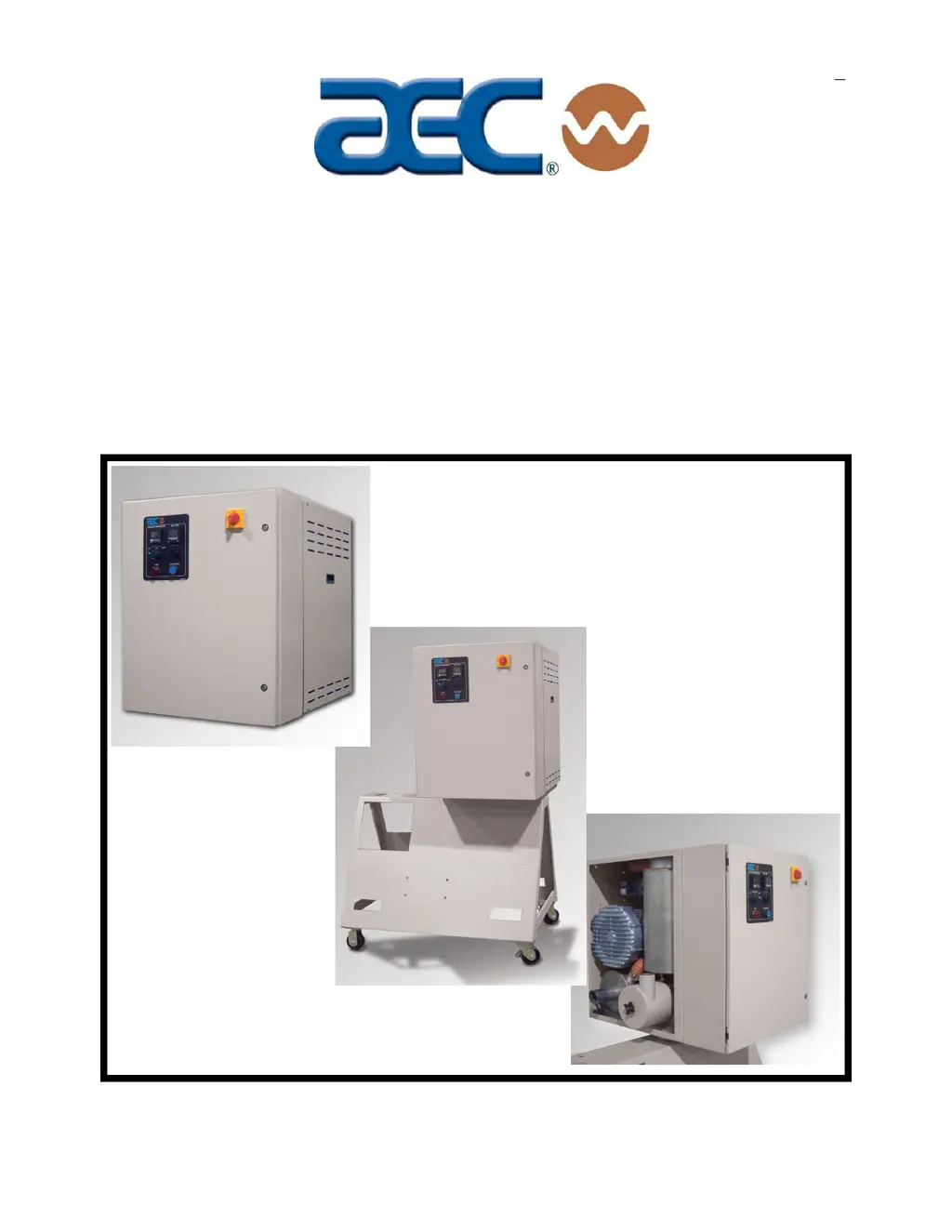
Operation and Installation Manual
AD Series
Dehumidifying Dryers
Important! Read Carefully Before Attempting to Install or Operate Equipment
Part No. A0555768 Revision A Bulletin No. WH1-645.1
$30
00

Table of Contents

Questions and Answers

  • H
    hallricardoAug 17, 2025
    Why is there a loss or reduction in drying capacity in my AEC AD?
    • W
      William RowlandAug 17, 2025
      A loss or reduction in drying capacity in your AEC Dryer can occur if the process heaters are faulty, in which case they should be replaced. Another cause can be contamination of the desiccant beds, requiring desiccant replacement. Also, the material being dried might differ from what was originally specified, and different materials may need adjusted drying times or temperatures. Finally, inspect the flex hose to or from the drying hopper for air leaks and replace it if needed.
  • E
    Eric DanielsAug 20, 2025
    Why does my AEC AD have poor dew point performance?
    • A
      Alexander HarringtonAug 20, 2025
      Poor dew point performance in your AEC Dryer can be caused by several factors. These include a burned-out regeneration heater, which would need repair or replacement, or contaminated/worn-out desiccant, which would need replacement. Leaking process air hoses should be repaired or replaced. Check that the dryer and drying hopper are properly sized. A bad dew point sensor should also be replaced.
  • A
    amandarodriguezAug 22, 2025
    How to troubleshoot little or no air coming from the process delivery tube in my AEC AD?
    • J
      Jared FisherAug 22, 2025
      If little or no air is coming from the process delivery tube of your AEC Dryer, it could be due to a dirty filter, which should be cleaned or replaced. Desiccant beds contaminated by material or plasticizer leaking into the system will also cause this problem; replace the desiccant. A tripped blower overload should be reset after fixing the underlying problem. Finally, blower fins filled with dust or contaminants should be cleaned by removing the blower side plate, cleaning the baffles, and replacing the plate.
  • A
    angela38Aug 26, 2025
    What causes material in the drying hopper of my AEC Dryer to cake or melt down?
    • M
      Marvin AndersonAug 26, 2025
      Caking or melting in the drying hopper of your AEC Dryer can occur if the process temperature is set too high due to operator error; check the resin manufacturer’s data sheet for the correct drying temperature and ensure plant personnel know the correct set point. It can also happen if the high-temperature alarm is not set properly, so reset it. If the process set point is out of the acceptable range, restore the temperature controller to factory pre-sets. Verify the correct Celsius or Fahrenheit settings. Also, ensure the process thermocouple is properly installed in the inlet tube.
  • J
    Justin CarlsonAug 27, 2025
    What to do if there is a loss or reduction of process air temperature in my AEC Dryer?
    • H
      Heather PerryAug 28, 2025
      A loss or reduction of process air temperature in your AEC Dryer can be caused by faulty process heaters; check for open heaters and replace if needed. Another cause is a faulty solid-state temperature controller, which should be replaced. Also, process temperature settings may have been adjusted incorrectly; ensure plant personnel know the proper temperature set point and post a sign next to the controller.
  • J
    Jessica SteeleAug 30, 2025
    What causes continued poor dew point performance in my AEC AD Dryer?
    • J
      Jennifer CookAug 30, 2025
      Continued poor dew point performance in your AEC Dryer could be due to a fouled dew point sensor manifold; clear any obstruction to ensure air flows freely through the sensor. Also, a dirty filter will cause this issue; clean or replace the filter element.
  • R
    rebeccabraySep 2, 2025
    What does it mean if there is suction in the delivery tube and pressure from the return tube of my AEC AD Dryer?
    • A
      Amy DeleonSep 2, 2025
      Suction in the delivery tube and pressure from the return tube of your AEC Dryer indicates the phase is reversed on the power drop coming into the dryer. Stop the dryer. If the dryer was connected to the drying hopper, check to see if the desiccant and process air heater has been contaminated with resin. If so, replace the desiccant and remove any resin carry-over. Otherwise, change the phase of two legs of the three-phase power drop.
  • J
    Juan GriffinSep 5, 2025
    What to do if my AEC AD Dryer continues to have a loss or reduction in drying capacity?
    • G
      Gregory MccartySep 5, 2025
      A continued loss or reduction in drying capacity in your AEC Dryer can occur if the airflow valve is sticking or failing to shift; check for proper operation of the valve actuators and repair or replace if necessary. Another cause is blower fins filled with dust or contaminants, so remove the blower side plate, clean the baffles, and replace it. Replace the filter elements.
  • M
    Matthew WilliamsSep 8, 2025
    What does it mean if the PLC Regeneration Heater Left/Right output indicators are both off on my AEC AD?
    • E
      Emily PierceSep 8, 2025
      The PLC Regeneration Heater Left/Right output indicators might both be off on your AEC Dryer due to regenerating bed cooldown. Verify that the blower contactor is on and check the input wiring to the PLC if the Blower Input indicator is off. This can also happen if the process air is in a high-temperature condition. If there is insufficient power to the PLC, check the power supply and power wiring to the PLC. Replacing the PLC may be necessary if it is faulty (PLC Power light is on, Run light is off, and/or Error light is on).
  • K
    Kyle PhillipsSep 12, 2025
    Why are the PLC Regeneration Bed LED indicators both off on my AEC Dryer?
    • L
      Lynn MuellerSep 12, 2025
      If both PLC Regeneration Bed LED indicators are off on your AEC Dryer, check the power supply and power wiring to the PLC if there is insufficient power to the PLC (Power LED is off). If the PLC is faulty (PLC Power light is on, Run light is off, and/or Error light is on), replace it.

Summary

Safety

Mechanical Installation

Provides guidance on mechanical installation, emphasizing secure attachment and safe lifting practices.

Safety Considerations

Explains the meaning of safety terms (NOTICE, CAUTION, WARNING, DANGER, IMPORTANT) and how to report safety defects.

General Responsibility

Emphasizes the importance of safety for owners, operators, and maintenance personnel, linking it to productivity and accident prevention.

Operator Responsibility

Details the operator's role in safe dryer operation, stressing awareness of capabilities, limitations, and workplace safety rules.

Maintenance Responsibility

Highlights safety priorities for maintenance workers and outlines essential steps before removing, adjusting, or replacing parts.

Safety

Provides information on safety devices and procedures inherent to the AD Dryer, aiming to supplement standards for a safer working environment.

Installation

Rigging and Placing the Dryer

Provides guidance on rigging and placing the dryer, referencing figures for safe rigging diagrams and lifting lugs.

Making Electrical Connections

Details how to make electrical connections, emphasizing voltage, phase, electrician qualifications, and grounding.

Checking for Proper Blower Rotation

Explains how to check for proper blower rotation, especially for three-phase models, to avoid desiccant contamination.

Controls

Setting the Process Air Temperature

Provides instructions on how to set the process air temperature on the dryer, consulting resin manufacturers for recommendations.

Control Operation

Startup, Shutdown, and Operation

Pre-Startup Checks

Details essential pre-startup checks, including hose connections, companion equipment, and electrical connections.

Starting Up the Dryer

Provides a step-by-step guide for starting up the dryer, including power-up, hopper fill, and setting the temperature controller.

Shutting Down the Dryer

Explains the procedure for shutting down the dryer after processing is complete, including companion equipment and electrical disconnects.

Maintenance

Work Rules

Outlines maintenance work rules, emphasizing safety, following instructions, and using approved tools.

Replacing Worn Desiccant

Provides instructions for replacing worn desiccant, including safety precautions for handling hazardous desiccant material.

Replacing the Process Heater

Details the procedure for replacing the process heater element, emphasizing hazardous electrical current and lockout procedures.

Replacing;Cleaning the Regeneration Heater;Cooling Coils

Guides on replacing or cleaning regeneration heater and cooling coils, stressing hazardous electrical current and lockout.

Troubleshooting

Technical Assistance

AEC AD Series Specifications

General IconGeneral
ModelAD Series
CategoryDryer
CapacityVaries by model
Power SourceElectric or Gas
Drum MaterialStainless Steel
Heat SourceElectric or Gas
Temperature RangeVaries by model
WarrantyVaries by model and region

Related product manuals