67
4454C EN 2013-05-14 Troubleshooting checklist
CR 35-X DIGITIZER
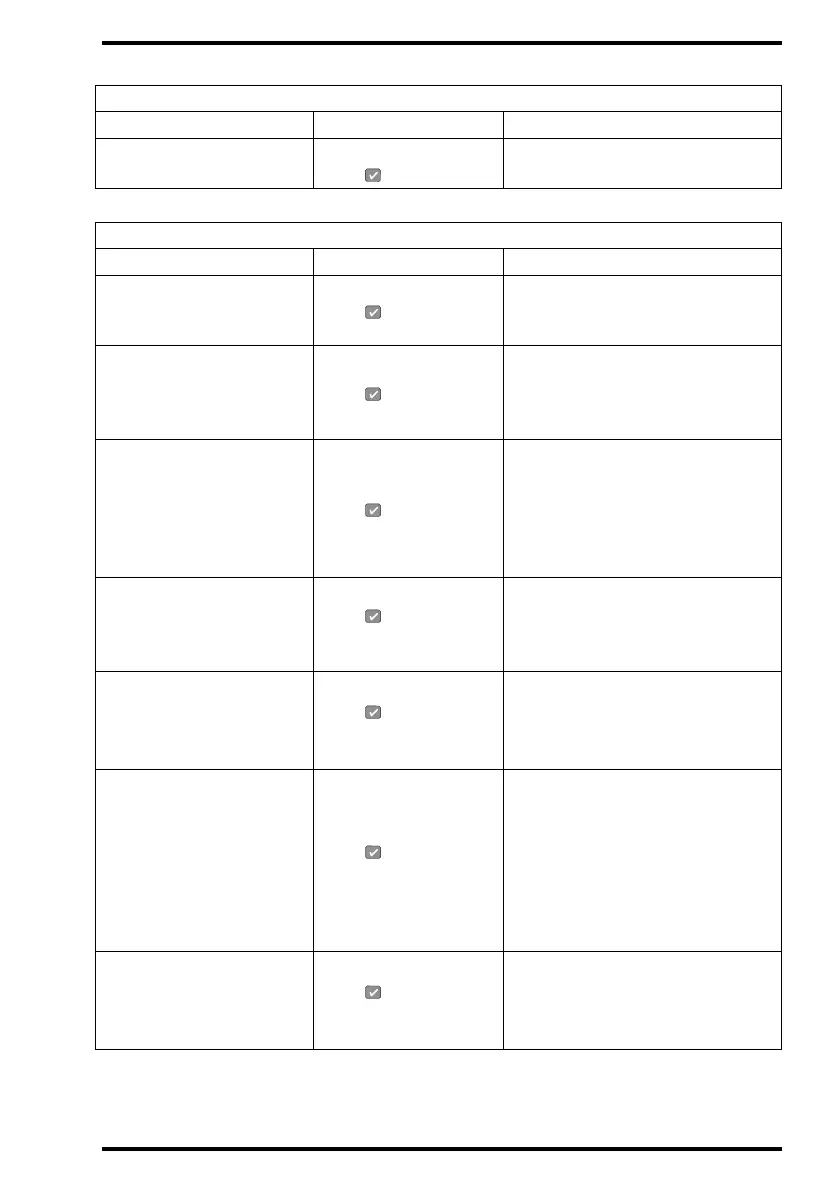
PARTLY SCANNED IP
DETECTED
Possible loss of image,
press
• Press Confirm key.
• Check image at destination.
Status field: LOCKED
MESSAGE 1 Message 2 Action
IP NOT SUFFICIENTLY
ERASED
Press
and erase again
• Press Confirm key.
• Refer to ‘Re-erasing an image plate’
on page 56.
EMPTY CASSETTE
Press
to get cassette
• Press Confirm key.
• Remove cassette.
• Insert cassette containing image
plate.
CASSETTE WRITE ERROR
Press to get cassette
• Press Confirm key.
• Remove cassette.
• Use another cassette.
• If problem persists with other
cassettes, contact your local service
organization.
WRONG CASSETTE
Press and remove
cassette.
• Press Confirm key.
• Remove cassette.
• Insert correct cassette in the right
way.
CASSETTE
IDENTIFICATION ERROR
Press , remove and
identify
• Press Confirm key.
• Remove cassette.
•Re-identify cassette.
• Re-insert cassette.
CASSETTE READ/WRITE
ERROR
Press , remove and try
again
• Press Confirm key.
• Remove cassette.
• Re-insert cassette.
• If problem persists, initialize and
identify cassette via ID Station.
• If problem persists with other
cassettes, contact your local service
organization.
CASSETTE NOT
IDENTIFIED
Press , remove and
identify
• Press Confirm key.
• Remove cassette.
•Identify cassette.
• Re-insert cassette.
Status field: WARNING
MESSAGE 1 Message 2 Action



 To Next Page