68
4454C EN 2013-05-14Troubleshooting checklist
CR 35-X DIGITIZER
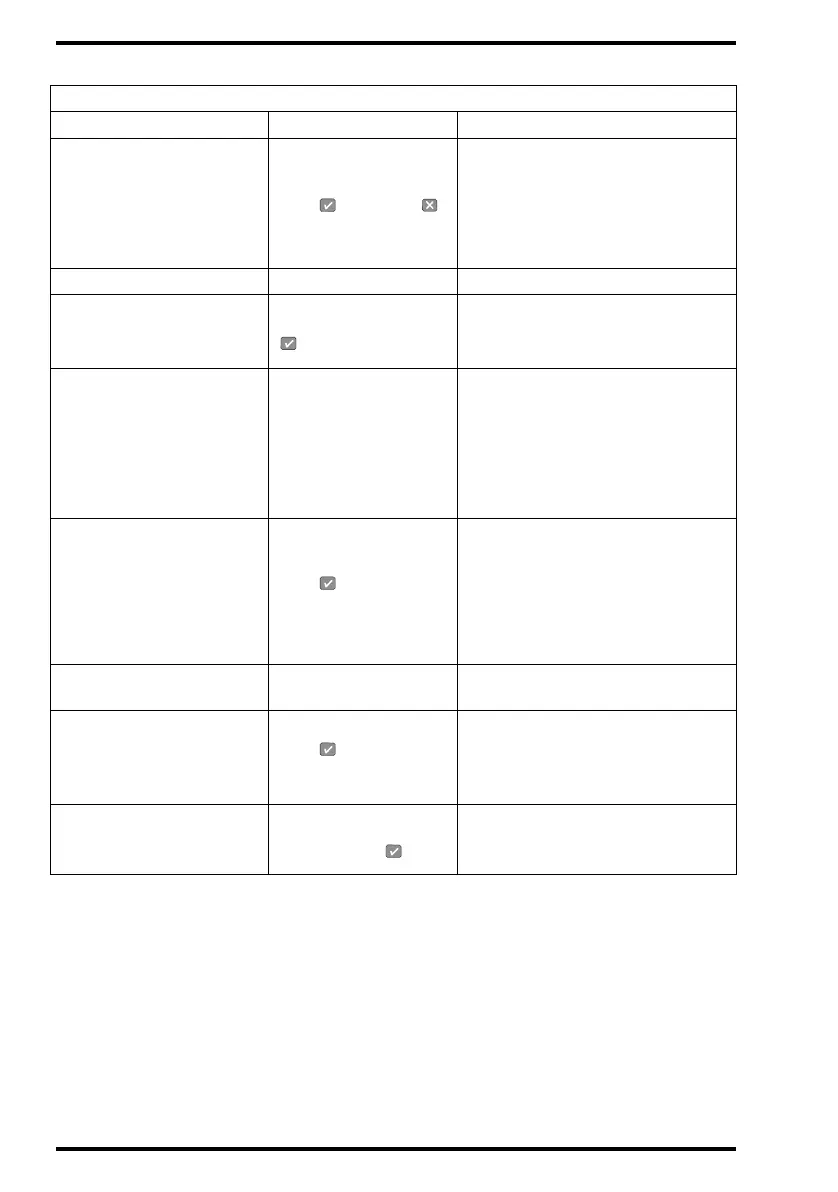
24 X 30 CM CALIBRATION
MISSING
Press
to accept or
• Press Confirm key to treat
24 x 30 cm image plate without
calibration or press Cancel key to
treat cassettes with other formats.
• Contact your local service
organization.
SERVICE MODE Please wait Wait.
CASSETTE SLOT BLOCKED
Remove cassette, press
• Remove cassette.
• Remove obstructing objects.
• Press Confirm key.
IMAGE-QUEUE FULL Check queue
• Refer to ‘Consulting the image
transmission queue (‘Queue
management’)’ on page 66 of the
Reference manual.
• Check that the CR 35-X is not off
line (Refer to ‘The display’ on
page 32).
UNKNOWN DESTINATION
[PPNAME]
Press , remove
cassette and identify
•Press Confirm key.
• Remove cassette.
•Identify cassette.
• Re-insert cassette.
• Check the configuration of the
system.
RIGHT SIDE PANEL NOT
CLOSED
Close right side panel Close the right side panel.
UNKNOWN IP-TYPE
Press , remove
cassette, call Service.
• Press Confirm key.
• Remove cassette.
• Contact your local service
organization.
EMERGENCY DATA NOT
DEFINED
Emergency keys
disabled, press
• Press Confirm key
• Contact your local service
organization.
Status field: LOCKED
MESSAGE 1 Message 2 Action



 To Next Page