:ANAPURNA L/XL OPERATOR MANUAL
AB]]]]]]]]]]]]]]]]]]]]]]]]]]]]]]]]]]]]]]]]]]]]]]]]]]]]]]]]]]]]]]]]]]]]]]]]]]]]]]]]]]]]]]]]]]]]]]]]]]]]]]]]]]]]]]]]]]]]]]]]]]]]]]]]]]]]]]]]]]]]]]]]]]]]]]]]]]]]]]]]]]]]]]]]]]]]]]]]]]]]]]]]]]]]]]]]]]]]]]]]]]]]]]]]]]]]]]]]]]]]]]]]]]]]24] 8/09/2006]
8.4. Long Stand Still
This procedure must be carried out:
- If the engine’s “Stand Still Time” is 1 week or longer…
- If the vacuum pressure is going to be closed down…
SHUTDOWN -- preparing the engine:
- Move the carriage to the Purge position.
- Flush cleaning solution through the heads:
- First purge the 4 right heads (Lc, Lm, W1, W2), close them,
and in the second stage, purge the remaining 4 left heads (K, C, M, Y).
- Finally, open the 4 right heads again, and purge all 8 heads together now.
By doing so, you’ll have the most optimal cleaning pressure.
- Leave all ink valves in the “S” position, set the Solution valve to “I”.
- On the Engine’s Control Panel, perform a “Head Lift-Up”.
(the carriage will go to the highest position)
- Clean the Head Base Plate with a cloth
- Set the Vacuum Pressure to “0”. (Negative Pressure)
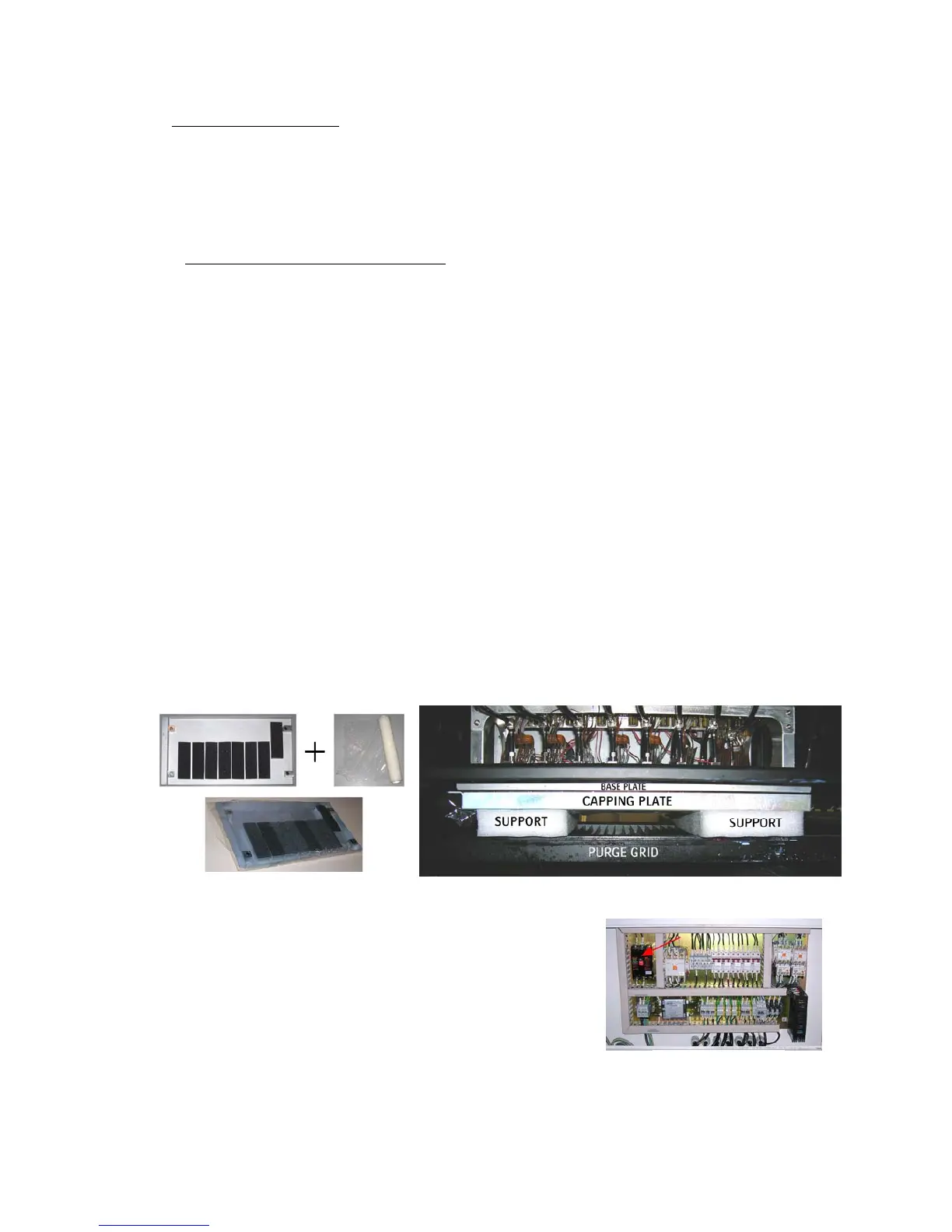
- Mount the “Capping Plate” underneath the Head Base Plate.
- use a plastic foil to wrap around the capping plate (new foil every time)
- place a support between the capping plate and the grid.
- bring down the carriage by turning manually, until it’s fixed.
(use some packing material as support)
- Push the emergency stop, and leave it pushed in! (restart-safety)
Shut down the engine’s PC.
- Switch OFF the main power, by using the main-switch
in the engine’s fuse box.
- Turn off the compressed air.
- THE ENGINE IS NOW READY FOR A LONG STAND STILL -
MAIN SWITCH














 To Next Page