:ANAPURNA L/XL OPERATOR MANUAL
AB]]]]]]]]]]]]]]]]]]]]]]]]]]]]]]]]]]]]]]]]]]]]]]]]]]]]]]]]]]]]]]]]]]]]]]]]]]]]]]]]]]]]]]]]]]]]]]]]]]]]]]]]]]]]]]]]]]]]]]]]]]]]]]]]]]]]]]]]]]]]]]]]]]]]]]]]]]]]]]]]]]]]]]]]]]]]]]]]]]]]]]]]]]]]]]]]]]]]]]]]]]]]]]]]]]]]]]]]]]]]]]]]]]]]40] 8/09/2006]
12.3. Printing the image
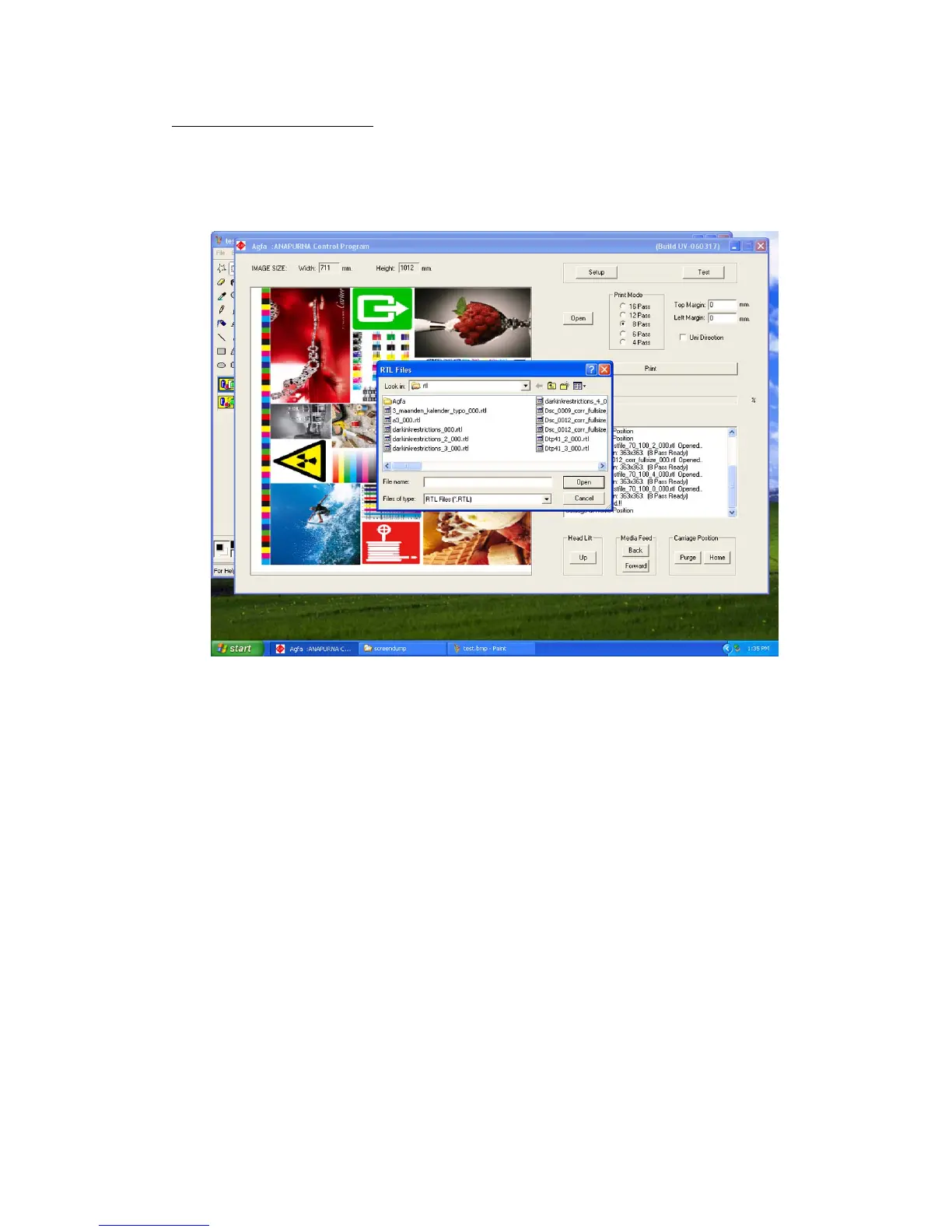
1) In the :Anapurna Control Program, OPEN the image file (.rtl) that is sent over
from the RIP.
2) Check the Image Size, and set the Print Mode to the correct # passes.
(check Status Message: e.g.: 8 pass Ready)
3) Set the Top- and Left- Margin according your desired placement.
(See chapter 9.1.3 and 9.2.2.2)
4) Choose between Uni- or Bi-directional printing.
5) Switch on the UV lamps. (See chapter 6.)
6) As soon as the “green” lamp comes up on the tower, you can press
the PRINT button. (green lamp on tower => UV lamps are ready)













 To Next Page